Defining Component URL Variables
To access the Component URL Variables page, select PeopleTools, Workflow, Notifications, Component Template Variables, Define Template Variables, Component URL Variables, Edit.
This example illustrates the fields and controls on the Component URL Variables page.
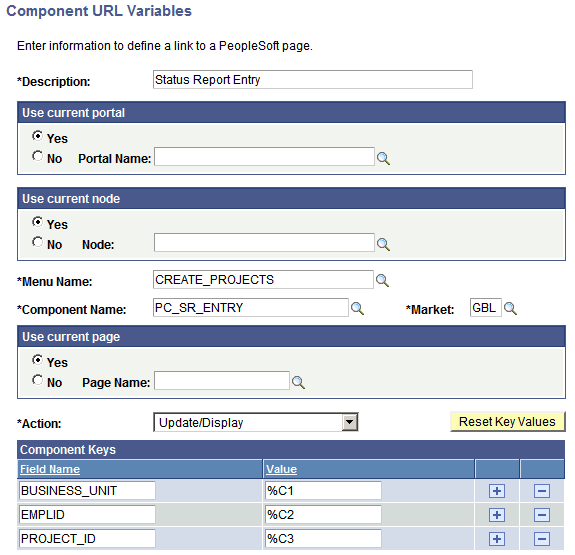
The name format for component URL variables is %URLC1, %URLC2, and so on.
| Field or Control | Description |
|---|---|
|
Use current portal |
If using the current portal for a link, select Yes. If using another portal, select No and enter the portal name. |
|
Use current node |
If the current node contains the URL, select Yes. If using another node, activate No and enter the node name. |
|
Use current page |
If you want the URL to dynamically include the page that the user has open, select Yes. If you want the URL to include a specific page, select No and enter the page name. |
|
Action |
Specify the action for the URL variables: Update/Display, Add, or Correction. |
|
Component Keys |
If the component is in the current node, click the Reset Key Values button to populate the Field Name column based on the component metadata. If the component is in another node, set the field names of the component keys yourself. In the Value column, specify a reference to a component data variable that was defined on the Component Data Variables page (for example, %C1, %C2, or %C3). If you do not specify the component key field names and values, the URL displays the Search Dialog page to the user. |