23 Agent Deployment
Deploying an agent turns your agent into a hosted application.
You can deploy an agent into the same AI compute attached to its playground or to a different AI compute. When you deploy the latest changes to your agent to the attached AI compute, the deployed agent represents a snapshot of the agent at the time of deployment. To update the deployed agent to the latest version, you need to redeploy the agent.
Each agent has a stable deployment URL that depends on the unique agent key. Re-deploying the agent multiple times overwrites the agent behind the deployment URL.
- An agent can only be deployed to one AI compute cluster at any given time.
- Deploying the same agent multiple times to the same AI compute cluster overwrites the previously deployed iteration of the agent.
Once you've deployed an agent, you can retrieve the chat URI to programmatically issue queries and retrieve responses from the agent from the Details tab of your agent.
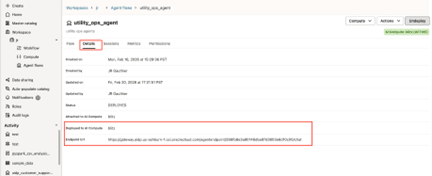
The endpoint URL is stable and it is tied to each agent. The URL includes the unique agentID assigned to each agent. In other words If you undeploy an agent and deploy it again, the URL remains the same. The benefit is that you don’t have to modify the client code calling the endpoint, the drawback is that you can overwrite an agent in production.
https://gateway.aidp.{oci-region}.oci.oraclecloud.com/agentendpoint/{agentId}/{protocol}oci-regioncorresponds to the Oracle AI Data Platform instance region;agentIdis the unique id associated with the agentprotocolis the communication protocol:chatwhich follows the OpenAI Responses API format anda2awhich follows the agent-to-agent communication protocol. Both protocols are available for each agent endpoint. For more information, see A2A Agent Deployment.
Note:
Two AI computes are listed in the Details tab. The Attached to AI Compute is used to test the agent in the playground. The Deployed to AI Compute hosts the deployed agent.The endpoint URL field is populated after you deploy your agent. You can call this endpoint URL from your production application.
Agents: Run As
You can choose the identity that a deployed agent uses for platform runtime operations. You can use your own identity or a service account to keep the deployment independent of an individual user’s access.
Run As applies to the deployed agent’s platform operations. It does not determine who can invoke the agent or how its tools authenticate to downstream systems. The person deploying the agent remains the authorized and audited requester.
Types of Identity
When deploying an agent, you can choose from two types of identity for Run As: your own identity and a service account.
Your own identity: AI Data Platform checks whether you have a saved credential in the Credential Store. If one exists, it's used automatically.
A service account: Service accounts stored in the Credential Store can also be selected as the Run As identity but only if you've been granted at least USE permission on that service account's credential.
See Credential Store (Preview) for information about creating and sharing credentials.
Ownership in Edit and Redeploy Behavior
If a user edits or redeploys an agent by clicking Redeploy and doesn’t change its service-account Run As selection, that selection is preserved; their USE permission for the existing credential is not checked again. If they explicitly select a service account, they need USE permission for its credential, or the request fails validation. Run As does not automatically switch to the editor when they lack that permission. It switches to the editor’s identity if the service-account selection is explicitly cleared or no service account is configured.
If a user undeploys the agent, then deploys it again, they must select a Run As identity again.
Deploy an Agent
You deploy an agent you have created and configured so other users are able to see and use it in your Oracle AI Data Platform instance.
- Next to the agent, click
 Actions and click Deploy. You can also click the agent name to open it and click Deploy in the top right.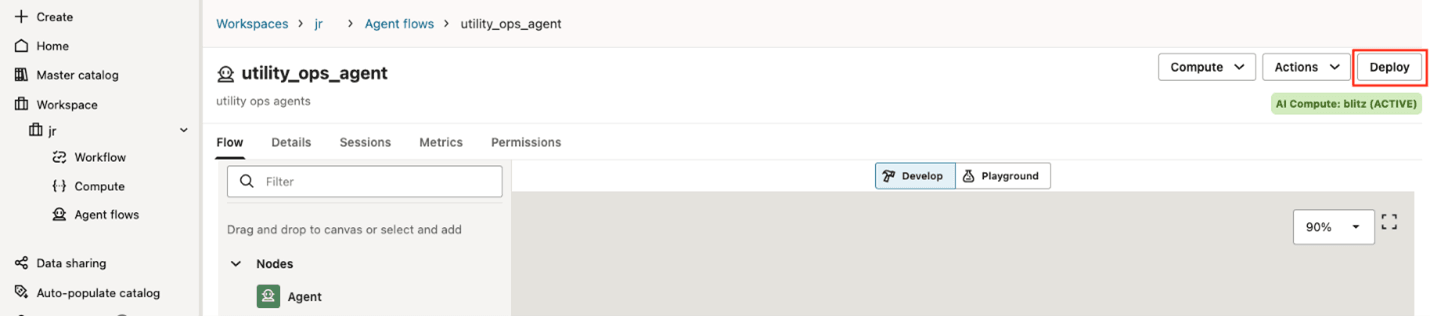
Deploy an Agent with OAuth2
You can deploy agents you have created and configured to use OAuth2 authentication to connect to external identity providers.
- Next to the agent, click Actions and click Deploy. You can also click the agent name and click Deploy in the top right.
Undeploy an Agent
You can choose to undeploy agents you have MANAGE permissions for, making them unavailable for use.
- Next to the agent, click Actions and click Undeploy.

A2A Agent Deployment
The Agent2Agent (A2A) protocol is an open standard for communication between independent AI agents, including agents built with different frameworks, hosted by different vendors, or running as opaque remote systems.
Its purpose is to give those agents a shared interaction model so they can discover each other’s capabilities, negotiate supported input/output formats, delegate or collaborate on tasks, and exchange information securely without exposing internal memory, tools, or implementation details. For more information, see Agent2Agent (A2A) Protocol.
A2A is meant to solve agent interoperability: instead of every agent integration being custom, a client or another agent can interact with any A2A-compliant remote agent using a common set of concepts and operations. The spec centers on messages, tasks, parts, artifacts, streaming updates, and push notifications; it supports synchronous replies, long-running asynchronous work, streaming, and enterprise-style auth/security patterns.
In Oracle AI Data Platform, all deployed agents are provided with an /a2a invocation path that can be called by A2A client applications.
What is an Agent Card?
An Agent Card is a JSON metadata document published by an A2A server. In AIDP, the A2A server is the AI compute hosting your agent deployment.
The card describes the agent’s identity, service endpoint, supported protocols/transports, capabilities, skills, supported input/output modes, and authentication requirements; clients use it to discover whether the agent is suitable and how to call it. A properly documented agent card is a requirement of the A2A protocol.
Agent cards in Oracle AI Data Platform are either in Draft state, meaning the agent has not been deployed, or Published, meaning the card was deployed alongside the agent.
Agent Card Actions
During the development of an agent, the card is available in the Actions menu of the agent.
- The draft card reflects the current state of the agent in development.
- The published card corresponds to a snapshot of the card taken when the agent was deployed. The published card reflects the state of the deployed agent.
Agent Card Fields
AI Data Platform supports a subset of the current A2A protocol agent card fields, available here: A2A Protocol - Agent Card.
| Field | Required | Description |
|---|---|---|
name |
Yes | A human readable name for the agent. Example: "Recipe Agent" |
description |
Yes | A human-readable description of the agent, assisting users and other agents in understanding its purpose. Example: "Agent that helps users with recipes and cooking." |
Agent Version |
Yes | The version of the agent. Example: "1.0.0" |
Documentation URL |
No | A URL providing additional documentation about the agent. |
Provider - Organization |
No | The service provider of the agent. |
Provider - URL |
No | The URL of the service provider. |
Capabilities |
Yes | A2A Capability set supported by the agent.
Only |
Skills
|
Yes | Skills represent the abilities of an agent. It is largely a descriptive concept but represents a more focused set of behaviors that the agent is likely to succeed at. Skills represent an array of AgentSkill. |
Each AgentSkill is made of several fields documenting the capabilities of the agent. Defining the agent skills in the agent card is the most time consuming operations and is an iterative process. Skills can be edited (along with the rest of the agent card) in the draft agent card prior to deployment.
Note:
inputModes, outputModes, and securityRequirements are provided by AI Data Platform and cannot be modified.
| Field | Required | Description |
|---|---|---|
Skill ID |
Yes | A unique identifier for the agent's skill. |
Skill Name |
Yes | A human-readable name for the skill. |
Description |
Yes | A detailed description of the skill. |
Tags |
Yes | A set of keywords describing the skill's capabilities. |
Examples |
No | Example prompts or scenarios that this skill can handle. |
Agent Deployment Endpoint A2A Path
An /a2a path is exposed in the URL of a deployed agent in addition to /chat.
For example, an agent will expose these paths to external clients:
https://gateway.aidp.{oci-region}.oci.oraclecloud.com/agentendpoint/{agentId}/chathttps://gateway.aidp.{oci-region}.oci.oraclecloud.com/agentendpoint/{agentId}/a2a
Both paths (/chat, /a2a) can be consumed by separate clients.
Session Variables in A2A
Values of session variables can be passed to an A2A agent in the message metadata field. The JSON snippet below shows the payload of a user message issued to the a2a agent with three session variables: userName, geoLocation, and os:
{
  "jsonrpc": "2.0",
  "method": "message/send",
  "params": {
    "contextId": "session_12345",
    "taskId": "task_67890",
    "message": {
      "role": "user",
      "parts": [
        {
          "text": "What is the current status of my order?",
        }
      ],
      "metadata": {
        "sessionvariables.userName": "George",
        "sessionvariables.geoLocation": “Dallas, TX”,
        "sessionvariables.os": "mobile_ios"
      }
    }
  },
  "id": "rpc-99821"
}
Example: Invoking an A2A Agent with OCI CLI (Non-streaming)
oci raw-request \
  --http-method POST \
  --auth security_token \
  --request-body '{
    "id": "<your-request-id>",
    "jsonrpc": "2.0",
    "method": "message/send",
    "params": {
      "configuration": {
        "acceptedOutputModes": [
          "text/plain",
          "text"
        ]
      },
      "message": {
        "contextId": "<your-context-id>",
        "kind": "message",
        "messageId": "<your-message-id>",
        "parts": [
          {
            "kind": "text",
            "text": "What is the capital of India?"
          }
        ],
        "role": "user"
      }
    }
  }' \
  --request-headers '{
    "x-session-id": "<your-session-id>",
    "dh-user-principal": "<your-user-principal>"
  }' \
  --target-uri " <your-a2a-agent-endpoint-url>"
Example: Invoking an A2A Agent with OCI CLI (Streaming)
oci raw-request \
  --http-method POST \
  --auth security_token \
  --request-body '{
    "id": "<your-request-id>",
    "jsonrpc": "2.0",
    "method": "message/stream",
    "params": {
      "configuration": {
        "acceptedOutputModes": [
          "text/plain",
          "text"
        ]
      },
      "message": {
        "contextId": "<your-context-id>",
        "kind": "message",
        "messageId": " <your-message-id>",
        "parts": [
          {
            "kind": "text",
            "text": "What is the capital of India?"
          }
        ],
        "role": "user"
      }
    }
  }' \
  --request-headers '{
    "x-session-id": "<your-session-id>",
    "dh-user-principal": "<user-principal>"
  }' \
  --target-uri "<your-a2a-agent-endpoint-url>"
Example: A2A Client SDK
import asyncio
import json
import logging
import typing
from collections.abc import Iterator
import uuid
import httpx
import oci
from a2a.client import A2AClient, ClientFactory
from a2a.types import (
    AgentCard,
    Message,
    Part,
    Role,
    TextPart,
    SendMessageRequest,
    MessageSendParams,
    MessageSendConfiguration,
    Task, SendMessageSuccessResponse, SendStreamingMessageRequest,
)

class OCIAuth(httpx.Auth):
    """httpx auth implementation using OCI signer via requests auth adapter."""

    def __init__(self, signer: oci.signer.AbstractBaseSigner):
        self._requests_auth = _OCIRequestsAuth(signer)

    def auth_flow(self, request: httpx.Request) -> Iterator[httpx.Request]:
        req = RequestsRequest(
            method=request.method,
            url=str(request.url),
            headers=dict(request.headers),
            data=request.content,
        )
        prepared: RequestsPreparedRequest = req.prepare()
        prepared = self._requests_auth(prepared)
        request.headers.update(dict(prepared.headers))
        yield request


def getOCIAuth():
    conf = oci.config.from_file(profile_name="DEFAULT")
    token_file = conf['security_token_file']
    token = None
    with open(token_file, 'r') as f:
        token = f.read()
    private_key = oci.signer.load_private_key_from_file(conf['key_file'])
    signer = oci.auth.signers.SecurityTokenSigner(token, private_key)
    auth = OCIAuth(signer=signer)
    return auth


async def _call_agent_with_a2a(agent_url: str, query: str, context_id: str,auth:OCIAuth) -> str:
    """Call an agent using the A2A protocol."""
    try:
        # Initialize OCI signer
        #headers = {"dh-user-principal": "dh-user"}
        headers = {"Accept": "*/*",
                   "dh-user-principal": "eyJhbGciOiJIUzI1NiIsInR5cCI6IkpXVCJ9..."}

        async with httpx.AsyncClient(timeout=60.0, auth=auth,headers=headers) as hc:
            agent_card = await _get_agent_card(agent_url,auth)
            print(f"Agent card is {agent_card}")

            client =  A2AClient(httpx_client=hc, agent_card=agent_card)
            # Create message
            message = Message(
                message_id=str(uuid.uuid4()),
                context_id=context_id,
                role=Role.user,
                parts=[Part(root=TextPart(text=query))],
                metadata={"sessionvariables.cred.mcp.weatherReportMCP.bearer": "valid-123"}
            )
            request = SendMessageRequest(
                id=str(uuid.uuid4()),  # Add the required id field
                params=MessageSendParams(
                    message=message,
                    configuration=MessageSendConfiguration(acceptedOutputModes=["text/plain", "text"]),
                ),
            )
            #json_string = json.dumps(message, indent=4)
            print(f"Send request : {request}")

            response = await client.send_message(request)

            logging.info("Received response from A2A server: %s", response.root.result)
            # Extract response
            result = response.root.result
            # Handle different response types


            if isinstance(result, Task):
                # Task response
                if result.artifacts:
                    # Extract text from artifacts
                    texts = []
                    for artifact in result.artifacts:
                        for part in artifact.parts:
                            if hasattr(part, "root") and hasattr(part.root, "text"):
                                texts.append(part.root.text)
                    return "\n".join(texts) if texts else "Task completed with no text response"
                elif result.status and result.status.message:
                    logging.info(f"Received Task status {result.status.state} from A2A server and status message is {result.status.message}", result.status.message)
                    if  result.status.state== "failed":
                        print("Failure observed in Task invocation")
                        for m_part in result.status.message.parts:
                           print(f"Error message  { m_part.root.text}")

                    return get_message_text(result.status.message)
                else:
                    return f"Task {result.id} status: {result.status.state if result.status else 'unknown'}"

            elif isinstance(result, Message):
                return get_message_text(result)
            else:
                logging.warning(f"Unexpected response type: {type(result)}")
                return "Received response but unable to extract text"
    except Exception as ex:
        logging.error(f"Error calling agent at {agent_url}: {ex}", exc_info=True)
        return f"Error communicating with agent: {str(ex)}"


async def _call_agent_with_a2a_with_stream(agent_url: str, query: str, context_id: str, auth: OCIAuth) -> str:
    """Call an agent using the A2A protocol with streaming (SSE) and return the final artifact text."""
    try:
        async with httpx.AsyncClient(timeout=60.0, auth=auth) as hc:
            agent_card = await _get_agent_card(agent_url)
            if not agent_card:
                return "No Agent Card Found"
            print(f"Agent card is {agent_card}")

            client = A2AClient(httpx_client=hc, agent_card=agent_card)
            message = Message(
                message_id=str(uuid.uuid4()),
                context_id=context_id,
                role=Role.user,
                parts=[Part(root=TextPart(text=query))],
            )
            request = SendStreamingMessageRequest(
                id=str(uuid.uuid4()),
                params=MessageSendParams(
                    message=message,
                    configuration=MessageSendConfiguration(acceptedOutputModes=["text/plain", "text"]),
                ),
            )
            print("Invoking Remote Agent request (beautified JSON):")
            print(json.dumps(request.model_dump(), indent=2, ensure_ascii=False))
            # Expected event types:
            # - TaskStatusUpdateEvent (working/in-progress)
            # - TaskArtifactUpdateEvent (contains Artifact.parts[].root.text) -> final output
            final_artifact_text_parts: list[str] = []

            async for event in client.send_message_streaming(request):
                # Print each SSE event as-is (SDK object)
                print(f"[A2A stream event] {event}")

                try:
                    result = getattr(event.root, "result", None)
                    if not result:
                        continue

                    # TaskArtifactUpdateEvent and TaskStatusUpdateEvent are SDK types; to avoid tight coupling,
                    # extract by attribute presence.
                    artifact = getattr(result, "artifact", None)
                    if artifact and getattr(artifact, "parts", None):
                        for part in artifact.parts:
                            root = getattr(part, "root", None)
                            txt = getattr(root, "text", None)
                            if txt:
                                final_artifact_text_parts.append(txt)
                except Exception:
                    # Keep streaming even if an event can't be parsed
                    continue

            return "\n".join([t for t in final_artifact_text_parts if t]).strip() or "Stream completed (no artifact text)."
    except Exception as ex:
        logging.error(f"Error calling agent at {agent_url}: {ex}", exc_info=True)
        return f"Error communicating with agent: {str(ex)}"
Edit a Draft Agent Card
You can edit the agent card for an agent that is not yet deployed.
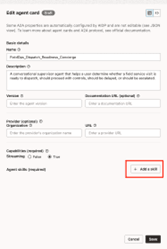
- Click on Actions, then click View agent card and Draft agent card.

- Click Edit.
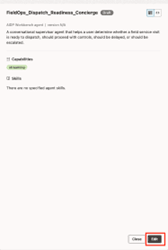
- You can switch the view by clicking Form or JSON in the top-right. The JSON view is more complete, but read-only. You can only edit fields in the Form view.
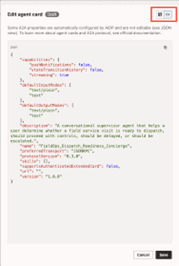
- Click Add a skill to add skills you want to expose to A2A clients.
Edit a Published Agent Card
You can modify a published agent card without having the undeploy or redeploy an agent.
Note:
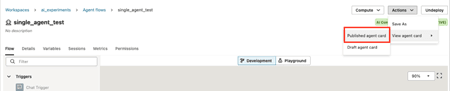
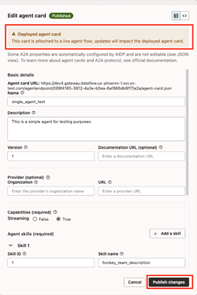
Changes you make to a published card are immediately reflected in the agent-card.json file accessible to A2A clients.- Click on Actions, then click View agent card and Published agent card.
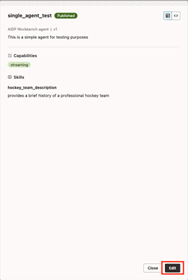
- Click Edit.
- Click Add a skill to add skills you want to expose to A2A clients.
https://gateway.aidp.{oci-region}.oci.oraclecloud.com/agentendpoint/{agentId}/a2a/agent-card.json