24 Invoke a Deployed Agent
You can invoke the endpoint URL of your agent from your production application.
Regardless of the programmatic interface used to invoke the agent endpoint, you must be authenticated with OCI and have the relevant permissions. In the case of agent endpoints, the caller needs to have at least USE permission on the agent endpoint.
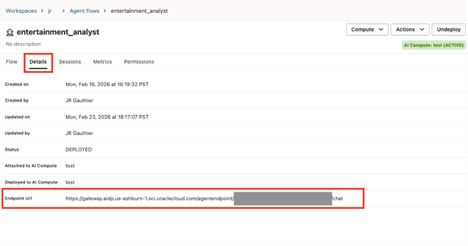
The endpoint URI is documented in the details tab of the agent UI. You can copy that endpoint URI into your code to invoke the agent.
To invoke a deployed agent as part of a workflow job, see Create an Agent Task.
Methods to Invoke Endpoint URIs
You can invoke the agent endpoint URI through different tools, SDKs, and CLIs.
The following methods allow you to invoke your endpoint URI in Oracle AI Data Platform agents.
Invoke with OCI CLI
oci raw-request
--http-method POST
--target-uri <your-agent-flow-endpoint-uri>
--request-body '{"query":"Tell me about the Ryder Cup in 1985"}'
--auth <security_token>
Invoke with Python Request Library
import oci import requests import json import uuid from contextlib import closing from requests import Request, Response
class AuthHelper: """ AuthHelper allows creating an OCI signer with either API key or security_token (which are short term sessions) """ def init(self, oci_profile: str, use_security_token:bool = True): config = oci.config.from_file(file_location="/Volumes/jr/default/misc/config",profile_name=oci_profile) if use_security_token: with open(config["security_token_file"], 'r') as f: token = f.read() private_key = oci.signer.load_private_key_from_file(config["key_file"])
 self.signer = oci.auth.signers.SecurityTokenSigner(token, private_key) else: self.signer = oci.signer.Signer( tenancy=config["tenancy"], user=config["user"], fingerprint=config["fingerprint"], private_key_file_location=config["key_file"], #pass_phrase=config.get("pass_phrase"), #private_key_content=config.get("key_content") )
@property
def Signer(self):
    return self.signer

class MyRawJsonRpcClient: """ Simple class using requests lib to post JSON to chat endpoint using OCI signing """ def init(self, chat_url:str, oci_profile: str, sessionKey:str, use_security_token:bool = True): self.authhelper = AuthHelper(oci_profile=oci_profile, use_security_token=use_security_token) self.authsigner = self.authhelper.Signer self.chat_url = chat_url self.sessionKey = sessionKey
def send(self, input:str) -> Response:
    body = {
        "isStreamEnabled" : False,
        "sessionKey" : self.sessionKey,
        "trace" : False,
        "input" :[{
            "role":"User",
            "content":[{
                "type" : "INPUT_TEXT",
                "text" : input
            }]
        }]
    }

    response:Request = requests.post(
        url =self.chat_url,
        params = None,
        auth = self.authsigner,
        json=body,
        headers={}
    )
    return response
sessionKey. sessionKey is the unique identifier of the user session with the agent. If you keep re-using the same sessionKey, user messages and agent responses are appended to the same conservation. client = MyRawJsonRpcClient(chat_url="<your-agent-flow-endpoint-uri>",
oci_profile = "DEFAULT",
sessionKey= “<your-session-key>”,
use_security_token = False )user_input = f"Hello, tell me a good dad joke."
r = client.send(input = user_input)
response_json = r.json()Through APEX
You can use the code sample available in the AI Data Platform Samples Github repository. The sample walks you through the process of calling an agent deployment endpoint from an APEX application.
Through Streamlit
You can use the code sample available in the AI Data Platform Samples Github repository. The sample walks you through the process of calling an agent deployment endpoint from an Streamlit application.
Best Practices - Async and Non-async Responses
We recommend that you write your client code assuming async responses. For example:
import httpx

async def fetch_data():
    async with httpx.AsyncClient() as client:
        response = await client.get(URL)
        return response.json()