Manage Compute
This section covers the basic functions of creating, changing, or removing compute clusters in your Oracle AI Data Platform.
About Compute Clusters
All-purpose compute clusters provide you the compute resources to process your workloads in an Oracle AI Data Platform instance.
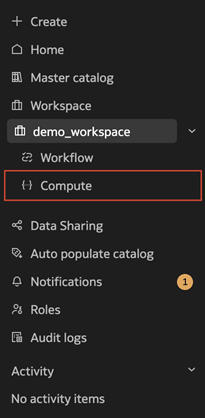
You manage your compute clusters from the Compute page in your AI Data Platform.
Types of Compute
Two types of compute exist in your AI Data Platform: all-purpose compute clusters and Default Master Catalog Compute Cluster.
You can only create all-purpose compute clusters in your AI Data Platform. All-purpose compute clusters are suitable for a versatile range of workloads and can be attached to your notebooks and used in workflows. Unless otherwise specified, any references to 'compute cluster' or 'cluster' in documentation refer to all-purpose compute clusters.
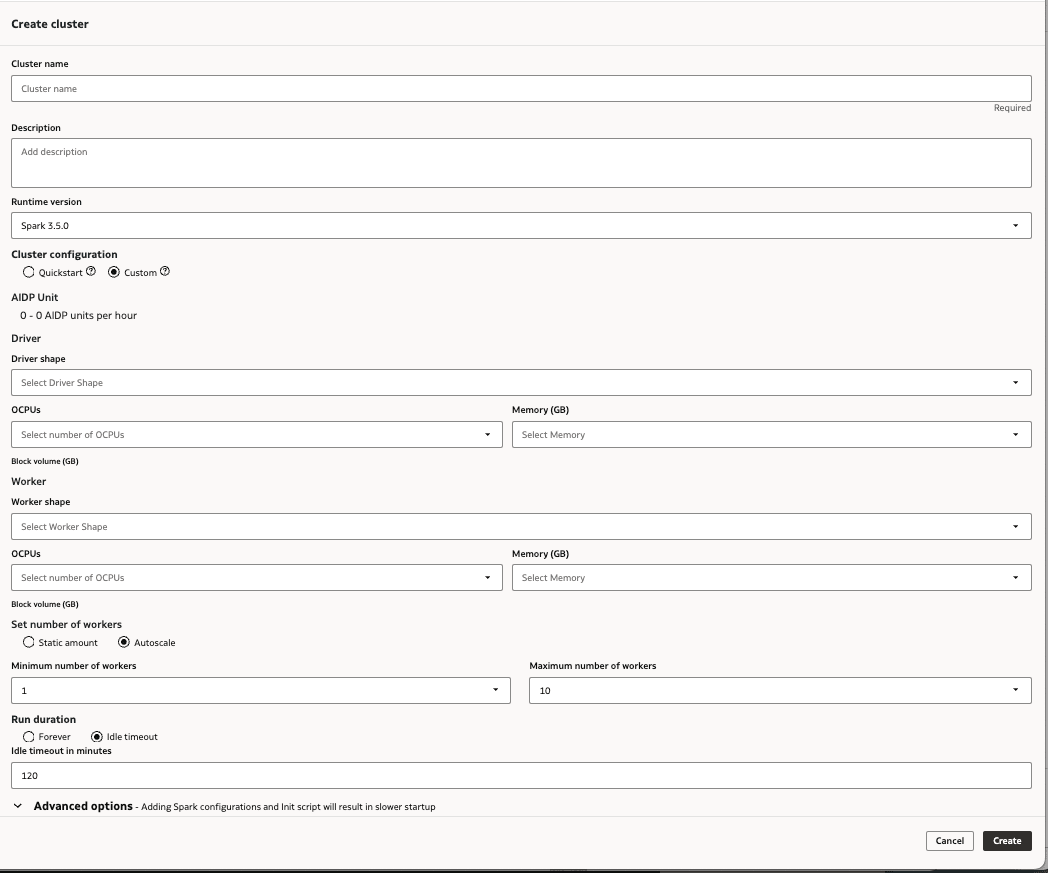
When you create a new all purpose compute cluster, you can choose either the Quickstart or Custom configuration. The Quickstart configuration is optimized to provide fast startup, while Custom configuration allows you to fine-tune your all purpose compute cluster to suit the specific workloads you need it to process. In both Quickstart and Custom configuration options, you can view cost projections and modify idle timeout options.
Note:
Installing custom libraries to a Quickstart configured all purpose compute cluster automatically changes it to the Custom configuration. This can impact startup performance.Default Master Catalog Compute Cluster is present in all AI Data Platform instances. This cluster is responsible for essential AI Data Platform functions, like search crawls, refreshing catalog objects, creating, editing, and deleting objects, and testing connections.
Cluster Runtime
All-purpose compute clusters can be created with an Apache Spark 3.5 runtime. The runtime environment is compatible with:
- Spark 3.5.0
- Delta 3.2.0 (pre-included)
- Python 3.11
- Scala 2.12
- Hadoop 3.3.4
- Java 17
Compute Configuration Export and Import
Once you have created a compute cluster, you can export the settings you configured for that cluster to your workspace or a volume in a catalog to use again for other clusters. You can import your saved configurations to other created clusters or import them as part of the creation process.
Your configurations are available to other users with access to workspace or volume you saved the configuration to, making it easy to share configurations across teams.
Create a Quickstart Cluster
You can choose to create an all-purpose compute cluster with preconfigured settings to process data and AI workloads in your Oracle AI Data Platform.
You can edit your cluster at any time after creation.
- Click Create in the left navigation panel then click Compute. You can also navigate to your workspace and click Compute, then click
 Create Cluster.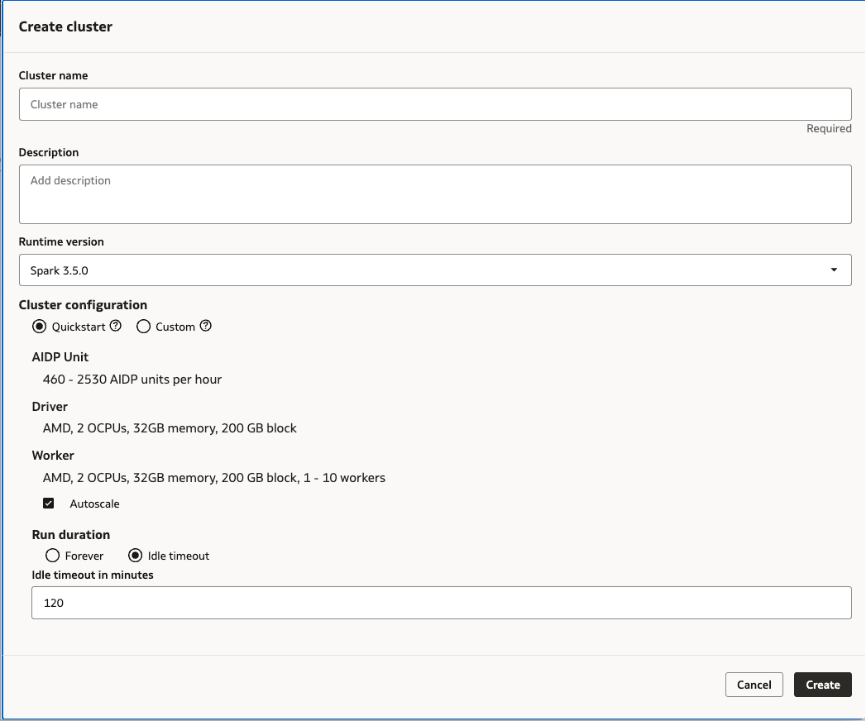
Create a Custom Cluster
You can create an all-purpose compute cluster with configuration settings of your own choosing to process data and AI workloads in Oracle AI Data Platform.
You can edit your cluster at any time after creation.
- Click Create in the left navigation panel then click Compute. You can also navigate to your workspace and click Compute, then click Create Cluster.
Create a Cluster Using an Imported Configuration
You can create an all-purpose compute cluster with configuration settings exported from an existing compute cluster in your Oracle AI Data Platform.
You can edit your cluster at any time after creation.
- Click Create in the left navigation panel then click Compute. You can also navigate to your workspace and click Compute, then click
Create Cluster.
- For Create method, select Use an exported configuration.
- From the Configuration file drop-down menu, select the exported configuration to use for your new cluster. Runtime, library, and environment settings are prefilled by the imported file.
- Provide a name and description to identify your cluster.
- Modify the remaining settings as needed.
- Click Create.
Create an NVIDIA GPU Cluster
You can choose to use an NVIDIA GPU in an All Purpose Compute Cluster to accelerate any workload in your unified AI and data pipeline.
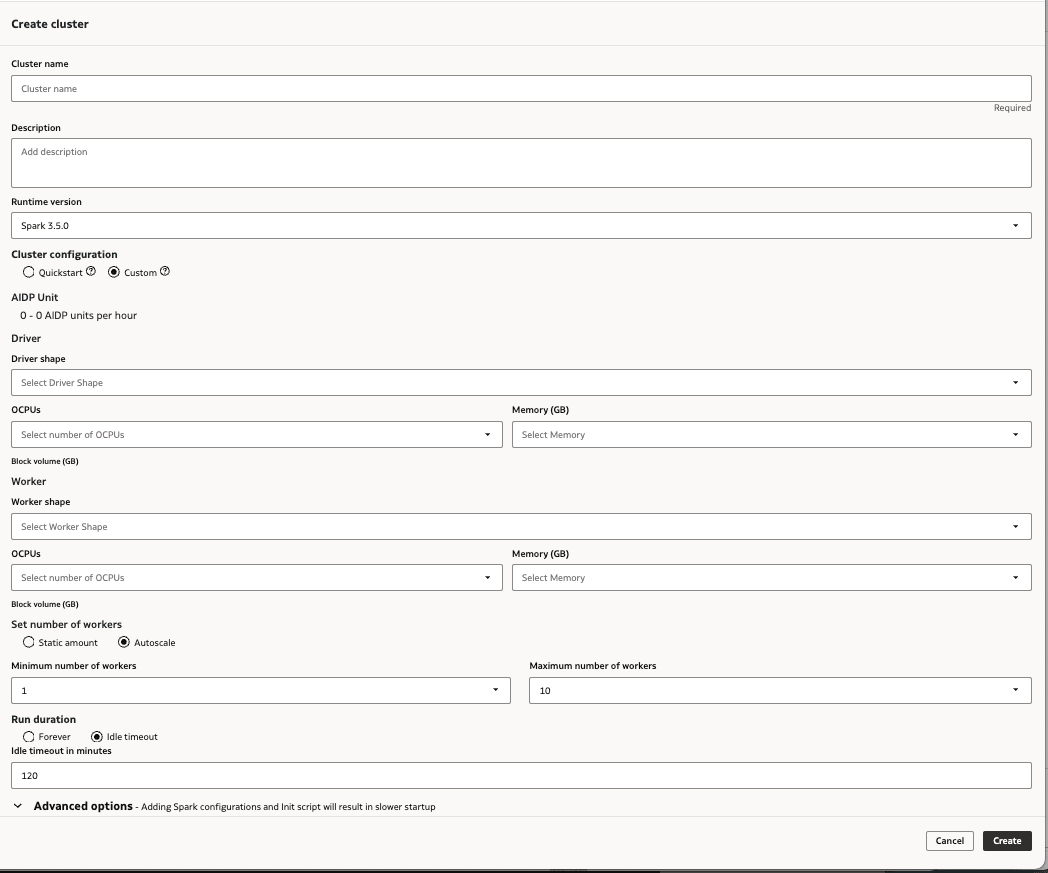
NVIDIA GPU shapes use the following configurations:
Table 9-1 NVIDIA GPU Shapes
| GPU Count | OCPU | Block storage (GB) | GPU memory (GB) | CPU memory (GB) |
|---|---|---|---|---|
| 1 | 15 | 1500 | 24 | 240 |
| 2 | 30 | 3000 | 48 | 480 |
Note:
When you use NVIDIA GPU shapes, both the Driver and Worker shape must be an NVIDIA GPU. Mixing CPU and GPU shapes for the same cluster is currently not supported.- Click Create in the left navigation panel then click Compute. You can also navigate to your workspace and click Compute, then click Create Cluster.
Tune an NVIDIA GPU Cluster for Apache Spark
You can tune your NVIDIA GPU clusters to optimize their performance by using recommendations from the GPU provider and by installing optional libraries.
Tuning GPU clusters can help optimize the performance of those clusters when called on by jobs in your Oracle AI Data Platform.
For NVIDIA GPU-based clusters, you can follow NVIDIA's Tuning Guide for recommendations and steps you can take to optimize performance.
You also have the option of installing NVIDIA cuDF and cuML plug-ins for Apache Spark libraries to assist with optimization:
- cuDF plugin for Apache Spark library is an accelerator for Apache Spark and provides a set of plugins that leverage GPUs to accelerate processing.
- cuML plug-in for Apache Spark library enables GPU-accelerated, distributed machine learning on Apache Spark and provides several PySpark ML compatible algorithms powered by the cuML library.
The cuDF plugin library is commonly used first for feature engineering and data cleaning, and then cross validation is performed at scale using the cuML plugin library. You can use these libraries for use cases like fraud detection (time series), web clickstream, and A/B experimentation.
Table 9-2 Recommended Spark Configurations
| Setting | Value | Note |
|---|---|---|
| spark.task.resource.gpu.amount | 0.0625 | 1 / spark.executor.cores |
| spark.rapids.sql.concurrentGpuTasks | 3 | GPU memory / 8GB, maximum of 4 |
| spark.rapids.shuffle.multiThreaded.writer.threads | 32 | CPU cores / GPU count per worker |
| spark.rapids.shuffle.multiThreaded.reader.threads | 32 | CPU cores / GPU count per worker |
| spark.shuffle.manager | com.nvidia.spark.rapids.spark350.RapidsShuffleManager | - |
| spark.rapids.shuffle.mode | MULTITHREADED | - |
| spark.plugins | com.nvidia.spark.SQLPlugin | - |
| spark.executor.resource.gpu.amount | 1 | - |
| spark.sql.files.maxPartitionBytes | 2 GB | Optional, recommended for large datasets |
| spark.rapids.sql.batchSizeBytes | 2 GB | Optional, recommended for large datasets |
| spark.rapids.memory.host.spillStorageSize | 32 G | Optional, recommended for large datasets |
| spark.rapids.memory.pinnedPool.size | 8 G | Optional, recommended for large datasets |
| spark.sql.adaptive.coalescePartitions.minPartitionSize | 32 MB | Optional, recommended for large datasets |
| spark.sql.adaptive.advisoryPartitionSizeInBytes | 160 MB | Optional, recommended for large datasets |
| spark.rapids.filecache.enabled | True | Optional, recommended if workloads will be reusing datasets |
Export Compute Configuration
You can export your compute cluster configuration and dependencies to a location in your workspace so it can be imported to other compute clusters.
- Navigate to your workspace and click Compute.
- Next to the compute cluster you want to export settings for, click
 Actions then click Export compute configuration. You can also click the cluster name, click Actions in the top-right, then click Export compute configuration.
 - Verify the dependencies, such as libraries and environment variables. Deselect any that should not be exported.
- Choose a save location in your workspace or in a volume.
- Click Export.
Import Compute Configuration
You can import existing compute cluster configurations and their dependencies to an all-purpose cluster using YAML configuration files in your workspace.
- Navigate to your workspace and click Compute.
- Next to the compute cluster you want to import settings for, click Actions then click Import compute configuration. You can also click the cluster name, click Actions in the top-right, then click Import compute configuration.
- Search your workspace or volume for the configuration YAML files you want to upload and select one or more.
- Review the configuration files you selected then click Import.
Modify a Cluster
You can change settings or add additional parameters for your clusters.
- Navigate to your workspace and click Compute.
- Next to the compute cluster you want to modify, click
Actions then click Edit.
- Modify the attributes of your compute cluster or add additional parameters as needed.
- Click Save.
Delete a Cluster
You can delete compute clusters that are unused or no longer needed.
- Navigate to your workspace and click Compute.
- Next to the cluster you want to delete, click
Actions and click Delete.
- Click Delete.
View Cluster Details
You can review the shape and settings of a cluster at any time.
- Navigate to your workspace and click Compute.
- Click the name of the cluster you want to view details for.
- Click the Details tab.
Maintenance Updates for Compute Clusters
Oracle AI Data Platform compute automatically applies maintenance updates without user intervention.
The maintenance updates cover any necessary security patches or bug fixes for operating system and AI Data Platform internal components. AI Data Platform verifies there are no running clusters before applying these monthly maintenance updates.