Create an Oracle Analytics AI Agent
When you create an AI Agent in Oracle Analytics, you bring together a dataset, a set of custom instructions to be passed to the Oracle Analytics AI Assistant, and specific knowledge documentation.
Ensure that your administrator has managed permissions related to AI agent use and configuration. See: Enable Users to Create AI Agents in Oracle Analytics.
- On your Home Page, click Create then click AI Agent.
- Select a dataset then click Add to Agent.
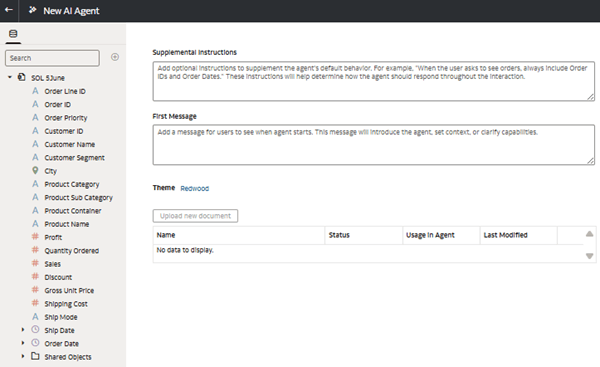
- Configure the agent on the New AI Agent screen. Enter supplemental instructions, then click Save.
- Enter a message for users to see when the agent starts in the First Message field.
- Enter a name for the agent, and optionally enter a description, then click OK.
- Upload one or more knowledge documents.
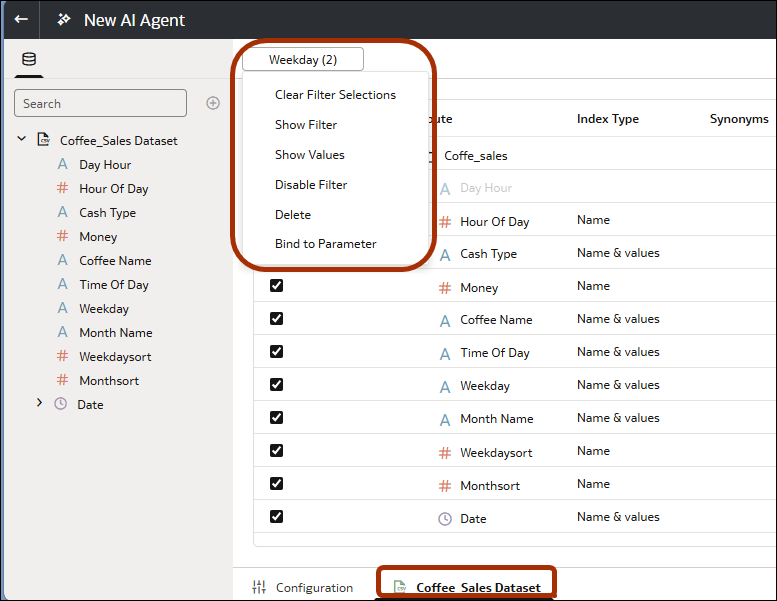
- If required, filter the dataset. For example, you might want your analytics users to only analyze data from weekends so you create a filter on "Weekday" and include "Saturday" and "Sunday".
- Display the dataset configuration page using the tab at the bottom of the New AI Agent dialog.
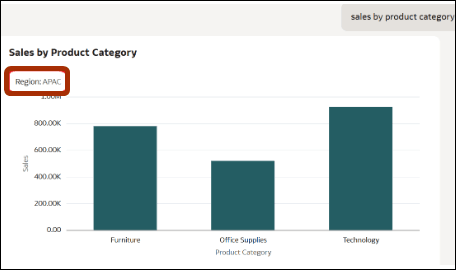
- Right-click filters to select configuration options.For example:- Select Show Values to display filter values in workbook edit mode. For example, the filter tile on the filter bar displays the region value "EMEA".- Select Show Filter to display filter values in workbook consumer mode so that workbook users know which data is displayed. For example, users can see the region value "EMEA".- Select Bind to Parameter to control the filter using a workbook parameter.
- Display the dataset configuration page using the tab at the bottom of the New AI Agent dialog.
- Click Save.
- Click Preview
 to run the agent. Enter test prompts and verify that the AI agent returns expected results. To go back and make further changes, click Edit the Agent
  .
.
You can share the AI agent with a specific set of users. See Control Access to Oracle Analytics AI Agents.