About Data Agents
Use a data agent with Oracle Analytics AI Assistant to ask focused questions about your business data and receive answers as visualizations or tables.
Data agents support questions with a defined scope, such as a sales total, a comparison between regions, or a breakdown of expenses by category. They are suited to routine reporting and follow-up questions as you explore data in a workbook.
How Data Agents Answer Questions
This diagram shows how a data agent adds context to your question before Oracle Analytics AI Assistant prepares a response. 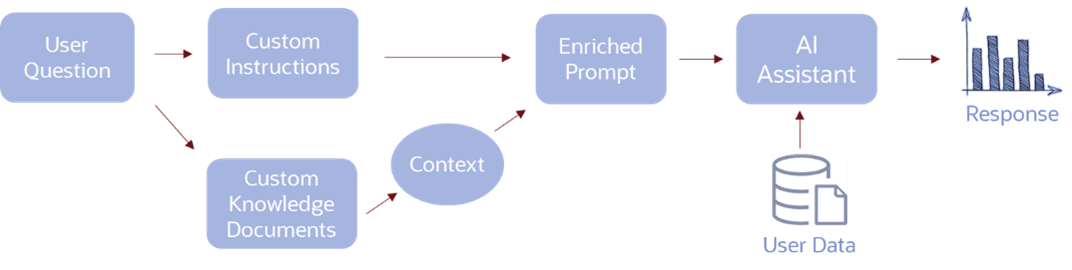
Description of the illustration ai_agent_workflow_png.png
A data agent uses one data source, which can be a dataset or subject area. The agent's author determines which columns are available to the agent and can define filters that limit the data used in responses.
When a user asks a question, the data agent adds context from the agent author’s supplemental instructions and relevant knowledge document excerpts. Oracle Analytics AI Assistant uses this context to interpret the request, query the associated data source, and present an answer. A response typically contains a visualization or table with an explanation of the findings.
For example, a user might ask, “What were sales by region last quarter?” and then ask a follow-up question to compare the results for two regions. Supplemental instructions can help the agent interpret business terms, such as the organization’s definition of a fiscal quarter.
Data Agents and Workbook Context
A workbook author can make a data agent available through the workbook AI Assistant. See Specify Data Agents Available to Consumers. Consumers can then ask questions while viewing the workbook. Authors can also test the agent in preview mode.
When workbook filter binding is configured, the data agent can receive mapped workbook filter values and use them in its responses. This allows questions to reflect the workbook’s current filter selections. Filters configured on the agent define its data scope and can't be overridden by consumers. See Configure Workbook Filter Context for Data Agents.
For information about the components shared by data agents and AIDP Deep Insights agents, see About Oracle Analytics AI Agents.