Specify AI Agents Available to Consumers
When you give consumers access to the Oracle Analytics AI Assistant in the Insights Panel using the presentation settings for a workbook, you can specify an AI agent for the AI Assistant to use with the workbook.
When consumers ask natural language questions to the Oracle Analytics AI Assistant to analyze data in the workbook, the assistant will use the specified AI Agent as a data source.
You must enable Workbook Assistant for consumers from the Insights Panel section before you can select an agent. See Specify Insights Panel Options for Consumers.
For information about AI agents, see Use AI Agents and the Oracle Analytics AI Assistant to Interact with Data.
- On your home page, hover over a workbook, click Actions, and select Open.
- From the Preview menu
 , select Configure Presentation.
 - In the presentation settings panel, click the Workbook tab.
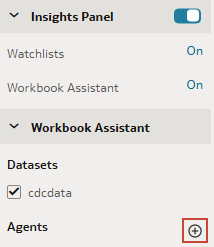
- In the Workbook Assistant section, click Add Agent.
- Select the agent you want to associate with the workbook, and click OK.
- Click Save.