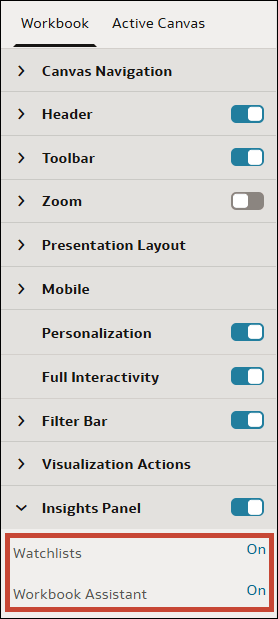
Specify Insights Panel Options for Consumers
When you configure the presentation settings for a workbook, you can specify whether consumers can access watchlists, Auto Insights, and the Oracle Analytics AI Assistant in the Insights Panel. You can also specify whether the panel opens by default when they open the workbook.
When you enable the Insights Panel for consumers, the following options are enabled by default:
- Watchlists: Consumers can view watchlists that have been shared with them.
- Insights: Consumers can access Auto Insights to view the generated visualizations. To specify the data sources you want Auto Insights to use for consumers, see Specify Datasets Available to Consumers with Auto Insights.
- Workbook Assistant: Consumers can ask natural language questions to the Oracle Analytics AI Assistant to analyze data in the workbook. To specify the data sources you want the AI Assistant to use, see Specify Datasets and Subject Areas Available to Consumers with Workbook Assistant and Specify AI Agents Available to Consumers.
Note:
Even if these options are enabled, a consumer can only use watchlists or the Assistant in the Insights Panel if your administrator has granted them the Use Assistant in Workbooks or the Create and Edit Watchlists permissions. See About Permissions.Additionally, when you enable the Insights Panel, you can turn on the Open by Default option so that the Insights Panel opens automatically when consumers open the workbook.
- On your home page, hover over a workbook, click Actions, and select Open.
- From the Preview menu
 , select Configure Presentation.
 - In the presentation settings panel, click the Workbook tab.
- In the Insights Panel section, review the options that are available to consumers and turn off any options that you don't want them to use.
- To make the Insights Panel open automatically when consumers open the workbook, turn on Open by Default.
- Click Save.