Edit Heat Matrix Views
A heat matrix view visually represents the relationship between data values as a gradient of colors in a table format. You can edit properties such as view size, the display of header and data cells, and the display of a legend.
About Heat Matrix Views
A heat matrix view shows you a two-dimensional depiction of data in which values are represented by a gradient of colors. A simple heat matrix provides an immediate visual summary of information that is well suited for analyzing large amounts of data and identifying outlier values.
A heat matrix displays data from one measure. Colored cells are formed by the grouping and intersection of the columns and rows placed in the Prompts, Sections, Rows, Columns, and Color By drop targets. Cells are displayed as percentile bins or as a continuous color. You can hover over a cell to display its value or display values in cells all the time.
By default, the first measure of the analysis in the Criteria tab is selected as the Color By measure and represents the measure's value. The Style element defaults to Percentile Binning with "quartile" as the value for the number of bins. Cells display uniformly, in that each cell has the same width and the same height. Cell height and width don’t have to be the same. A "transparent" diagonal pattern of stripes indicates null values.
You can display a legend below the heat matrix that includes:
-
One measure (selected in the Color By list) and its corresponding label.
-
The number of specified bins (for example, quartile), color-coded and labeled, or a gradient bar that is displayed as a continuous color fill and is labeled "low" to "high."
Here is an example of a heat matrix view on a dashboard page. Each sales representative's revenue is displayed by region and product and prompted by product type. Sales revenue is binned by year. This heat matrix depicts the product revenue outliers for each sales representative (for example, in 2008, Angela Richards has no sales revenue for Bluetooth Adaptors or MP3 Speakers Systems for any region.)
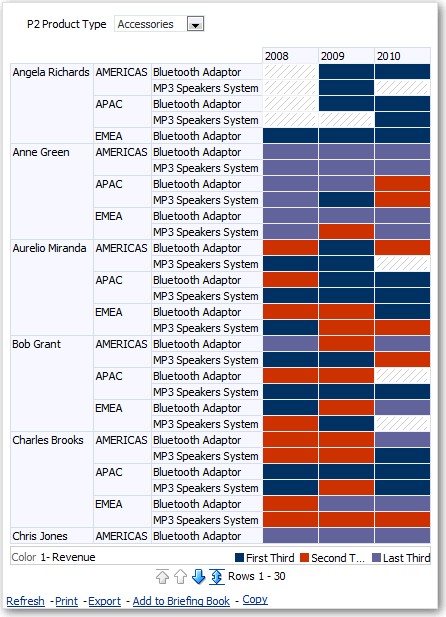
Description of the illustration heat_matrix1.gif