Policies Required to Integrate Oracle Analytics with Generative AI Models
If you're sourcing generative AI models from Oracle Cloud Infrastructure, set up minimum security policies for users.
Overview
The OCI user that you specify in the connection between Oracle Analytics Cloud and your OCI tenancy (see Create a Connection to Your Oracle Cloud Infrastructure Tenancy) must:
- have read, write, and delete permissions on the compartment containing the OCI resources you want to use.
- belong to a user group with the following minimum OCI security policies.
- be saved in the Shared Folders area of the catalog (if you want other users to execute queries using AI Functions that use a model from this connection)
You can connect using either an OCI API key or resource principal (see Overview of Identity and Access Management).
Note:
Oracle Cloud IDs (OCIDs) are resource identifiers used in OCI.Adding Security Policies in OCI
In OCI, navigate to Identity & Security, then Policies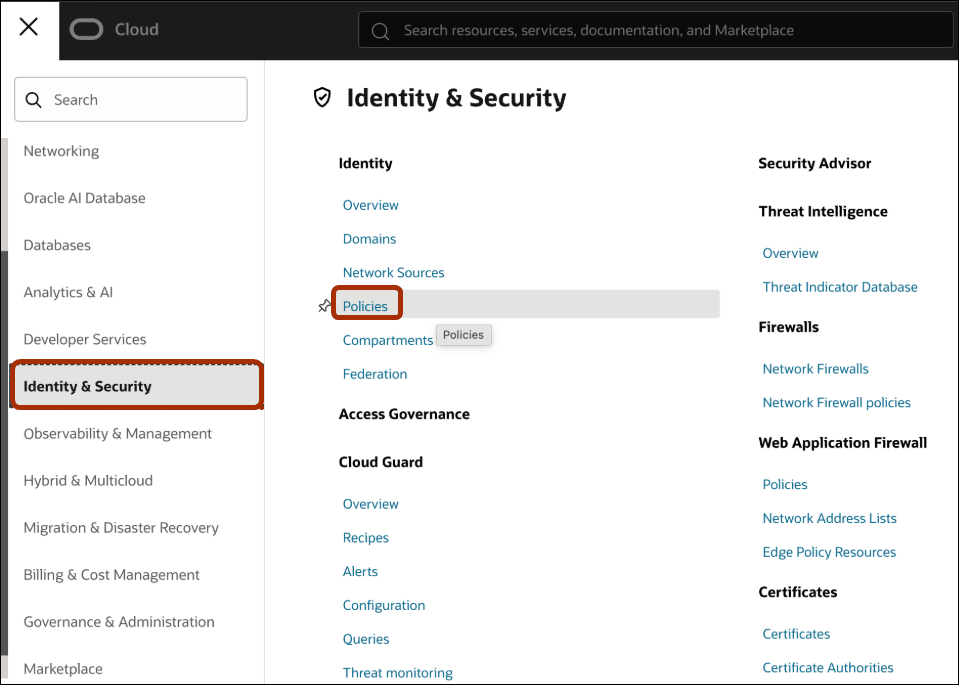
Description of the illustration ai-functions-15.png
.
Use the Policies area to create and manage security policies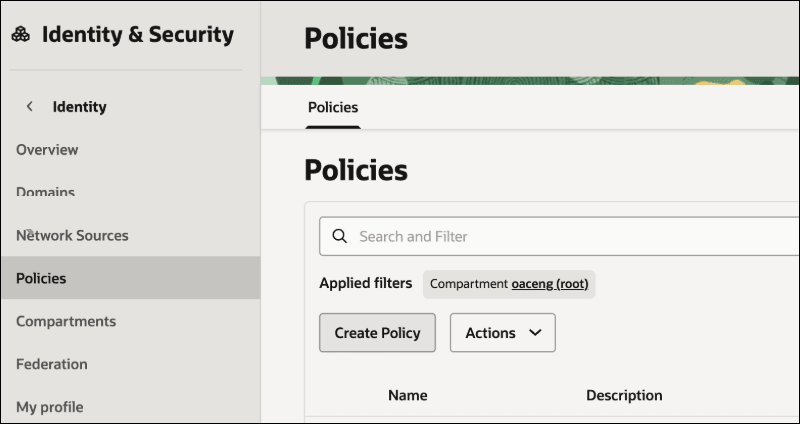
Description of the illustration ai-functions-16.png
.
Policies Required
To provide access to OCI Generative AI resources, use one of the following:
- A single broad-based OCI policy. This is simpler to implement but provides less control over access to OCI resources.
- Multiple fine-grained OCI policies. These provide tighter control over access to OCI resources.
Single Broad-based OCI Policy
| API Key Policies | Resource Principal Policies |
|---|---|
Allow group <group_name> to manage generative-ai-family in compartment <compartment_name> |
Allow any-user to manage generative-ai-family in compartment <compartment_name> where all {request.principal.id='<analytics_instance_ocid>'} |
Note:
For resource principal, if you have multiple Analytics instances under a compartment, specify{request.principal.type='analyticsinstance', request.principal.compartment.id='<compartmentA_ocid>'} instead of {request.principal.id='<analytics_instance_ocid>'}.
Multiple Fine-grained OCI Policies
| Purpose | API Key Policies | Resource Principal Policies |
|---|---|---|
| Provide access to OCI Generative AI Chat | Allow group <group_name> to manage generative-ai-chat in compartment <compartment_name> |
Allow any-user to manage generative-ai-chat in compartment <compartment_name> where all {request.principal.id='<analytics_instance_ocid>'} |
| Provides access to OCI Generative AI Model |
Allow group <group_name> to manage generative-ai-model in compartment <compartment_name>Note: Setting thegenerative-ai-model policy enables listing and registering a Generative AI model in Oracle Analytics, but it doesn’t allow using a pre-registered model for inference. To allow using a Generative AI model for inference in Oracle Analytics, ensure that the generative-ai-chat policy is also configured.
|
Allow any-user to manage generative-ai-model in compartment <compartment_name> where all {request.principal.id='<analytics_instance_ocid>'} |
| Provides access to OCI Generative AI Endpoint | Allow group <group_name> to manage generative-ai-endpoint in compartment <compartment_name> |
Allow any-user to manage generative-ai-endpoint in compartment <compartment_name> where all {request.principal.id='<analytics_instance_ocid>'} |
| Provides access to OCI Generative AI Dedicated AI Cluster | Allow group <group_name> to manage generative-ai-dedicated-ai-cluster in compartment <compartment_name> |
Allow any-user to manage generative-ai-dedicated-ai-cluster in compartment <compartment_name> where all {request.principal.id='<analytics_instance_ocid>'} |