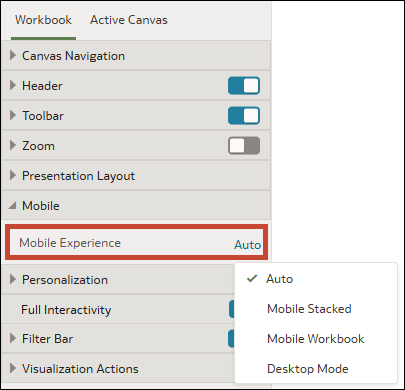
Specify the Workbook Layout for the Mobile App
When you configure the presentation settings for a workbook, you can specify a workbook layout for consumers that open it in the Oracle Analytics mobile app.
Oracle Analytics applies the mobile experience option when a user opens the workbook in the app. If a mobile user doesn't use Auto as the Default Layout for the workbook in the app, their setting overrides the presentation setting.
The mobile experience options are:
- Auto - Uses whatever setting the user has enabled in the mobile app.
- Mobile Stacked - Stacks all visualizations in a vertical list so the user can scroll through them one at a time.
- Mobile Workbook - Maintains the design and layout of the canvases while applying breakpoints, if available, to optimize the mobile experience.
- Desktop Mode - Renders the workbook exactly as it appears on a desktop, without applying breakpoints. Users can experience the full design and functionality of the workbook.
For information about designing canvas layouts with breakpoints, see Design Canvas Layouts for Different Screen Sizes.
- On your home page, hover over a workbook, click Actions, and select Open.
- From the Preview menu
 , select Configure Presentation.
 - In the presentation settings panel, click the Workbook tab.
- In the Mobile section, click the Mobile Experience field and select a layout.
- Click Save.