Use Case: Propagate User Identity for MCP Tool Invocations
This use case provides an overview of how OAuth JWT user assertion is used to securely propagate the same user identity and access credentials across the MCP gateway, MCP server, and agentic AI tool-registered integrations to the endpoint system. Identity propagation is supported with the OAuth using JWT User Assertion security policy.
Overview
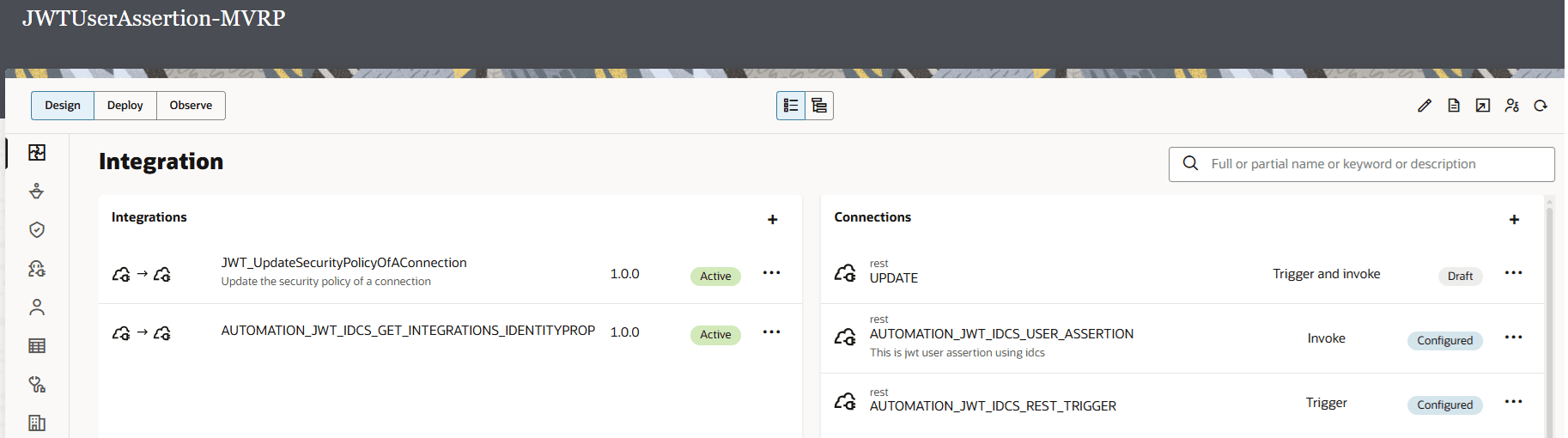
- Two integrations are registered as agentic AI tools.
- JWT_UpdateSecurityPolicyOfAConnection integration: Calls the Developer API for Oracle Integration 3 to update the security policy of a specific connection in a service instance.
- AUTOMATION_JWT_IDCS_GET_INTEGRATIONS_IDENTITYPROPAGATION integration: Calls the Developer API for Oracle Integration 3 to list the integrations in a specific service instance.
- A REST Adapter invoke connection used in the integrations is configured with the OAuth using JWT User Assertion security policy.
- The agentic AI tools are discovered during MCP server creation and configuration. The MCP server is also configured to use JWT user assertion security.
- The MCP gateway is created and configured to manage the MCP server (and its discovered agentic AI tool-registered integrations).
- The MCP gateway is run. During design-time configuration, several different user names are specified. However, the user running the MCP gateway is securely propagated across the MCP gateway, MCP server, and agentic AI tool-registered integrations to the endpoint system.
Prerequisites
- Create or use an existing confidential application configured with the JWT assertion grant type in the Oracle Cloud Console. The information created with the confidential application is required for adapter and MCP server configuration. For creation instructions, see Use OAuth 2.0 Grants in Identity Domain Environments in Using the REST Adapter with Oracle Integration 3.
- Manually create a signing key to upload on the Certificates page. See Upload a Certificate to Connect with External Services in Using the REST Adapter with Oracle Integration 3. The service provider typically provides instructions on how to generate the signing keys and the format. For an example, see Required Keys and OCIDs.
- Create the JWT header and JWT payload JSON files. You upload both files on the Connections page when configuring the REST Adapter invoke connection to support JWT assertions. For details about creating JWT JSON files, see JWT Assertions Outbound Use in Using the REST Adapter with Oracle Integration 3.
Configure a Connection
- The REST Adapter invoke connection is configured with the OAuth using JWT User Assertion security policy. The JWT private key alias specified is the same as the signing key uploaded on the Certificates page in Oracle Integration. See Prerequisites.
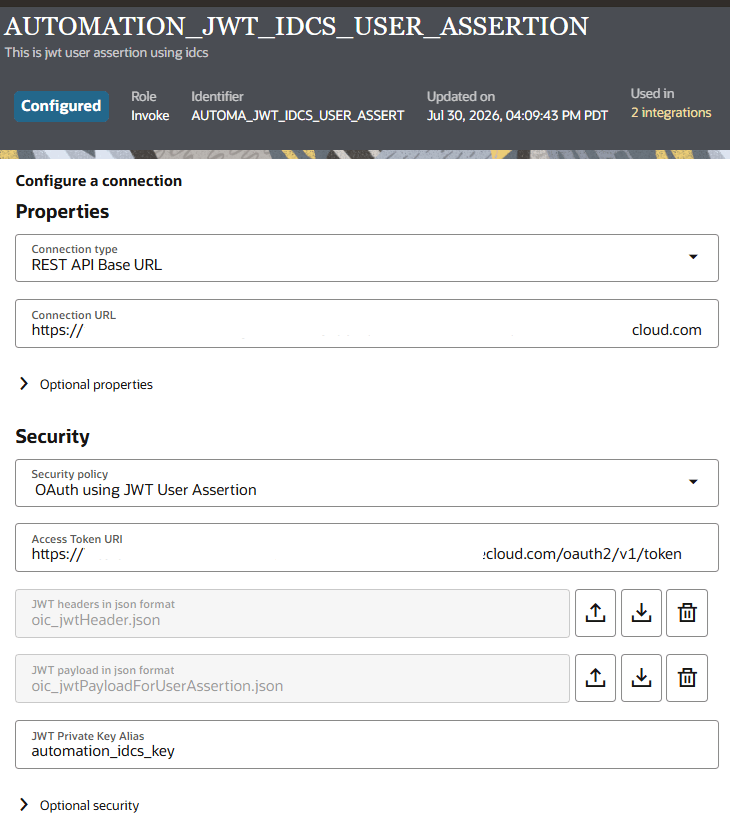
- The JWT header and payload files created in Prerequisites are uploaded. The JWT payload file contains the
subproperty, which contains the user identity to propagate from the MCP gateway to the MCP server to the MCP tool invocations (the underlying integrations) to the endpoint system.{ "iss": "a24ga932184c4e81aade747d764b2f02", "sub": "mike.smith@example.com", "aud": "https://identity.oraclecloud.com/", "nbf": 1734994451, "exp": 1744998451, "iat": 1739994481, "jti": "2d29e3b4-982a-71ea-94a2-3785e926dy83" }
Map the User Identity
- The map action between the trigger and invoke connections defines the subject to propagate.
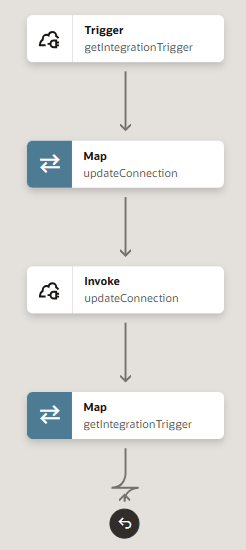
- The source (trigger) Subject element is mapped to the target (invoke) Subject element. This mapping indicates you want to use identity propagation to send the subject to the endpoint system. Oracle Integration generates the downstream access token and invokes the endpoint system with the originating user. Without this mapping, the endpoint system cannot receive the originating user.

Register the Integrations as MCP Tools
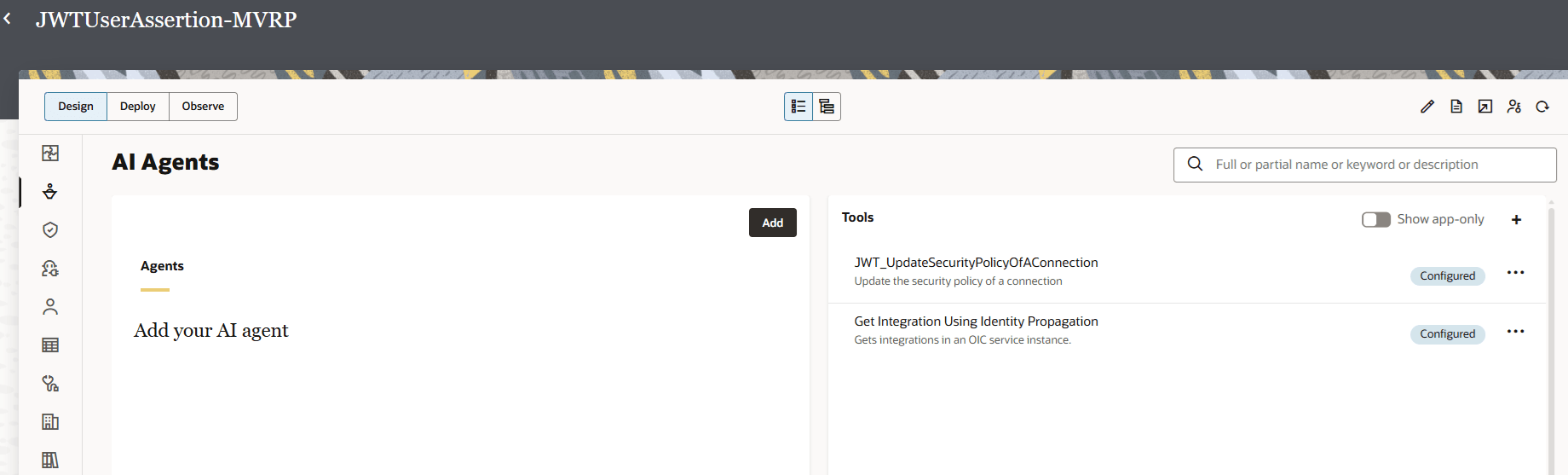
- The two integrations are registered as MCP tools for AI agents. See Register the Integration as an Agentic AI Tool.
Configure the MCP Server
- The MCP server (for this example, named Factory API MCP Server) is selected to be managed by the MCP gateway.
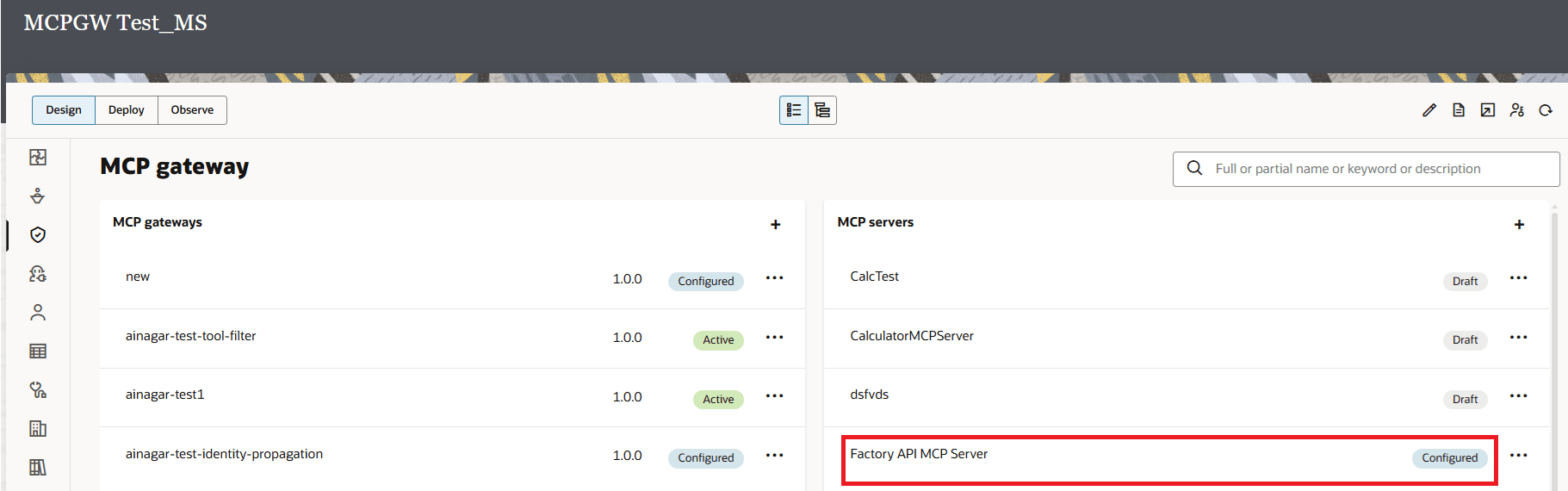
- Factory API MCP Server is configured as follows:
The two integrations registered as tools are discovered and displayed on the right side of the page when the connection is tested and saved.
- JWT_UpdateSecurityPolicyOfAConnection
- GET_INTEGR_USING_IDENTI_PROPAGATION
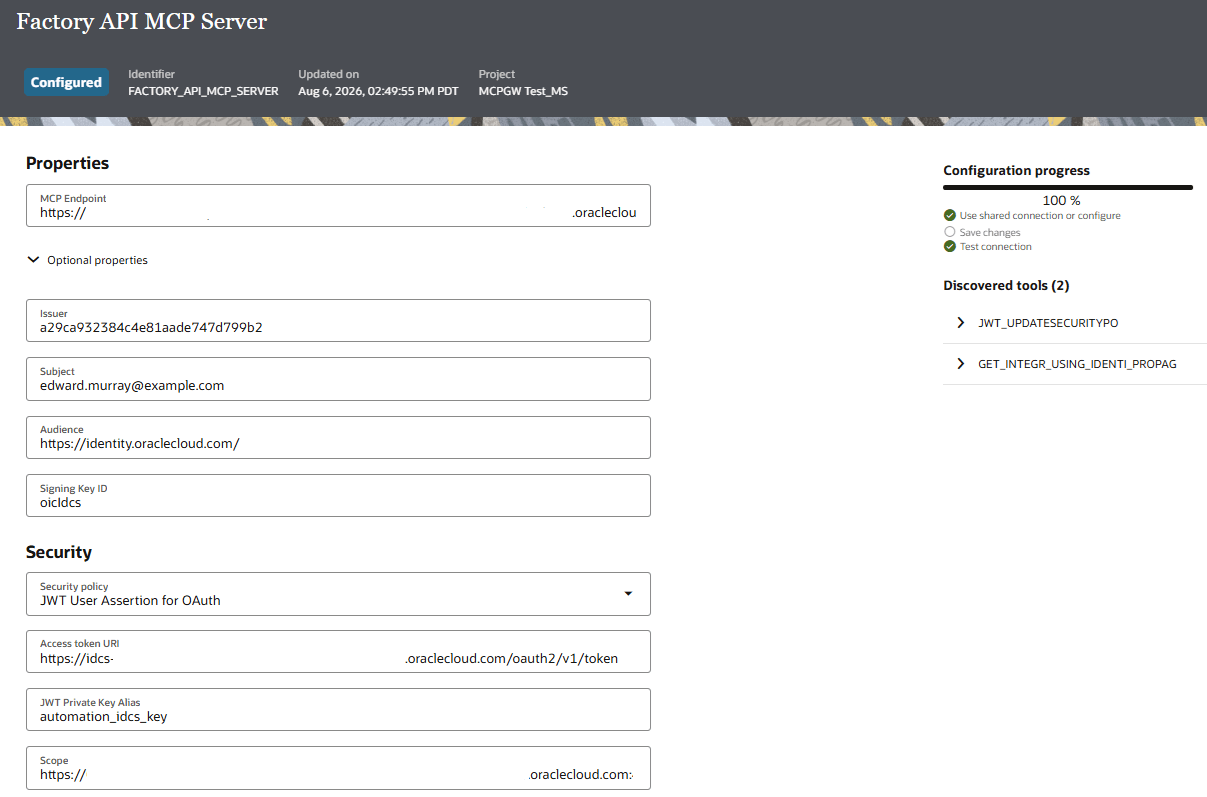
The MCP server properties are configured as follows:
Element Description MCP Endpoint The MCP server endpoint to which to connect. Optional properties The claims used to generate the token: - Issuer
- The client ID.
- Subject
- The user (for this example,
edward.murray@example.com). Note that the user name is different than the user name specified for thesubjectparameter in the JWT payload file uploaded during REST Adapter invoke connection configuration.
- Audience
- Is
https://identity.oraclecloud.com.
- Signing Key ID
- The signing key (for this example,
oicidcs). This is the identifier you use when you upload the public certificate in the identity domain (IDCS) client confidential application.
Security policy JWT User Assertion for OAuth is selected for user identity propagation. Access token URI The access token URI to use. JWT Private Key Alias The JWT private key alias to use (automation_idcs_key). This is the same name specified: - When configuring the REST Adapter invoke connection.
- When uploading the signing key on the Certificates page in Oracle Integration. See Prerequisites.
Scope The scope of the service instance.
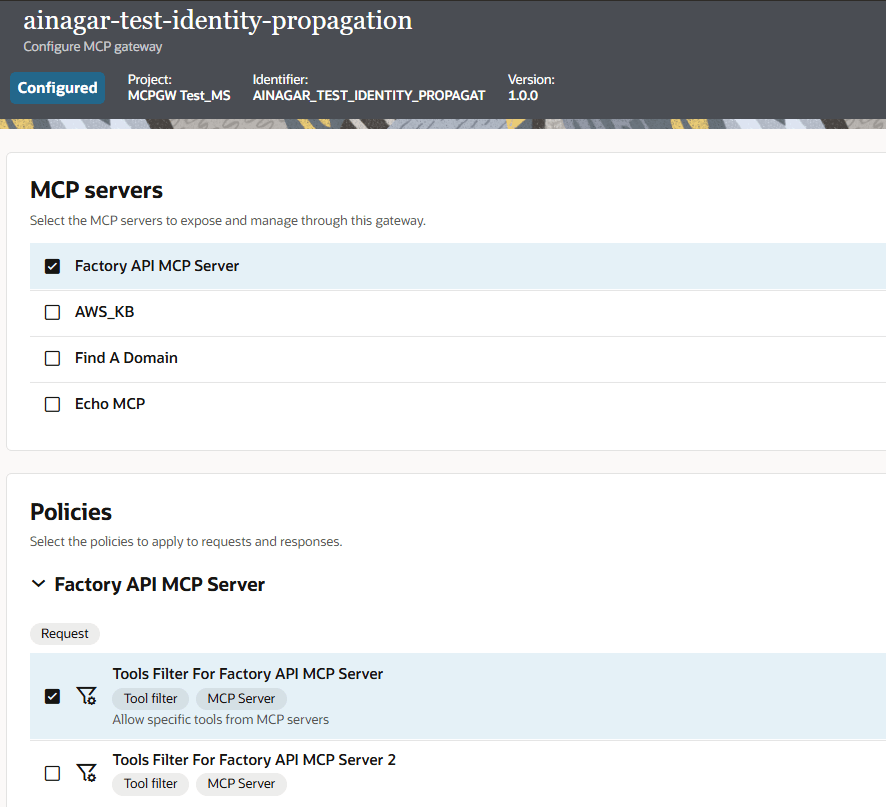
Define the MCP Server and Policies for the MCP Gateway
- The MCP gateway is created and configured to manage the MCP server (Factory API MCP Server) described in Configure the MCP Server. A filter is defined to expose both agent AI tool-registered integrations that were discovered.
Run the MCP Gateway
- The MCP gateway is run (for this example, from Postman).
- The user calls the MCP gateway with their OAuth token. You obtain this token by creating or using an existing confidential application using the OAuth Authorization Code grant type in the Oracle Cloud Console. This token enables the user running the MCP gateway in Postman to have their identity propagated across the MCP gateway, MCP server, and agent AI tool-registered integrations to the endpoint system.
- When you connect to the gateway, the caller is validated and routes the tool call to the selected MCP server.
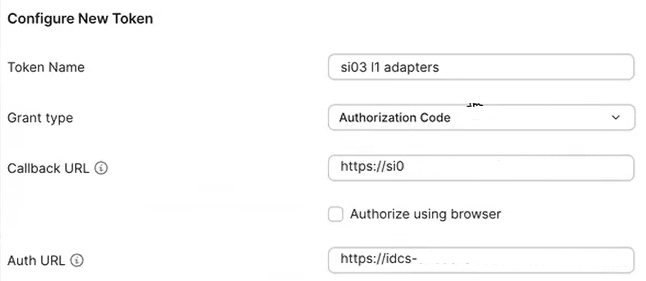
- After a token is issued, Run is clicked to connect to the MCP gateway. Note that both integrations registered as tools are displayed.
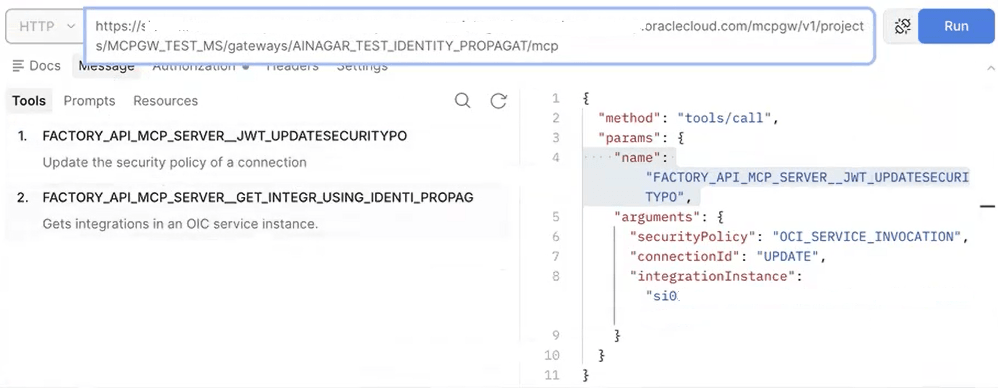
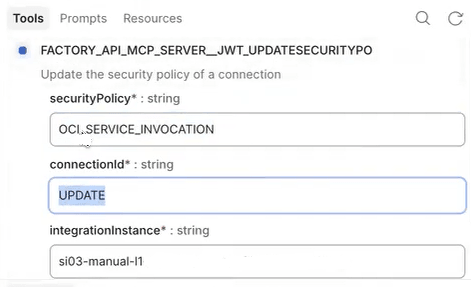
- Once gateway connectivity is established, you call the MCP server. For this example, the connection is updated to specify a different security policy (OCI Service Invocation) in the specified service instance. The JWT_UpdateSecurityPolicyOfAConnection tool, which calls the Developer API for Oracle Integration 3 to update the security policy of a specific connection in a service instance, is invoked.
- Postman returns the response details. The response indicates that the JWT_UpdateSecurityPolicyOfAConnection tool is successfully called.
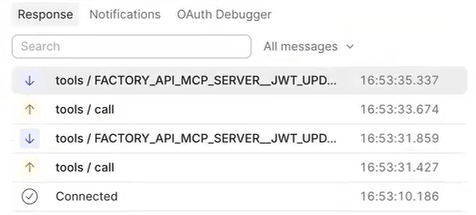
The response also shows that the user who ran the MCP gateway (for this example,
kevin.hoffman@example.com) is propagated through the MCP gateway, MCP server, and agent AI tool-registered integrations to the end system even though two other users were specified during design time. The end user’s identity is determined at runtime by whoever is using the agent, not by users configured at design time.{ "name": "UPDATE", "status": "CONFIGURED", "securityPolicy": "OCI_SERVICE_INVOCATION", "created": "2026-07-30T23:53:35.245+0000", "createdBy": "\"", "lastUpdatedBy": "kevin.hoffman@example.com" }