Prerequisites for Creating a Connection
Satisfy the following prerequisites appropriate to your environment for creating a connection with Oracle Integration.
- Download the Credentials Wallet and Obtain Database Details
- Configure the Wallet to Support Multiple Hosts
- Satisfy Bulk Data Import Operation Prerequisites
- Manage AI and Vector Profiles
- Migrate from an Oracle Database Classic Cloud Service Database Instance to an Oracle Autonomous AI Transaction Processing or Oracle Autonomous Data Warehouse Database Instance
- Configure the Embedding Models and Database User Privileges
Download the Credentials Wallet and Obtain Database Details
You must download the credentials wallet and obtain database details.
- Download the client credentials wallet from the Oracle Autonomous AI Transaction Processing instance. See Download Client Credentials (Wallets) in Using Oracle Autonomous AI Database Serverless.
- Ensure that the target database is accessible.
- Ensure that you have write permissions to the database.
- Ensure that you have the required permissions to run stored procedures and SQL statements.
- Know the database service name.
- Know the database service user name and password for connecting to the database.
Configure the Wallet to Support Multiple Hosts
Once you download the wallet credentials and obtain the database details, you can add primary and secondary host addresses to the tnsnames.ora file.
The secondary host can be used as a disaster recovery (DR) site if the connection to the primary host is lost or unavailable.
tnsnames.ora file to support multiple hosts, ensure that the following conditions are met:
- Enable failover.
- Disable load balancing.
- Ensure that the service names and wallet certificates for both hosts are valid. See Download the Credentials Wallet and Obtain Database Details.
- Add both the primary and secondary host addresses to the
tnsnames.orafile.
atppedr_low  =
(DESCRIPTION =
     (RETRY_COUNT=5)
      (RETRY_DELAY=3)
              (ADDRESS_LIST =
               (FAILOVER=on)
                (LOAD_BALANCE=off)
                   (ADDRESS=(PROTOCOL=tcps)(PORT=1522)(HOST=host_name-region-1.example.com))
                   (ADDRESS=(PROTOCOL=tcps)(PORT=1522)(HOST=host_name-region-1.example.com))
  )
   (CONNECT_DATA =
    (SERVICE_NAME=service_name)
  )
  (SECURITY =
    (SSL_SERVER_DN_MATCH=yes)
  )
)
Satisfy Bulk Data Import Operation Prerequisites
If you want to use the bulk data import operation, you must configure the Oracle Autonomous AI Transaction Processing (ATP) Adapter to use the JDBC With OCI Signature security policy on the Connections page. Before you can successfully configure this security policy on the Connections page, you must complete the following prerequisites.
- Create an API signing key. You then specify the signing key in Oracle Cloud
Infrastructure.
- Copy the finger print value generated by Oracle Cloud
Infrastructure. You need this value when configuring the JDBC With OCI Signature
security policy on the Connections page.
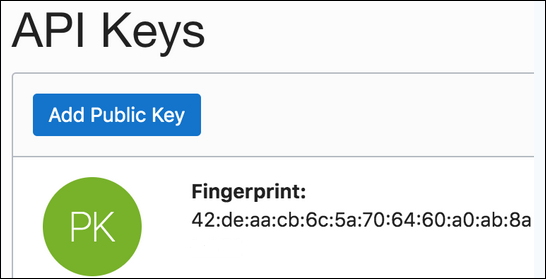
- Copy the finger print value generated by Oracle Cloud
Infrastructure. You need this value when configuring the JDBC With OCI Signature
security policy on the Connections page.
Manage AI and Vector Profiles
You must create and manage your AI profiles and vector profiles.
- AI profiles: Create and manage
your AI profiles through the
DBMS_CLOUD_AIpackage.See Manage AI Profiles.
- Vector profiles: Create and manage
your vector profiles and index through the
DBMS_CLOUD_AIpackage.
Migrate from an Oracle Database Classic Cloud Service Database Instance to an Oracle Autonomous AI Transaction Processing or Oracle Autonomous Data Warehouse Database Instance
Perform the following steps if you want to migrate from an Oracle Database Classic Cloud Service database instance to an Oracle Autonomous AI Transaction Processing or Oracle Autonomous Data Warehouse database instance.
- Migrate all the required database objects, stored procedures, wrapper procedures, and tables to the destination Oracle Autonomous AI Transaction Processing or Oracle Autonomous Data Warehouse database instance.
- Change the Oracle Database Cloud Service
Adapter connection details to point to an Oracle Autonomous AI Transaction Processing or Oracle Autonomous Data Warehouse database instance.
- Go to the Connection page for the Oracle Database Cloud Service Adapter.
- Click Configure Connectivity.
- Specify the new host name.
- Specify the new service name and click OK.
- Click Configure Security.
- Select the Oracle Wallet security policy.
- Upload the wallet.
- Specify the wallet password and reconfirm it.
- Specify the database service username.
- Specify the database service password, reconfirm it, and click OK.
- Delete the agent from the connection.
- Test the connection.
- Once the test is successful, click Save to save the connection details.
- Reactivate the integrations.
Configure the Embedding Models and Database User Privileges
You must configure the embedding models and database user privileges.
Configure the Embedding Models in Oracle Autonomous AI Transaction Processing
Vector ingestion and vector search in Oracle Autonomous AI Transaction Processing require pretrained embedding models to be preconfigured and available at the database level. These models generate vector embeddings from document content and are mandatory for all vector-based operations.
Before performing vector ingestion, upload one or more approved embedding models to the database. Embedding models configured as part of this prerequisite are reused across document ingestion pipelines, vector search queries, and hybrid search queries.
Note:
Vector ingestion or search cannot be executed unless this prerequisite is satisfied.See Convert Pretrained Models to ONNX Model: End-to-End Instructions for Text Embedding.
Use DBMS_DATA_MINING.IMPORT_ONNX_MODEL to import the embedding model.
DBMS_DATA_MINING.IMPORT_ONNX_MODEL(
  'EMBEDDING_MODEL_NAME',
  EMBEDDING_MODEL_SOURCE_BLOB,
  JSON(
    '{
      "function": "embedding",
      "input": {
        "input": ["INPUT_ATTRIBUTE"]
      },
      "embeddingOutput": "OUTPUT_ATTRIBUTE"
    }'
  )
);
Grant Database User Privileges
Grant the database user used by the integration the privileges required for hybrid index operations. These privileges support table creation, vectorizer preference creation, hybrid vector index creation, vector search package execution, and hybrid index ingestion, search, and ingestion status operations.
db_user with the Oracle Autonomous AI Transaction Processing database user used by the adapter connection. GRANT CONNECT TO db_user;
GRANT RESOURCE TO db_user;
GRANT CREATE SEQUENCE TO db_user;
GRANT CREATE TRIGGER TO db_user;
GRANT CREATE TABLE TO db_user;
GRANT CREATE JOB TO db_user;
GRANT EXECUTE ON DBMS_VECTOR_CHAIN TO db_user;
GRANT EXECUTE ON DBMS_SCHEDULER TO db_user;
GRANT EXECUTE ON CTX_DDL TO db_user;
GRANT EXECUTE ON DBMS_CLOUD TO db_user;
GRANT EXECUTE ON DBMS_HYBRID_VECTOR TO db_user;
ALTER USER db_user QUOTA UNLIMITED ON DATA;