Use Case: Extract Data Using OCI AI Services
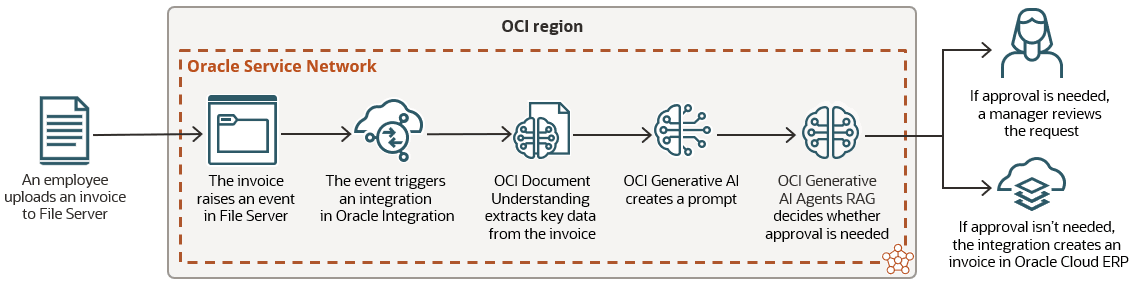
Use Oracle Integration with OCI AI services to introduce AI capabilities into your automated business processes. In this use case, the OCI AI services extract key data from an invoice, and an integration uses the data to create the invoice in Oracle Cloud ERP.
Overview
| Step 1. Upload an invoice | Step 2. Extract data | Step 3. Update Oracle Cloud ERP |
|---|---|---|
|
Upload an invoice to File Server |
Extract information from the invoice and create a prompt for approving the invoice |
Review the prompt, and determine whether to approve, reject, or get help from an employee using human in the loop |



Prerequisite. Upload company policy
An employee uploads the company's expense policy document to OCI Generative AI Agents RAG. The document explains when invoices can be auto-approved, auto-rejects, or subject to manager approval.
Step 1. Upload an invoice
-
An employee uploads an invoice to File Server.
-
The uploaded file raises a File created system event in Oracle Integration.
Step 2. Extract data
-
An integration that subscribes to the File created system event runs when the event is created.
-
The integration uses OCI AI service actions to call the following services:
-
OCI Document Understanding: This service extracts key details from the invoice, including the items to purchase and the purchase amounts.
-
OCI Generative AI: This service creates a prompt, such as: "Approval needed for a keyboard that costs $22 and a mouse that costs $19."
-
Step 3. Update Oracle Cloud ERP
-
The integration sends the prompt to OCI Generative AI Agents RAG, which compares the prompt to the company policy and determines the next steps:
-
If the invoice can be automatically approved, such as because the items are within the defined purchase amounts, the integration creates an invoice in Oracle Cloud ERP.
-
If the invoice can be automatically rejected, such as if an employee is trying to purchase jewelry, the integration rejects the invoice.
-
If the invoice is subject to manager approval, such as because the items exceed the defined purchase amounts, the integration calls human in the loop, which creates a task for a manager.
The manager's task contains the extracted data from the invoice.
-