Edit Automatic Refresh Policy for Refreshable Clone
When you enable the automatic refresh option a refreshable clone automatically refreshes from the source database at regular intervals. By default, automatic refresh is disabled and you must manually refresh at least once every 7 days.
The edit auto refresh settings dialog allows you to enable or disable automatic refresh for a refreshable clone. When automatic refresh is enabled you can change the automatic refresh options.
Note: The automatic refresh option is only available when the source database uses the ECPU compute model.
Perform the following prerequisite steps as necessary:
-
Open the Oracle Cloud Infrastructure Console by clicking the
 next to Cloud.
 -
From the Oracle Cloud Infrastructure left navigation menu click Oracle AI Database and then click Autonomous AI Database.
-
On the Autonomous AI Database page, select your Autonomous AI Database from the links under the Display name column.
To edit auto refresh options:
-
On the clone source, on the Details page, select the Refreshable clones tab.
-
In the Refreshable clones list, under Display name, select a refreshable clone.
-
On the refreshable clone, in the Clone information area, in the Automatic refresh field click Edit.
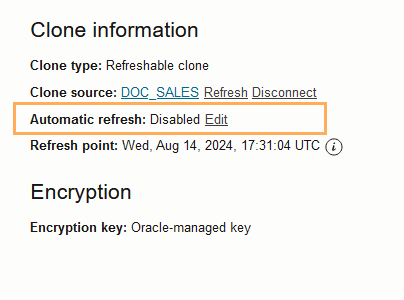
Description of the illustration adb_clone_edit_automatic_refresh.png
This shows the Edit automatic refresh policy pane.
-
Select or deselect Enable automatic refresh to enable or disable automatic refresh for the refreshable clone. When Enable automatic refresh is selected, you can modify the options:
-
Frequency of refresh: specifies the refresh frequency in hours or days. The minimum is one hour and the maximum is 7 days. The default Frequency of refresh value is 1 hour.
-
Data lag: specifies the data lag in minutes, hours, or days, the minimum is 0 minutes and the maximum is 7 days. This is the value that specifies the amount of time behind the source that the data refresh is, where a value of 0 specifies that the refreshable clone refreshes to the latest available timestamp. The default Data lag value is 0.
-
-
Click Save.
Subscribe to the Information event com.oraclecloud.databaseservice.autonomous.database.information to be notified about the completion or failure of a scheduled Automatic Refresh. See Information Events on Autonomous AI Database for more information.
Note: You can also use the Autonomous AI Database API to edit automatic refresh policy for a refreshable clone using UpdateAutonomousDatabase, UpdateAutonomousDatabaseDetails, timeOfAutoRefreshStart, autoRefreshFrequencyInSeconds, and autoRefreshPointLagInSecond. See UpdateAutonomousDatabaseDetails Reference and UpdateAutonomousDatabase for more information.