Overview of Datasets Page
The Datasets page lets you view and edit existing datasets, and also create new ones.
The following figure shows the Datasets page:
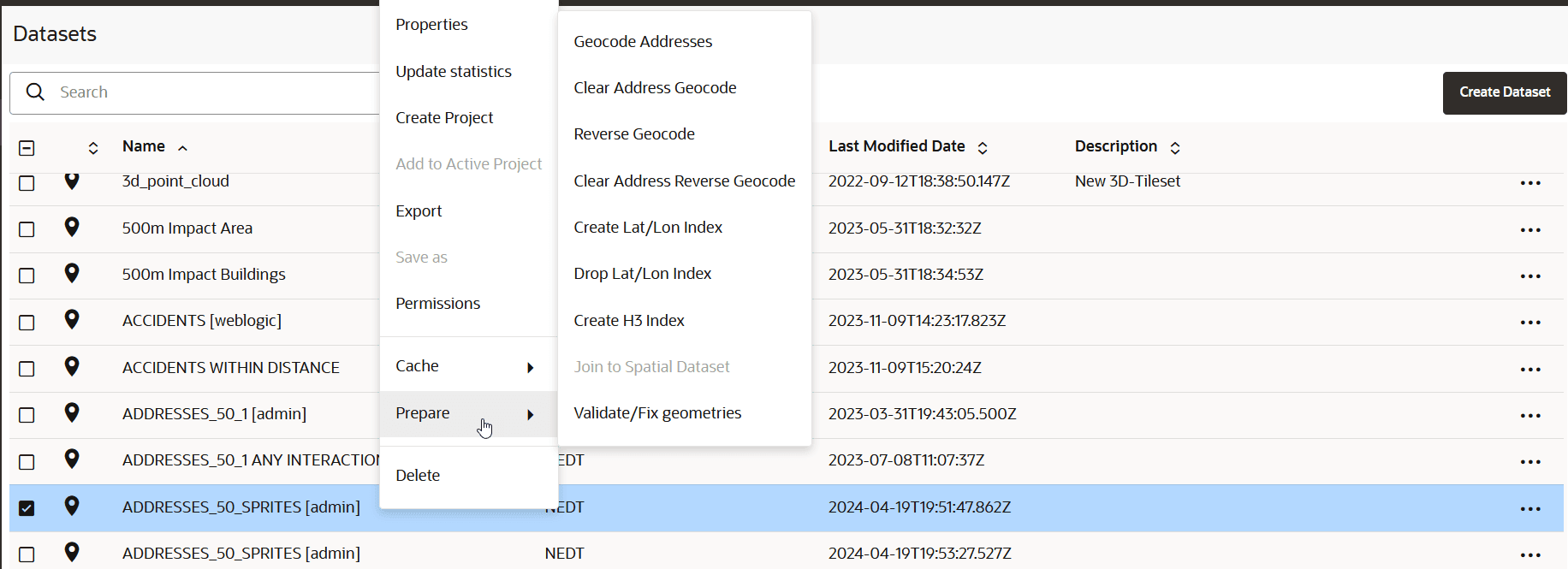
Description of the illustration datasets-page.png
Datasets that are displayed on the Datasets page belong to one of the following two categories:
-
Manually created by clicking Create Dataset or when you perform a Save as operation with the Create Dataset option enabled. This dataset can then be added to the project for visualization.
-
Automatically created when you perform spatial analysis, save selected features, or store pins as a map layer.
This dataset gets instantly added to the map visualization and also appears listed in the Datasets page. Such a dataset is known as a spatial analysis dataset.
You can perform the following actions on the Datasets page:
-
You can manually create a new dataset, by clicking Create Dataset.
-
You can filter to view datasets that are either created by you, or shared with you, or both.
-
By clicking
 against any displayed dataset or by right-clicking a dataset row, you can perform the following actions:
-
Properties: View or modify properties of the dataset
-
Update Statistics: Update the dataset statistics (refer to Update Statistics for Datasets)
-
Create Project: Create a new project using the dataset
-
Add to Active Project: Add the dataset to the project in the Active Project page
-
Export: Export the dataset (in GeoJSON or CSV file format)
-
Save as: Make a new copy of the dataset
-
Permissions: Configure dataset sharing and permissions
-
Cache: Control map tiles pre-caching activities (refer to About Cache in Spatial Studio)
-
Prepare: Prepare a dataset for any of the following options:
-
Geocode Addresses: Add geocoded information such as geographic coordinates to the dataset
-
Clear Address Geocode: Remove geocoded information from the dataset
-
Reverse Geocode: Add address information from a set of geographic coordinates to the dataset
-
Clear Address Reverse Geocode: Remove address information from the dataset
-
Create Lat/Lon Index: Create latitude/longitude index
-
Drop Lat/Lon Index: Remove latitude/longitude index
-
Create H3 Index: Prepare an H3 aggregation dataset
-
Join to Spatial Dataset: Prepare a non-spatial dataset for map visualization by joining to a spatial dataset
-
Validate/Fix geometries: Validate the geometries in the dataset and also fixes the geometries where it is possible for Spatial Studio to do so in an automatic manner.
-
-
Delete: Delete the dataset
-