

Vector Table
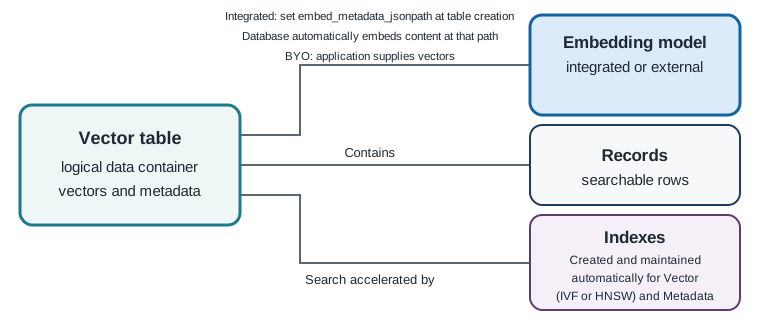
A vector table is the searchable data container for Oracle VecDB. It stores records containing the vectors and metadata used for semantic search and filtering.
See Record for the structure and fields of an individual record and the query reference for the Python search workflow.
Oracle VecDB supports integrated-embedding tables and bring-your-own-vector (BYO) tables. Both table types store vectors and metadata for semantic search; they differ in where the embedding model runs and which values your application supplies.
Choose a table type
An embedding model is required for both workflows. Integrated embeddings use a model loaded in Oracle AI Database. BYO uses a model hosted by your application or an external provider, such as OCI Generative AI.
| Table type | Where embeddings are generated | What you provide to the table |
|---|---|---|
| Integrated embedding | Oracle AI Database generates embeddings with a model loaded in the database. | Source content in the metadata field selected by embed_metadata_jsonpath; Oracle AI Database embeds it when you upsert the record. |
| Bring your own vector | Your application or an external provider generates embeddings. | A precomputed vector in dense_vector, together with metadata. |
Use the same embedding model and compatible configuration for the stored content embeddings and query embeddings. See Embedding and Reranking Models for the model requirements and the warning about using different embedding spaces.
For Python configuration of either table type, follow create_vector_table.
Integrated Embedding Vector Tables
Use an integrated-embedding table when Oracle AI Database should generate vector embeddings from your source content. Follow this sequence:
- Load an embedding model in Oracle AI Database.
- Create a vector table, select the loaded model, and set
embed_metadata_jsonpathto the JSON path containing the source content. - Upsert records with content at that path. Oracle AI Database reads the content at that path and automatically generates and stores its vector embedding with the integrated model selected for the table.
For the Python ingestion workflow, follow upsert_vectors.
Bring-Your-Own-Vector Tables
Use a BYO table when your application or an external provider generates embeddings outside Oracle AI Database:
- Create a vector table with a dense vector type.
- Generate content and query embeddings with the same external embedding model.
- Upsert records that include the vector values and metadata used for filtering.
For example, you can generate embeddings with OCI Generative AI and supply the resulting vectors to the SDK. Follow upsert_vectors for the Python workflow.
Records, metadata, and indexes
The table type changes how embeddings are produced, not the basic record structure. Both workflows store a record ID, a dense vector, and metadata. Store source content and application attributes such as title, content, genre, tenant_id, document_id, document_source, and chunk_id in metadata when those values are needed for display, traceability, or filtering. Metadata filters are applied as part of the vector query; they are not a separate search step.
By default, Oracle AI Database creates and maintains vector and metadata indexes automatically. Vector indexes can use HNSW or IVF. You can also control index operations for workflows such as bulk loading. See Indexes to understand HNSW and IVF indexes and the index API guide for Python operations.
When to use multiple vector tables
Use a separate vector table for each embedding configuration when you use different embedding models, vector dimensions, or distance metrics. Stored vectors and query vectors must use the same embedding space and compatible search configuration, so do not mix incompatible vectors in one table.
For many tenants that share the same embedding model, record structure, and lifecycle, use one vector table and include a tenant identifier such as tenant_id in metadata. Apply that identifier as a metadata filter on every tenant-scoped query. See the query reference for the Python query pattern. This avoids creating a table for every tenant when the tenants share the same embedding configuration.
See Embedding Workflows when choosing how vectors are generated, Record for the data stored in each row, and Indexes for search acceleration.
Related samples
- Compare integrated-embedding and BYO table creation in the Embedding & Ingest Patterns notebook.
- See table creation and loading for a product catalog in the Fashion Product Search application.
Next steps
- To create a table with the Python SDK, follow create_vector_table.
- To add records, follow upsert_vectors.
- To search stored vectors and apply metadata filters, follow query.
- To understand individual records or index choices, see Record and Indexes.
Parent topic: Concepts