Dependent Layout Download
When a business user performs a download for a set of dependent layouts, Oracle Visual Builder Add-in for Excel starts with the primary layout and then progresses through the hierarchy.
The download process for a set of dependent layouts is similar to the other processes with these differences:
- When a download is performed on any layout in a set of dependent layouts, the download process applies to all the layouts in the set.
- A download always starts with the primary layout even if a different worksheet is currently active.
- The check for pending changes applies to all layouts in the hierarchy.
- The entire hierarchy is cleared of current data.
- Query prompts are only available for the primary layout.
- When descendant rows are downloaded with separate requests, additional download parameters, if configured, are applied at each respective level. See Filter Data for a Set of Dependent Layouts.
-
The prompt to continue after the first page appears once only for the primary layout.
If the primary layout is a Form-over-Table layout, this prompt applies to the child table. There is no prompt for descendant layouts.
- Each layout in the hierarchy uses the specific pagination settings, such as Limit and Offset, from their respective business objects. See Configure Pagination for a Business Object.
Descendant Table Layout Download
For descendant table layouts, the rows the add-in downloads depend on the rows in the direct parent table layout. For each row in the direct parent table layout, the add-in retrieves and processes all relevant child rows. If there are download parameters defined on the descendant table layout, the search criteria may limit the number of child rows retrieved for each parent row. See Filter Data for a Set of Dependent Layouts.
By default, the add-in sends separate GET requests to retrieve descendant rows. So to retrieve child rows, the add-in starts by making a single GET request to retrieve the first page of child rows for a given parent.
Writing the child rows to the worksheet takes place in order: all child rows for parent row 1 are written, then the rows for parent 2, and so on.
Much like the standard download, the add-in processes the retrieved rows for the page, requests the next page in the background, and writes the page’s rows to the worksheet. It keeps iterating over pages until all children for the parent row are retrieved and processed.
Note: Up to 4 GET requests may be made on background threads, in parallel.
Instead of downloading with separate requests, you can configure the add-in to download descendant rows in a single payload. See Configure Download to Use a Single Payload. In this scenario:
-
The add-in makes one or more GET requests to retrieve the business object items for the table rows.
The number of parent rows per request is determined by the value of the Limit Parameter Value field on the Download tab of the Business Object Editor. See Configure Pagination for a Business Object.
The GET request is configured to include all descendant rows.
-
The service sends a response payload that includes the set of parent rows for the table as well as all descendant items for those parent rows.
-
The add-in writes the returned parent items data into the table and captures the descendant rows.
-
The add-in repeats these steps until all parent items have been retrieved and written into the table.
-
The add-in writes the descendant rows for each descendant layout in the hierarchy to the respective table without making any more REST requests.
Configure Download to Use a Single Payload
If you have a set of dependent layouts, you can configure Oracle Visual Builder Add-in for Excel to download all relevant descendant rows in a single payload. Use of a single payload can significantly improve performance.
This feature is only available for ADF REST services.
If your primary layout is a Form-over-Table layout, the add-in first makes a single GET request to retrieve field values for the form part of the layout. It then makes requests to retrieve blocks of rows for the table part of the layout as well as all relevant rows for the dependent layouts.
If the primary layout is a Table layout, the add-in makes one or more GET requests to retrieve the business object items for the table rows. All descendant items for those parent rows are also included in the response payload.
Note: This feature will not scale to handle large, enterprise-level volumes. If you enable this feature, test the download behavior to ensure that all required use cases will succeed in all customer environments and scenarios. Review Notes and Limitations of Single Payload Downloads for more information about scalability.
To enable this feature:
- Select the primary layout, then click Designer from the Oracle Visual Builder tab to open the Layout Designer.
- Click the Download tab in the Layout Designer.
-
From this tab, expand Advanced, then select Retrieve Descendant Rows in Single Payload.
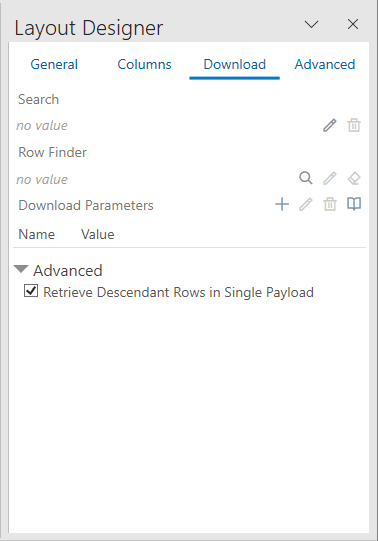
Description of the illustration retrieve-descendant-rows-download.png
Notes and Limitations of Single Payload Downloads
Single payload downloads (also referred to as “nested” downloads) are only supported for ADF REST services. Review this section to see if the feature is suitable for your integrated workbook.
Scalability
Be aware that this feature will not scale to handle large, enterprise-level volumes. If you enable this feature for your workbook, you are responsible for any scalability issues that arise. Make sure to test your workbook to verify that all required use cases will succeed in all customer environments and scenarios.
Use of CPU, memory, and network bandwidth resources could exceed acceptable levels, depending on the business object hierarchy and the data volume at each level in the hierarchy. Potential issues include:
- Complex business logic or the processing of large numbers of nested descendant items could push the request duration beyond what some load balancers and other network components, such as Akamai, support. This could result in the request failing due to a timeout.
- Large response payload sizes will likely consume large amounts of memory and CPU. This could potentially affect other clients working against the same endpoint, virtual machine, or container. It could also affect Excel and other programs running on the business user’s computer.
Limitations
- ADF REST services only
- This feature is not compatible with the use of the
fieldssearch parameter. - The add-in uses the
expandquery parameter on the GET request for the top-most business object. The GET request includes all the descendant business objects (child, grandchild, and so on), by name for theexpandquery parameter value. The REST service implementation must support this. -
In the current implementation, there are limitations on the number of descendants retrieved for a given parent row. The limit is imposed by the ADF REST framework for a given GET on the parent collection that uses the
expandquery parameter to include descendant items in the response payload.In cases where the number of descendants for a given parent item exceeds the limit (
hasMore=true), the add-in displays a message in the Status Viewer that not all rows were downloaded for the affected worksheet.