Configuring the Fields Displayed in the Component
Many dynamic forms and tables have rule sets with only one default rule. When this is the case, you can change the fields displayed in the component directly in the Properties pane, without opening the rule set editor.
To edit the layout in the Properties pane:
- Open the page you want to modify in the Designer.
-
Locate the component you want to edit in the Properties pane, or select the component on the page to open the component’s details pane in the Properties pane.
If the component’s details pane looks something like this, the component’s rule set has one rule, which is always applied, and you can edit the layout to add, remove, and change the order of the fields directly in the Properties pane:
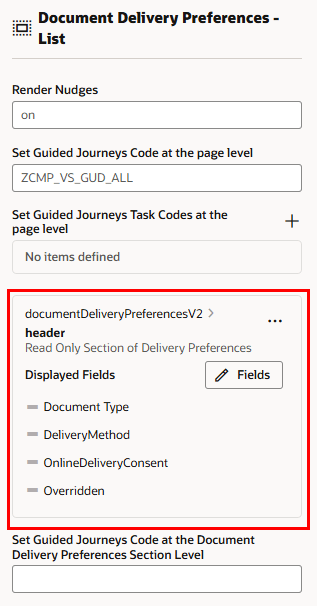
Description of the illustration express-ruleset-norule.png
However, if the details pane looks like this, you need to use the rule set editor to configure the fields:
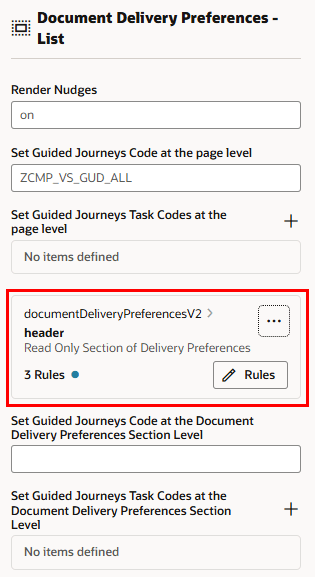
Description of the illustration express-ruleset-multiplerules.png
In this case, you click Rules to open the rule set editor. For more, see Configure Rules in the Rule Set Editor.
- Edit the fields displayed in the component.
-
To change the field order, grab the handle next to the field and moving it into position.
This task applies to pages that use rule sets. On some pages that use business rules, the Business Rules pane may show a separate Reorder Fields button for changing the order of fields within regions in a virtual layout. For more, see Reorder Fields in Regions.
- To delete a field, click the Trash icon next to the field name.
- To add and remove fields, click Fields, and then select and deselect fields in the Choose Fields popup.
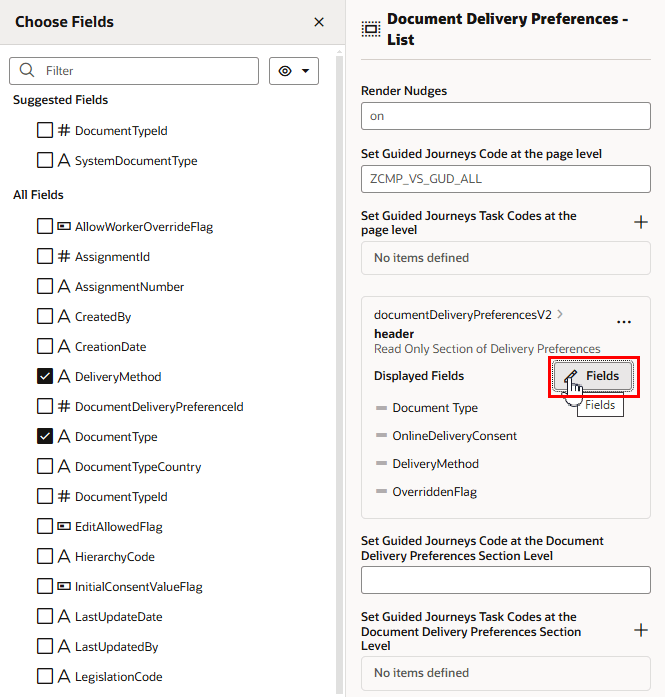
Description of the illustration express-ruleset-selectfields.png
-
The changes you make in the Properties pane are always displayed in the component because the rule controlling the fields has no conditions. If you want to use rules with conditions, or you want to group fields, you need to create the rules in the rule set editor. For more, see Configure Rules in the Rule Set Editor.