Column Mapping
Column mapping is the process of deriving the schema of the target dataset from the source dataset, enabling you to select all columns, select some columns, or exclude columns from the source dataset, based on the needs of the business user.
Select all columns
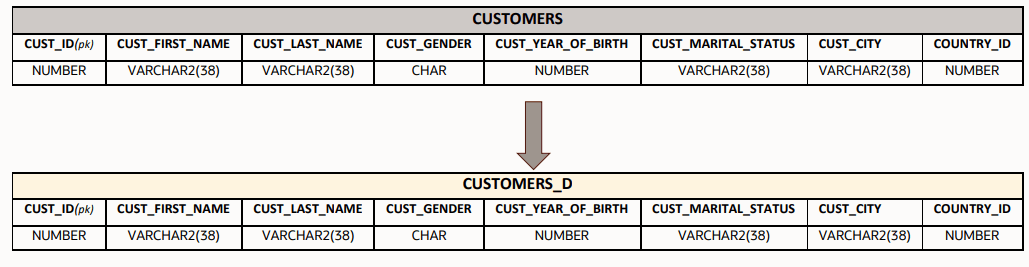
If you select all the columns from the source table or derived dataset, the column properties of the source dataset are inherited by the target dataset. The target dataset contains all the columns from the source or derived dataset with no modifications to the schema.
IMPORT SOURCE CUSTOMERS
DEFINE DATASET CUSTOMERS_D
   ROWSOURCE CUSTOMERS;
   THIS = CUSTOMERS;
END
CUSTOMERS are in the target table CUSTOMERS_D with no modifications to their properties:
CUST_IDCUST_FIRST_NAMECUST_LAST_NAMECUST_GENDERCUST_YEAR_OF_BIRTHCUST_MARITAL_STATUSCUST_CITYCOUNTRY_ID
IMPORT SOURCE CUSTOMERS
DEFINE DATASET CUSTOMERS_D FROM CUSTOMERS END
Select some columns
You can choose to bring in a subset of columns from the schema of the source or derived dataset.
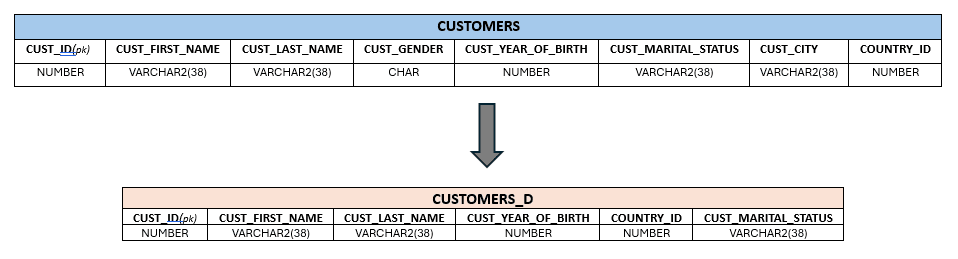
Description of the illustration dasrg-colmapping-some.png
IMPORT SOURCE CUSTOMERS
 DEFINE DATASET CUSTOMERS_D
  ROWSOURCE CUSTOMERS;
  THIS = CUSTOMERS[CUST_ID,CUST_FIRST_NAME,CUST_LAST_NAME,
                   CUST_YEAR_OF_BIRTH,COUNTRY_ID,CUST_MARITAL_STATUS];
ENDCUSTOMERS form the schema in the target dataset CUSTOMERS_D:
CUST_IDCUST_FIRST_NAMECUST_LAST_NAMECUST_YEAR_OF_BIRTHCOUNTRY_IDCUST_MARITAL_STATUS
IMPORT SOURCE CUSTOMERS
DEFINE DATASET CUSTOMERS_D FROM CUSTOMERS[CUST_ID,CUST_FIRST_NAME,
CUST_LAST_NAME,CUST_YEAR_OF_BIRTH,COUNTRY_ID, CUST_MARITAL_STATUS] END
Exclude columns
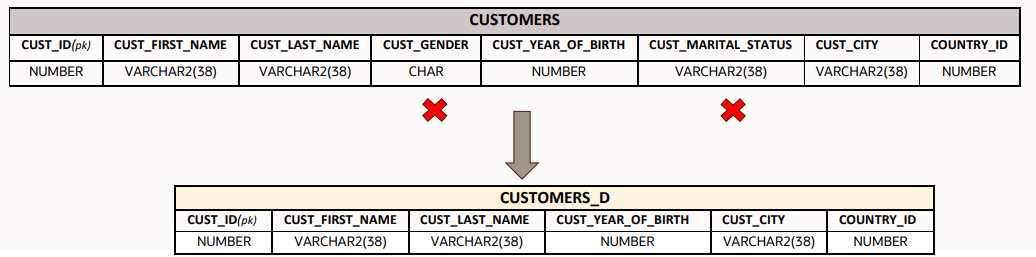
If you want to exclude certain columns from the source table or derived dataset, you can use the EXCLUDE keyword. The remaining columns remain in the target dataset.
IMPORT SOURCE CUSTOMERS
 DEFINE DATASET CUSTOMERS_D
   ROWSOURCE CUSTOMERS;
   THIS = CUSTOMERS EXCLUDE [CUST_GENDER,CUST_MARITAL_STATUS];
 END
IMPORT SOURCE CUSTOMERS
DEFINE DATASET CUSTOMERS_D FROM CUSTOMERS EXCLUDE [CUST_GENDER,CUST_MARITAL_STATUS] END