View the Estimated Data Refresh Time

For daily refresh of data and pipeline execution to update all the resulting key metrics and dashboards, the execution time depends on many factors.

See Factors Affecting Data Refresh Performance.

The system provides estimated range for when the data is published with the scheduled incremental data refresh. This helps you plan any dependent tasks and inform users when data would be available for analysis.

  1. Sign in to your service.
  2. Turn on the pipeline execution estimation using the Data Refresh Estimate preview feature on the Enable Features page.
    The estimated refresh completion details are visible on the Pipeline Settings page. See Make Preview Features Available.
  3. In Oracle Fusion Data Intelligence Console, click Data Configuration under Application Administration and on the Data Configuration page, under Configurations, click Pipeline Settings.
  4. View the estimated refresh completion time for daily pipelines on the Pipeline Settings page in the Estimated Refresh Completion field as a time range if you've enabled Data Refresh Estimate under the Preview Features tab on the Enable Features page.
    You can also view the estimated refresh completion time using the information icon on the Request History page for the in-progress refreshes.
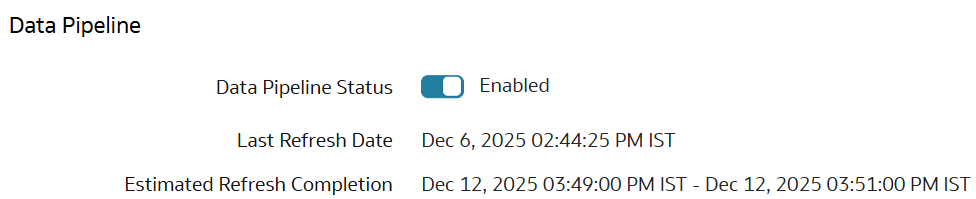
    Estimated Refresh Completion details on the Pipeline Parameters page

  5. Trigger any subsequent operations based on the estimated refresh completion time.
  6. If the scheduled refresh isn't complete within the expected time, review the data refresh performance considerations. See Considerations for Data Refresh Performance.
  7. Subscribe to Event Notifications and set up the DataRefresh - Estimate event type to receive email notifications. See Enable Event Notifications (Preview) and Event Types, Attributes, and Attribute Values for Event Rules.