How is it determined whether my primary color passes the accessibility contrast checks?
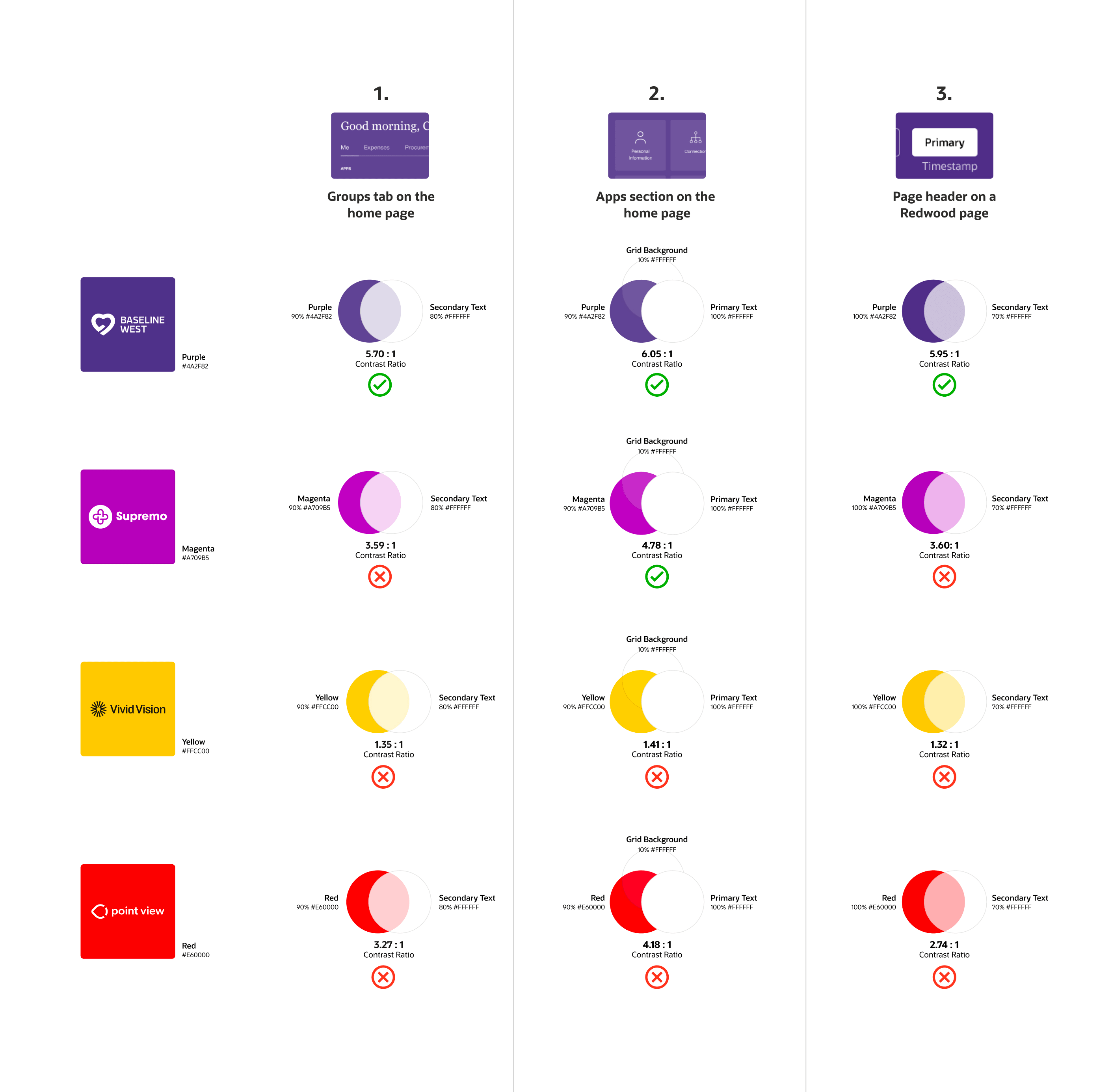
Your primary color is tested against three key UI usage patterns in Oracle Fusion Cloud Applications. When the color passes all three contrast checks, the color is applied directly in the application. For each check, the color contrast ratio between the text and background must be 4.5:1 or higher as defined by the Web Content Accessibility Guidelines (WCAG). This threshold ensures that the content remains readable and accessible for all users across the application. If the color fails any of these checks, the exact primary color you selected won't be used. Here are the three color contrast checks.
| # | UI Element | Color Contrast Check |
|---|---|---|
| 1. | Groups tab on the home page | Unselected tab text (80% white) on a 90% primary color background |
| 2. | Apps section on the home page | 100% white text on a background with 10% white over a 90% primary color |
| 3. | Page header on a Redwood page | Secondary text (70% white) on a primary color background |
Here's an illustration of how the checks are performed.