Email Notifications
By default, the Cloud Account Administrator (oraclecloudadmin_ww@epm.oraclecloud.com) sends an email to each new user.
The email contains the credentials (user name and a temporary password) that the user needs to sign in to the environment.
- User names must contain only ASCII characters and must be unique within the identity domain.
- If used as the user name, the email ID must be unique.
- The first name, last name and email ID of users may contain the apostrophe punctuation mark (').
- Email IDs containing the apostrophe punctuation mark cannot be used as the user name. Use these information sources:
If the users are added through Oracle Cloud Console, EPM Automate, or REST API, the emails are sent as they are added.
Note:
You can modify the notification templates for the email notifications from Identity Cloud Service for activities, including user addition, role assignment, and password expiry. You can select the notification language, the activities for which notifications are to be sent, the email sender, subject, and body. For detailed information, see Customize Oracle Identity Cloud Service Notifications in Administering Oracle Identity Cloud Service.How to Avoid Welcome Email Notifications for Newly Created Users
When you configure Single Sign On (SSO) with an identity provider (IdP), import user information from a file into IAM Interface to prevent Welcome Email Notifications to be sent to users. The import file should have the following fields:
User ID,Last Name,First Name,Work Email,Primary Email Type,Federated,ByPass Notification john.doe@example.com,Doe,John,john.doe@example.com,WORK,TRUE,TRUE jdoe,Doe,Jane,jane.doe@example.com,WORK,TRUE,TRUE
Make sure that Federated and ByPass Notification fields are both set to TRUE.
How to Avoid Welcome Emails for Users Created Through Cloning
In SSO-enabled environments, you can prevent activation emails being sent to newly created users through the cloning process, for example, during the migration to OCI (Gen2). For more information, see Customize Oracle Identity Cloud Service Notifications.
To turn off activation emails:
- Sign into IAM Interface. See: Accessing the IAM Interface.
- Navigate to Notifications tab.
- Click Edit notifications.
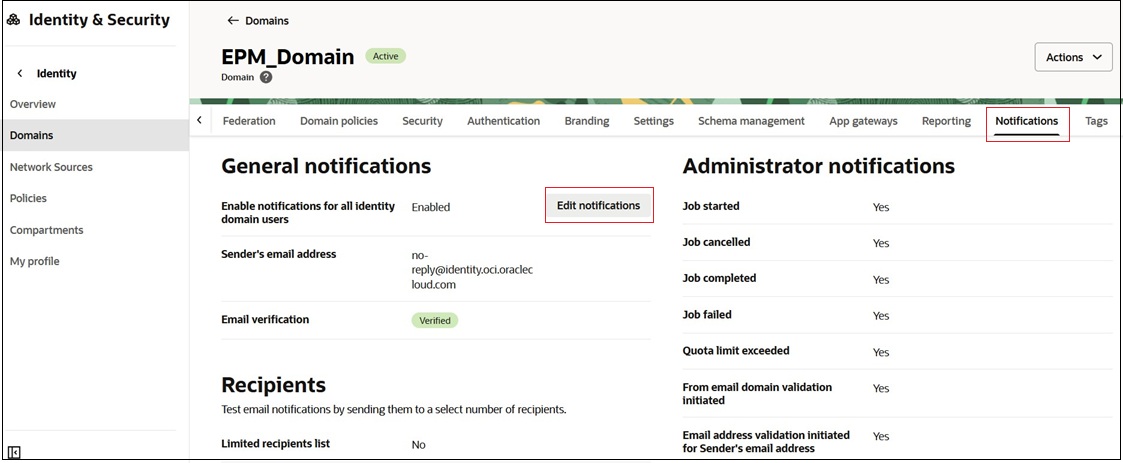
- On Edit notifications page, scroll down to End User notifications.
- Disable the notifications you do not wish to send.
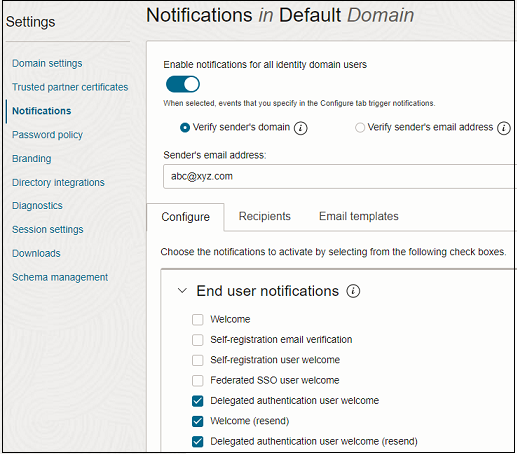
- Click Save changes.