Replicating the Vault for Disaster Recovery
If your environments are configured with Oracle-managed Disaster Recovery (DR), you must replicate the vault to the DR region so that the encryption key is available in both regions.
Prerequisites
Before replicating the vault, assign the following policy in the Policy Builder.
Allow service keymanagementservice to manage vaults in tenancyReplicating the Vault
To replicate the vault:
- Open the Navigation menu, search for "Identity & Security" and select Vault.
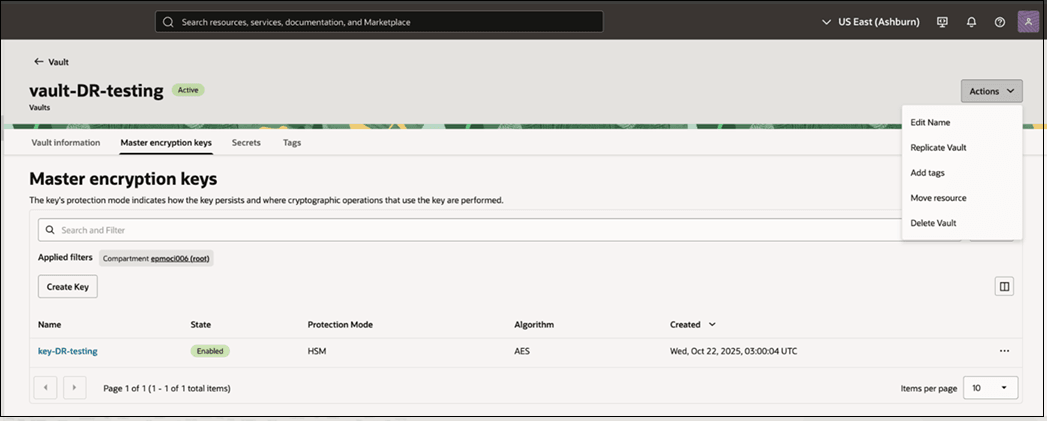
- Select the vault you want to replicate and navigate to the Master Encryption Keys tab.
- From the Actions menu, select Replicate
Vault.
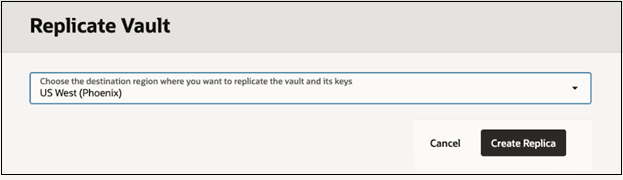
- Choose the destination region.
- Click Create Replica.
Note:
- The replicated vault and its keys are available in the DR region.
- The vault and keys retain the same OCID as the primary region.
- Replication does not create new keys. It makes the same key available across regions.
- This ensures that the same encryption key can be used during failover.