Updating Current Oracle Managed Access Settings
You can modify OMA settings by creating approval templates and assigning them to environments.
If you do not want to allow auto-approval, you can configure a manual approval workflow by creating an approval template.
About Approval Templates
An approval template defines how access requests are reviewed and approved.
In a template, you specify the users or groups responsible for approving requests. These can include administrator users or administrator groups, depending on your organization’s setup.
An approval template allows you to define:
- Approvers for access requests
- Approval levels (up to three levels)
- The approval sequence
Once created, the template can be assigned to an environment to enforce manual approval instead of auto-approval.
Creating an Approval Template and Assigning it to an Environment
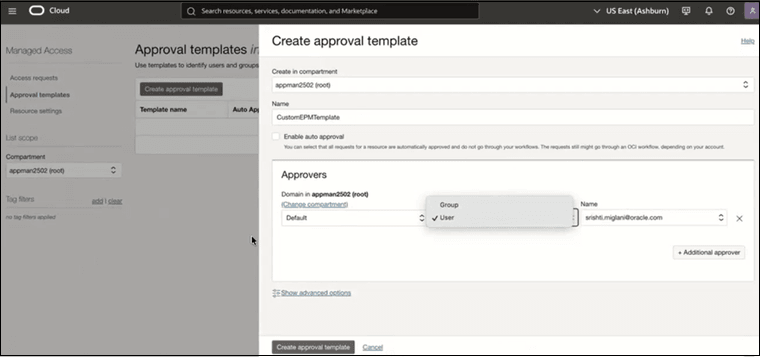
To create an approval template:- Sign in to the Oracle Cloud Console as an Account Administrator or Identity Domain Administrator.
- From the Navigation menu, search for "Identity & Security" and select Managed Access.
- Select Approval templates.
For instructions, refer to create an approval template on Oracle Cloud Infratstructure documentation.
Note:
- You can define a single approver for simple workflows.
- Using Advanced Options, you can configure layered approvals (up to three levels), allowing requests to be approved in sequence by different roles, such as managers or hierarchical groups.
- You can create multiple approval templates based on your needs. For example, you can define separate templates for production and test environments and assign them to different approvers.
- Select Resource settings.
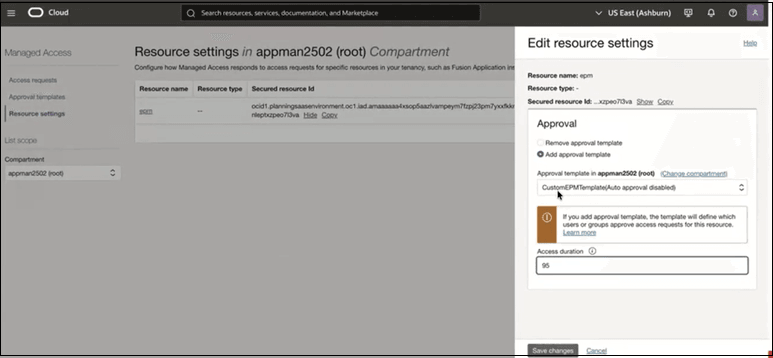
- Select an environment and then, select Add approved template to assign the newly created approval template to this environment.
- Update the Access duration, if required.
Note:
For the same approval template, you can configure different access durations for each environment, such as longer durations for test and shorter durations for production. - Click Save changes.
Learn More
For complete details on configuration, workflows, and advanced options, see Managed Access Overview in Oracle Cloud Infrastructure documentation.