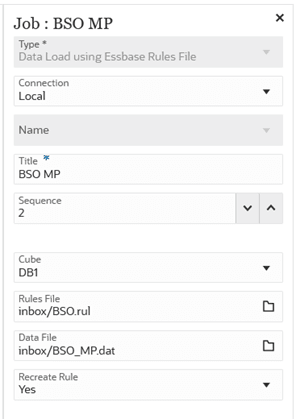
Using a Data Load Essbase Rules File Job Type
Use the Data Load Essbase Rules File job type to leverage Essbase load rules for data loading, enabling customers migrating from on-premises Essbase environments to reuse their existing load rules and source files without converting them into Data Integration definitions, thereby reducing migration effort and preserving familiar workflows. By enabling direct data loads through Essbase load rules, the system also helps maintain comparable performance and avoids the additional processing overhead typically associated with Data Integration, ensuring a more efficient and seamless data loading experience in the cloud.
Note:
For parameters that are common to all job types, see Pipeline Process DescriptionTable 12-10 Data Load Essbase Rules File Job Type Parameters
| Data Load Essbase Rules File Job Type Parameters | Description |
|---|---|
| Cube | Specify a valid cube name to load. |
| Rules File | Upload rules file to inbox using File browser. |
| Data File | Upload data file to inbox using File browser |
| Recreate Rule | If set to Yes, system recreates the rules file
if it already exists. If there are modifications to rule file, then the
user can reload the rule file and set this flag to
Yes.
If set to No, system creates the rule file if it doesn't exist in the system. If it exists, it'll reuse the existing rules. |
Note:
Load rules that use SQL to pull data directly from relational sources and load rules that include SQL statements to load source data aren't supported. You must remove the SQL from the load rule and provide the load rule and data in separate files.Here's a sample job parameter for Wait job type: