Enable Debug Logging
Debug logging can be enabled by a Manager in Intelligent Advisor Hub to provide detailed information about what is happening when data is run through an interview. This can help identify where unexpected behavior occurs in interviews.
Note: Debug logging may have security implications and have a significant impact on performance. Debug events are recorded user and system events, significantly increasing the amount of data collected and stored.
To enable debug logging:
- In Intelligent Advisor Hub, navigate to the Deployments Page.
- Click the deployment name. The deployment details page is displayed.
- Click the Actions menu and select View debug log.
- On the Debug log page, select Activate in the banner.
- In the Debug logging window:
- Select the debug logging duration in the drop-down. Options are 5 minutes, 15 minutes, 30 minutes, 1 hour, 2 hours, 3 hours, 6 hours or 12 hours.
- (Optional) Select the option to Delete all existing debug logs on activation.
- Click Activate.
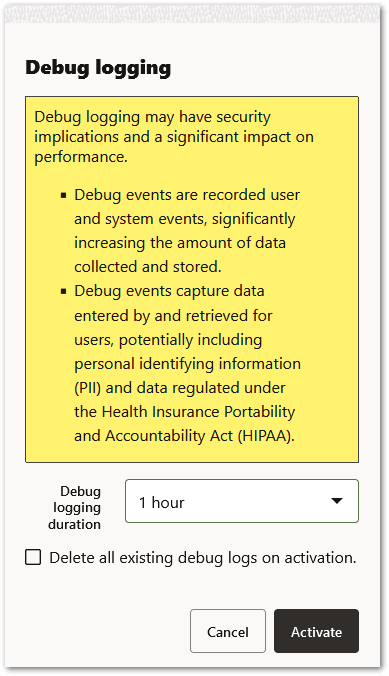
Debug logging is now enabled for the deployment for the selected duration. The deployment details page is updated to show that debug logging is now active for the project.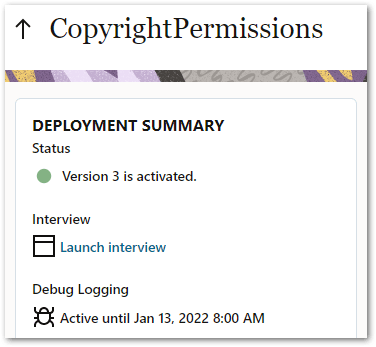
Debug logging for a deployment will automatically expire once the selected duration has passed. You can also manually Disable Debug Logging. Debug logging for a deployment will be automatically terminated by the system if the maximum number of debug logs for the deployment is reached before the debug period expires. If the debug log is already at capacity, you will be unable to enable debug logging until you either select Delete all existing debug logs on activation in the Debug logging window, or you delete some debug logs manually.
Note: When debug logging is enabled, detailed request and response payloads, and response codes returned during load, save, checkpoint and query interactions, are recorded during interviews for all connection types (B2C Service, Oracle Fusion, Oracle Integration, generic integration, web service connector) except for interview extension data connections.