Define Marketing Segments
Segmentation is the process of dividing profiles into groups based on shared characteristics or behaviors for better analysis, personalization, or targeting. A segment is a set of criteria that identifies a group of profiles that have something in common.
Some examples of marketing segments include:
- Accounts in EMEA whose subscription for Supremo Power support services will expire in the next 3 months.
- Customers with a high lifetime value who haven't viewed a product in the past 30 days.
- All contacts who attended a webinar or those from a certain industry.
A profile is a record from a unified (or master) data object that represents a person or
entity you might want to target. The segment builder accesses these profiles via logical
data objects. The segment builder offers default logical objects for profiles from
Accounts, Contacts, and
Customers, and your administrator can create custom logical tables for
other profile types, subject to certain restrictions.
Because segments are defined in terms of criteria, rather than a fixed list, the profiles that qualify for the segment is dynamic. A profile is a record from a unified (or master) object that represents a person or entity you might want to target. Different profiles might be included each time the segment is executed. Segments are executed when counts or samples are requested, and upon activation.
Anatomy of a Segment
The starting point for a segment is always its profile object, for example
Contacts. You can then add conditions (criteria) from
Contacts or any other object that's related to it.
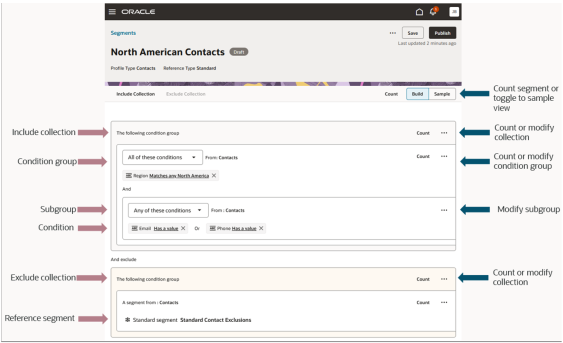
For example, you might want to target only those contacts who are in North America
for whom you've either an email or phone number, but who aren't part of your
standard exclusion list. To do this, you'd create conditions with the
Region, Email and Phone
attributes and arrange them into a condition group within an include collection, and
then add the reference segment with your standard exclusions in an exclude
collection:
| Anatomy | Description |
|---|---|
| Conditions | Conditions are the basic building blocks of a segment. Each condition has three parts:
|
| Condition Groups |
Conditions are combined into condition groups, which:
Tip:
Whenever possible, place all conditions from a given object into a single condition group. This helps to improve performance and is more likely to give you the result you want. |
|
Subgroups |
Within a condition group, you can create a subgroup. Use
subgroups when you need a mix of |
| Reference Segments |
When one segment is added to another segment, it's called a reference segment. Reference segments let you specify criteria once and use them over and over in other segments. If you add a reference segment to a condition group, you can't add any other conditions. Reference segments are very useful, but they can also make segment queries very complex. For this reason, there are restrictions on how reference segments can be used. For example, you can only add five reference segments to a given segment. This restriction doesn't apply to precalculated reference segments. |
| Collections |
Condition groups are organized into collections. Within a
collection, you can specify whether the condition groups
should be combined with Segments can have 1 or more Include Collection and zero or 1
Exclude Collection. You can specify |
| Data Objects and Attributes |
You can create conditions at both the condition group and
subgroup levels by selecting The attributes you see in the list change depending on your
previous selections within a condition group. For example,
if |
| Counts |
Counts are available at the segment, collection, and condition group levels. They aren't available for subgroups or individual conditions. You can request counts at the level of the segment, all include collections, individual collections, or individual condition groups. Counts are executed in real time and typically return within a few seconds, though they can take longer if the segment is complex. Counts always represent unique profiles, even if the
conditions are from a different data object. For instance, a
condition group in a segment of Tip:
Counts don't update automatically. You must select Count to refresh the count. Counts are saved when the whole segment is saved. If a segment is very complex and/or there's a large volume of data, the count might time out. First, try to optimize by combining conditions groups wherever possible. If optimization isn't possible, contact your help desk for help. |
| Samples |
In addition to counts, you can get a sample of profiles that
meet the segment criteria by selecting the
|