AI Quota
SuiteProjects Pro enforces frequency limits to control the usage of generative AI services. These limits apply to all generative AI usage across the account. Each time one of your account's users generates a project summary, for example, it counts toward the limits for your account.
-
Maximum number of AI requests in a 1-month window:
20,000. -
Maximum number of AI requests in a 24-hour window:
2,000.
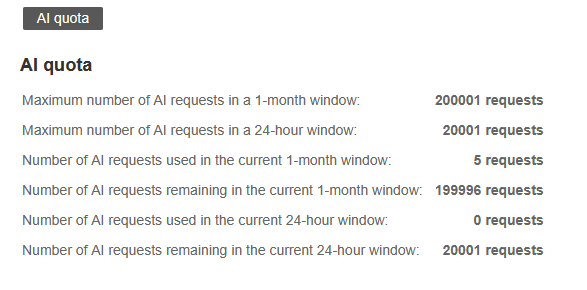
To track the generative AI usage against frequency limits for your company's SuiteProjects Pro account, go to Administration > Global Settings > Account > AI quota.
The AI quota page shows the AI frequency limits for your account, the number of AI requests made in the current 1-month or 24-hour sliding window, and the number of AI requests remaining in the current 1-month or 24-hour sliding window. You can use this page to track AI usage but you cannot change the frequency limit settings. It is a read-only page for all users.
If you have any questions about frequency limits, contact SuiteProjects Pro Support.
For more information about AI features in SuiteProjects Pro, see Artificial Intelligence (AI) in SuiteProjects Pro.
This page is available only if the Project Summary feature is enabled for your account. For more information about the Project Summary feature, see Project Summary.
Interactions with NetSuite Expert in SuiteAnswers don't count toward your AI limits in SuiteProjects Pro. For more information about NetSuite Expert in SuiteAnswers, see NetSuite Expert in SuiteAnswers for SuiteProjects Pro.