FSM Customer and Asset Selection
Field Service Management (FSM) helps keep the Customer and Asset selected for service work consistent. On NetSuite forms, selecting a Customer can narrow the available Asset choices, and selecting an Asset can narrow the Customer choices. A linked project, case, or task can also supply values or affect which changes are retained.
This feature applies to project, case, CRM task, project task, opportunity, estimate (quote), sales order, and invoice forms. FSM Mobile has separate selection configuration.
How It Works
Customer and Asset selection combines three actions:
-
Filtering narrows the choices in a field.
-
Sourcing fills a field from a related record.
-
Reconciliation keeps related values consistent when a field changes or the record is saved.
The following diagram shows how the starting selection controls the available choices:
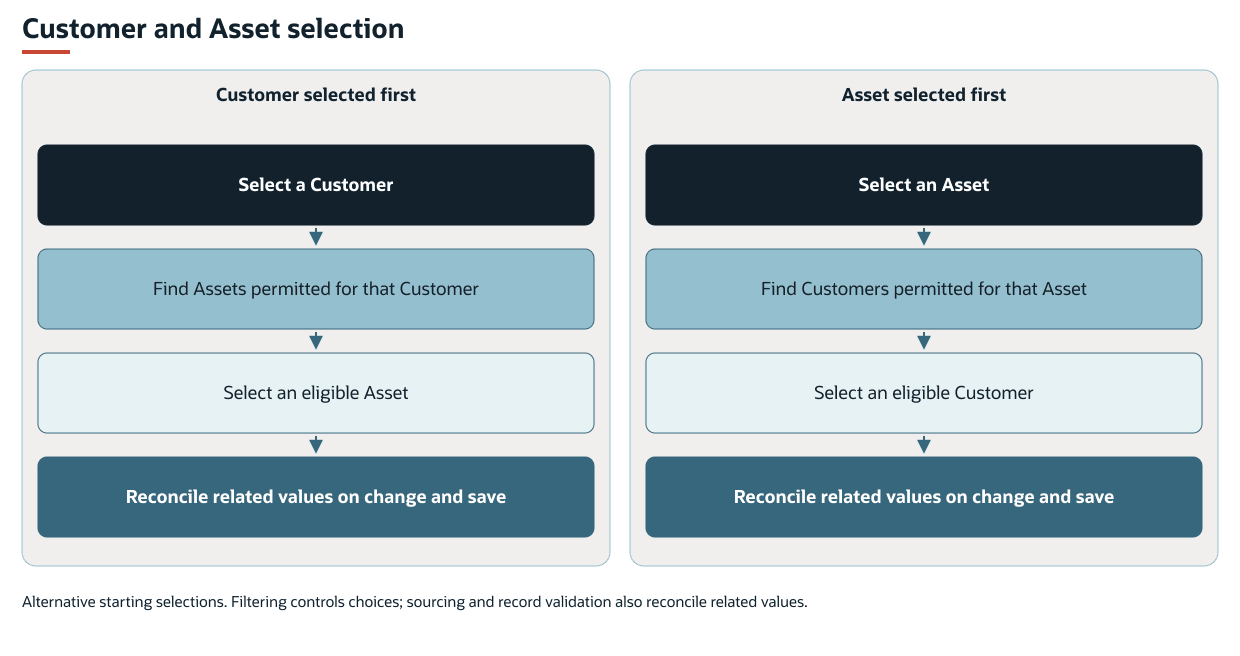
The field selected first normally controls filtering of the other field. For example, selecting a Customer limits Asset choices to the assets permitted for that customer. Selecting an Asset first limits Customer choices to the customers permitted for that asset. Clearing the controlling field releases its restriction. If the other field still has a value, filtering can then run in the opposite direction.
The default relationship uses the asset's Customer (custrecord_nx_asset_customer). With this relationship, selection is limited to assets linked directly to the selected customer. A NetSuite parent customer or subcustomer relationship does not itself include every asset in that customer hierarchy.
An account can define a different selection relationship, such as service providers permitted to bill work for an asset owned by another customer. The asset owner and the customer selected for service work can therefore be different. Permitting a customer in the selection list does not change the Customer stored on the asset.
Asset parent-child inheritance is a separate capability. It can determine the Customer stored on a child asset, which then participates in selection. See FSM Asset Hierarchy and Inheritance.
Key Behaviors
The following table describes selection-list behavior. The record-specific sourcing rules in Record Interactions can also affect the final values.
|
Condition |
Behavior |
|---|---|
|
Both fields are editable when the form opens, and an Asset is already selected. |
FSM uses the Asset to filter Customer choices first. |
|
Both fields are editable when the form opens, and no Asset is selected. |
FSM uses the selected Customer, if any, to filter Asset choices. |
|
Only one of the two fields is visible and editable. |
FSM can filter that editable field using the value in the other field. |
|
A filtered candidate record is inactive. |
It is excluded from the available candidates. |
|
A current selection is absent from the candidate list when the form first opens. |
The selector retains that selection on initial load. Opening an old record does not, by itself, clear its historical pairing. |
|
The controlling value changes. |
FSM refreshes the other field's candidates. A selected value that is no longer permitted can be cleared. |
|
The relationship permits no candidates. |
The filtered list has no permitted records. A required field still requires a value before the form can be saved. |
|
The relationship is configured without a restriction between Customer and Asset. |
FSM leaves the native field's choices in place. Other NetSuite restrictions still apply. |
Filtering alone does not automatically select the only available record. A value that appears automatically can instead have been sourced from an asset, project, case, or task.
The initial retention of a historical pairing applies to the selector. Other record rules can still source or replace values when the record is saved.
Record Interactions
Field labels can vary by account. The selection fields are distinct from native Customer, Company, Entity, or Parent fields even where FSM synchronizes their values.
On cases, CRM tasks, and project tasks, an asset can supply a blank Field Service Customer. A selected project can supply the Customer and Asset used for the service work. On cases and CRM tasks without a selected project, FSM synchronizes Field Service Customer with native Company. The following table describes record-specific sourcing and relationship changes.
|
Record |
Customer and Asset Behavior |
|---|---|
|
Project |
Field Service Customer ( Selecting an Asset can fill a blank Customer. When the Asset changes, FSM retains an existing permitted Customer. Otherwise, the asset's Customer can replace it. If native Parent is absent, hidden, or read-only, the Field Service Customer field cannot be edited. |
|
Case |
A selected project supplies Field Service Customer ( |
|
CRM Task |
A selected project supplies Customer and Field Service Task Asset ( A conflicting Customer or Asset change can clear the case link. A conflicting project relationship can be replaced with the Customer. The same rule applies to cases. |
|
Project Task |
Its native company relationship identifies a project. If a Customer or Asset change conflicts with that project, FSM restores the project's value. It does not replace that relationship with a Customer. |
|
Opportunity, Estimate (Quote), Sales Order, and Invoice |
By default, FSM synchronizes Field Service Customer ( An associated CRM task or project task can supply Field Service Asset ( |
Changing Customer or Asset can affect the project or case relationship, or the chosen value can be restored from a related record. The available choices and the final record values are separate parts of the feature.
Selecting an Asset can also affect a task's service location. Address and coordinate sourcing are described in FSM Maps, Geo-location and Tracking.
Processing Model and Lifecycle
The form interactions run when a create, edit, or copy form opens and when selection values change. FSM also reconciles related records during validation and saving. A selection displayed on the form is therefore not a guarantee of the values that will be saved.
The Field Service User Event script (customscript_nx_userevent) prepares the form and supports record validation. The Field Service Client script (customscript_nx_client) applies the interactive selection behavior.
Candidate filtering runs with the form. It does not create a customer or asset or transfer asset ownership.
Creating a case with a linked transaction can request background updates to that transaction's project and case links. Changing a case's saved company relationship can separately request these updates.
Changing the saved company relationship on a case with a Field Service Case Type can also request updates. These updates affect company and case links on the linked CRM tasks.
The requested updates can remain incomplete if their scheduled processing fails. Saving the case does not establish that all linked records have been updated. For shared execution and monitoring, see FSM Script Reference.
The selector preserves the form's requirements for fields that must have a value. A required value cleared by filtering can prevent saving. Record validation can also prevent a save. The selectors have no separate processing status or dedicated error-record lifecycle.
Configuration
For the supported settings, defaults, and examples, see Configuring FSM Customer and Asset Selection.
Administrators can define permitted relationships, including service providers and relationships held in association records, or remove the model's restriction between Customer and Asset. The two selection directions are configured separately. Changing the customers permitted for an asset does not automatically change the assets permitted for a customer. A field listing additional customers affects selection eligibility only when the relationship configuration uses it.
Use Customer and Asset Eligibility for relationship setup and examples. Use views/assetcustomer for form selector settings and display choices.
Disabling the selector removes its interactive filtering. Related-record sourcing and save-time reconciliation remain active.
Removing relationship restrictions can permit an unrelated customer to be selected for service billing. Asset ownership, transaction Entity synchronization, and linked project or case rules still have their own effects.
Limitations and Constraints
The feature has the following limitations:
-
The selector operates on relevant visible, editable fields on NetSuite forms with the applicable FSM form scripts. A hidden or read-only field cannot provide the same editable selection control.
-
NetSuite form filtering does not establish the choices available in FSM Mobile or the Schedule Board. Those surfaces use their own configured data and selection rules.
-
Imports, integrations, and scripted updates use their own validation paths. These filtered form lists do not establish a common eligibility rule across those paths.
-
The presence of Field Service Customer and Asset fields on another transaction type does not establish the same interactive behavior.
Related Topics
- FSM Features
- FSM Asset Hierarchy and Inheritance
-
FSM Maps, Geo-location and Tracking
- Customer and Asset Eligibility
- views/assetcustomer