getItemPrice()
The getItemPrice() function (server-side) retrieves pricing information for items. You can pass the returned price data to the priceMatrix() function to retrieve prices for different price levels and quantities. For more information, see priceMatrix().
Syntax
Use this syntax for the getItemPrice() function:
            getItemPrice({
    items: [id1, id2, id3], // items OR skus
    skus: ['itemId1', 'itemId2', 'itemdIdn']
    plevel: number1 | [number1, number6],
    fields: ['fieldId1', 'fieldId2', 'fieldIdn'],
    plnames: true | false,
    useids: true | false,
    groups: true | false
}).done(callback);
Return Value
The function returns a promise that, when resolved, provides detailed pricing data for the requested items. The returned object contains detailed pricing information and methods. For more information, see Returned Data and Returned Methods.
Parameters
All properties are optional. Use either the items or the skus property. These properties can't be used at the same time. If you omit both, all items are retrieved.
The getItemPrice() function accepts an object as a parameter. The object includes the following properties:
-
items- Array of internal item IDs to get. It can't be used withskus. -
skus- Array of item IDs corresponding to the Item Name/Number field. It can't be used withitems. -
fields- Additional fields to return. -
plevel(string or number) - Restricts the returned prices to one or multiple price levels. This property accepts a single value or an array, for example1or['1', '6']. Always set this property for better performance. -
plnames- Iftrue, loads a list of price level names. This property isfalseby default. -
useids- Iftrue, the returned data will include key-value objects by item internal ID and thegetPriceById()method. This property isfalseby default. -
groups- Iftrue, returns group items. This property isfalseby default.
Examples
The following examples show how to use the getItemPrice() function.
Retrieving Prices for All Items
This example retrieves prices for all items across all price levels.
              getItemPrice().done(function(rdata) {
    console.log('Done', rdata);
});
Retrieving Prices for Specific Items
This example retrieves prices for specific items using their internal ID, and information for the Display Name/Code and Sales Description fields. It will also load price level names.
              getItemPrice({
    items: [387, 502],
    fields: ["displayname", "salesdescription"],
    plnames: true,
    useids: true
}).done(function(rdata) {
    console.log('Done', rdata);
});
As an alternative, you can use the skus parameter to retrieve item prices through their Item Name/Number (field ID: itemid). See the example below:
              getItemPrice({
    skus: ["ACC0001", "ACC0030"],
    fields: ["displayname", "description"]
}).done(function(rdata) {
    console.log('done!', rdata);
});
Returned Data
The object returned by getItemPrice() contains several properties and methods that provide access to item and pricing information. The following image shows the properties contained in the returned object.

-
items- Array containing the loaded items. -
itemByID- Object organized by item internal ID. This property is available only whenuseids: trueis set. -
itemBySku- Object organized by Item Name/Number (field ID: itemid). -
priceLevels- Array containing price level names. This property is available only whenplnames: trueis set.
This image shows a specific object in the array of items. The object includes:

-
Item fields
-
Pricing data
-
Price levels with prices organized by quantity ranges
Returned Methods
The object returned by getItemPrice() also includes methods. The following table describes the available methods.
|
Method |
Description |
|---|---|
|
|
Retrieves item prices using the Item Name/Number (field ID: itemid). See getPrice(). |
|
|
Retrieves item prices using the item internal ID This property is available only when |
|
|
Retrieves group items. See getItemGroups(). |
For the following method examples, suppose you first retrieved data by using the following getItemPrice() call.
            getItemPrice({
    plnames: true,
    useids: true,
    groups: true,
    fields: ["displayname", "description"]
}).done(function(data) {
    window.rdata = data;
});
getPrice()
The getPrice() method retrieves item prices using the Item Name/Number (field ID: itemid). This method accepts the following parameters:
-
itemid- The Item Name/Number (field ID: itemid).Note:The
itemidis required. -
plevel- The price level. If omitted, it defaults to the first price level in the returned price level list. For example, ifplevel: [2, 6]is returned forgetItemPrice(), it assumes price level 2. -
qty- The quantity. If omitted, the default value is 1.
See the following example:
const priceByItemId = rdata.getPrice("ACC00001", "1", 9);
The example retrieves the price of an item using its item name or number, the price level and quantity. The result is stored in a variable.
getPriceById()
The getPriceById() method retrieves item prices using the item internal ID. This method accepts the following parameters:
-
iteminternalid- The item internal ID. -
plevel- The price level. If omitted, it defaults to the first price level in the returned price level list. For example, ifplevel: [2, 6]is returned forgetItemPrice(), it assumes price level 2. -
qty- The quantity. If omitted, it defaults to 1.
See the following example:
const priceByInternalId = rdata.getPriceById("387", "1", 1);
The example retrieves the price of an item using its internal ID, price level and quantity. The result is stored in a variable.
getItemGroups()
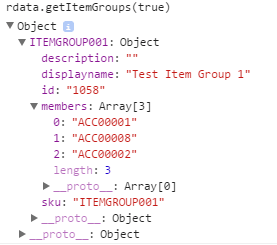
The getItemGroups() method can take the objectView parameter with true or false as values. If true, item groups are returned as an object in which each key is a group identifier and its value contains the corresponding group data. If omitted or false, the item groups are returned as an array.
This example returns the group items organized by the group identifier.
const groups = rdata.getItemGroups(true);
The resulting output may look like this:
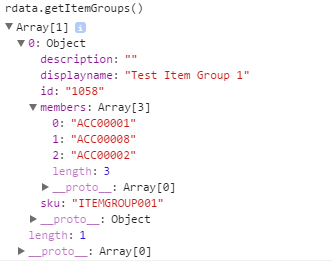
Instead, this example returns the group items as an array.
const groups = rdata.getItemGroups();
The resulting output may look like this: