getData()
The getData() function (server-side) queries NetSuite records stored in the database based on the specified criteria. The performance of a getData() query depends on the number of records retrieved, the type of data retrieved (such as basic fields, sublists, or joined fields), and whether the loadapi property is used. From fastest to slowest, performance is ranked as follows:
-
Fields
-
Sublists
-
Joined fields and sublist member fields (
:drilloption) -
loadapiproperty
Syntax
Use this syntax for the getData() function:
            getData({
  type: 'recordTypeId',
  id: number,    // Use id OR filter
  filter: ['fieldId1', 'operator', 'value1'],
  fields: ['fieldId2', 'fieldId3:text', 'fieldIdn'],
  allowDups: true | false,     // Use allowDups OR groupJoins
  groupJoins: true | false,
  loadapi: true | false,
  sortby: 'fieldId4',
  async: true | false,
  sublists: {
    sublistId1: ['fieldId1:text', 'fieldId2', 'fieldIdn'],
    'sublistId2:drill': ['fieldId1', 'fieldId2', 'fieldIdn'],
    // Add more sublists
  }
}).done(callback);
Return Value
The getData() function returns a promise that resolves to an array of objects. One object for each record matching the specified criteria.
Parameters
The type property is required.
The getData() function accepts an object as a parameter. The object includes the following properties:
-
type(string) - Specifies the NetSuite record type ID, for example,inventoryitemorsalesorder. -
id(number) - Specifies the internal ID of the record to retrieve. Use this property whenfilterisn't specified. -
filter(array of strings) - Defines a search filter expression. You can use a single or multiple conditions. Multiple conditions are combined using the following operators:'and','or'.Note:To retrieve only records in which a field contains a value, you can use the filter
['fieldID', 'noneof', '@NONE@']. This filter excludes records in which the field is blank or not set. -
fields(array of strings) - Specifies the fields to return.Results for dropdown lists, multi-select fields, and image fields include the internal ID of the selected option or image. To retrieve the selected option label or the relative File Cabinet URL for an image, add the
:textsuffix to the field ID. For example,'location:text'returns the location's name, for example,San Francisco.To retrieve the field label, add the
:labelsuffix to the field ID. For example,'location:label'returns Location. -
sublists(object) - Defines the sublists and sublist fields to return. Each key represents the sublist ID, and each value is an array of fields to retrieve from that sublist. You can add the:textsuffix to sublist field IDs.To retrieve fields from records referenced in a sublist line-not the columns in the sublist- add the
:drillsuffix to the sublist ID. For example, each line item in the Items sublist on the sales order references an item record, and the:drillsuffix retrieves fields from the reference item record itself. See the following example:sublists: { 'item:drill': ['itemid', 'displayname', 'cost'] } -
sortby(string) - Sorts search results by a single field. Results are arranged in ascending order: A to Z for text fields and lowest to highest for number fields. Records with blank values for the sort field appear at the end of the results list. -
async- Determines whether data is retrieved synchronously or asynchronously. It'strueby default, so the function runs asynchronously for better performance. -
loadapi- Iftrue,getData()first searches records by ID and then loads each record individually to retrieve fields and sublist data that can't be accessed through standard search methods. This property isfalseby default.Because records are loaded one at a time, using
loadapimay affect performance and increase resource usage, especially when retrieving many records. Use this property only when standard search functionality doesn't support your use case. For more information, see Retrieving Fields Using loadapi. -
allowDups- By default,getData()returns one result per unique record internal record ID. Iftrue, duplicate internal IDs are allowed and all matching results are returned. This property is useful for multi-select fields and defaults tofalse. For more information, see Working with Joined Fields. -
groupJoins- Groups results by record ID and it'sfalseby default. Iftrue, joined field values are grouped together as an array of objects within a single main result object for the record. This property is useful for matrix fields such as the price matrix because it avoids returning multiple duplicate main records . For more information, see Working with Joined Fields.
Examples
The following examples show how to use the getData() function.
Retrieving Data Using Fields and Filters
This example retrieves inventory items whose Display Name/Code contains the word notebook and whose Purchase Price (cost) is less than 30.
The fields returned include the Item Name/Number and Display Name/Code. Using the :text suffix, the code also returns the option label for the Display Name/Code and the Item Display Image file name instead of their internal IDs.
The results are returned to the callback function as an array of objects.
getData({
type: 'inventoryitem',
filter: [
['displayname', 'contains', 'notebook'],
'and',
['cost', 'lessthan', '30']
],
fields: [
'itemid',
'displayname',
'location:text',
'storedisplayimage:text'
]
}).done(function(data) {
console.log('Data', data);
});
See other filter examples:
-
['class', 'is', '2'] -
['cost', 'between', '500', '700']
Sorting Results by Field
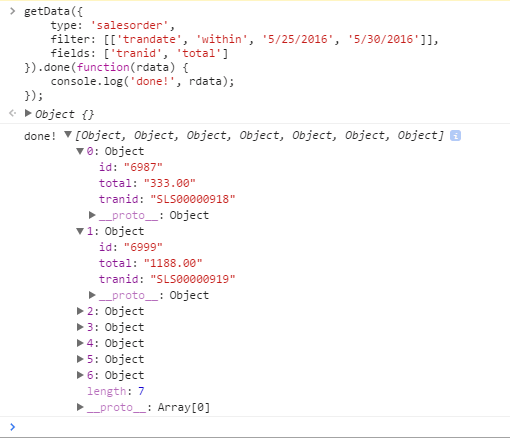
This example retrieves sales orders within a specified date range and the transaction ID and total amount for each order. The sortby property sorts the results by the total sales order amount in ascending order.
getData({
type: 'salesorder',
filter: ['trandate', 'within', '5/25/2016', '5/30/2016'],
fields: ['tranid', 'total'],
sortby: 'total'
}).done(function(rdata) {
console.log('Done', rdata);
});
The console output may look like this:
Retrieving Sublist Data
This example retrieves all line items for a specific sales order identified by its transaction ID. The returned fields include the sales order Customer and Date fields, as well as the sublist columns such as Item, Quantity, Rate, and Class. The :text suffix is used for the entity and class fields so that the results show labels instead of internal IDs.
getData({
type: 'salesorder',
filter: ['tranid', 'is', ' SLS00000976'],
fields: ['entity:text', 'trandate'],
sublists: {
item: ['item', 'quantity', 'rate', 'class:text']
}
}).done(function(data) {
console.log('Data', data);
});
Retrieving Data from a Record Referenced in a Sublist
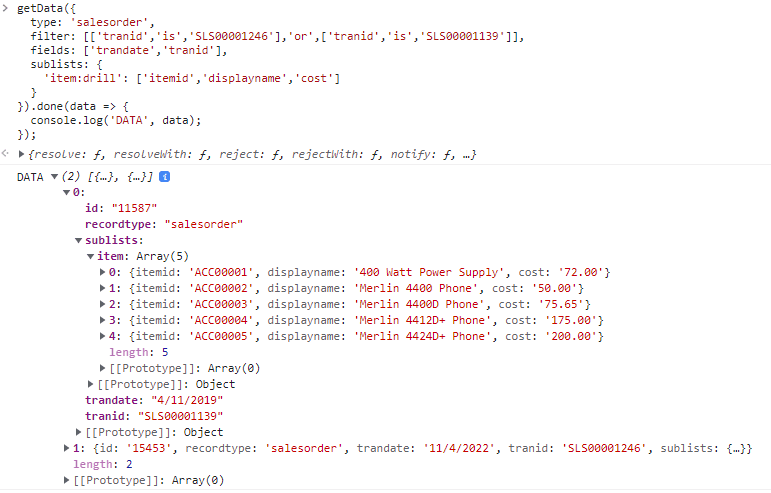
This example retrieves item details from the line items of specific sales orders using the :drill option to access fields from the referenced item records. Instead of returning only standard sublist columns, the query retrieves the Item Name/Number, Display Name/Code, and Purchase Price (cost) from each referenced item record. The results are returned as an array of sales order objects, each containing item details for every line.
getData({
type: 'salesorder',
filter: [
['tranid', 'is', 'SLS00001246'],
'or',
['tranid', 'is', 'SLS00001139']
],
fields: ['trandate', 'tranid'],
                sublists: {
  'item:drill': ['itemid', 'displayname', 'cost']
}
}).done(data => {
console.log('DATA', data);
});
The console output may look like this:
Retrieving Fields Using loadapi
Some NetSuite fields can't be retrieved using the standard search method. Examples include:
-
Hierarchical fields with multi-level relationships, such as the parent field on customer records.
-
Fields that are not available through search, such as the email field on entity records.
-
Certain sublist line fields, such as the Description field on sales order line items.
In these cases, you can load each record individually to extract the requested fields by either retrieving a specific record by its internal ID or setting loadapi: true in the getData() call. However, this approach may impact the script performance and consume more resources. Always prefer traditional search using the filter property only wherever possible, and use the load API approach only when standard search doesn't work for your use case.
Because loading records individually may affect performance and increase resource usage, use this approach only when standard search methods don't provide the required data. Whenever possible, use the traditional search approach by retrieving records through the filter property without loadapi.
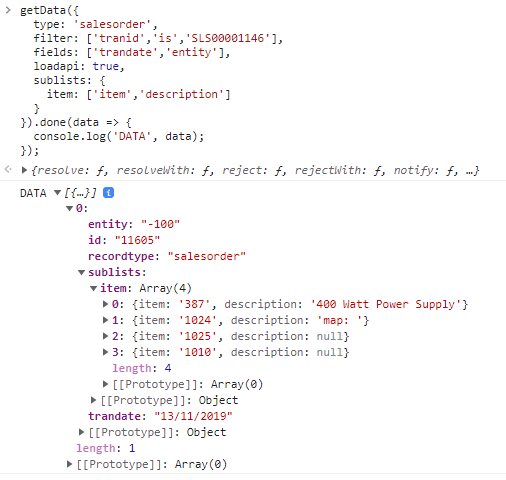
This example retrieves a specific sales order together with its transaction date, customer, and item descriptions from the Items sublist.
              getData({
    type: 'salesorder',
    filter: ['tranid', 'is', 'SLS00001146'],
    fields: ['trandate', 'entity'],
    loadapi: true,
    sublists: {
        item: ['item', 'description']
    }
}).done(data => {
    console.log('DATA', data);
});
See the console output:
Working with Joined Fields
With getData(), you can retrieve data from joined fields and sublist member fields. The syntax for a joined field is joinName.fieldName. You can use joined fields when working with matrix fields, such as the price matrix on the inventory item. For example, pricing.unitprice lets retrieves pricing data from the price matrix.
By default, getData() returns only one result for each unique record. If a record contains multiple joined rows, such as multiple price matrix entries, only the last joined row is returned, and the remaining rows are omitted.
Retrieving all Joined Rows with allowDups
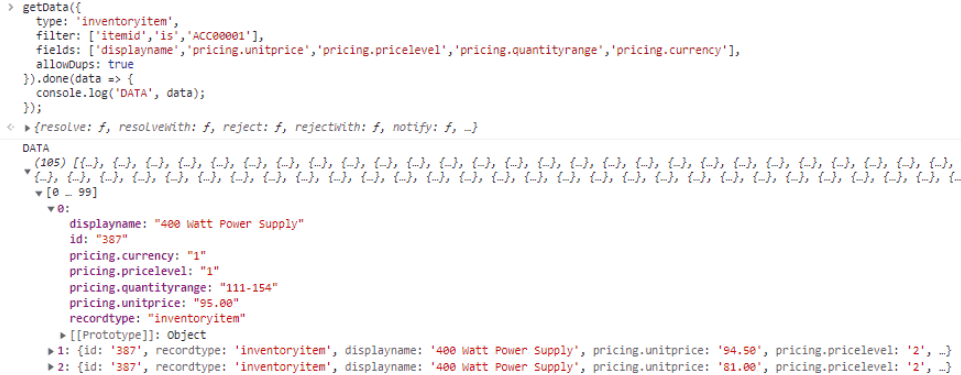
To retrieve all joined rows, set allowDups to true. This property allows duplicate main records to be returned, resulting in one object for each joined row. The following example returns a separate object for every pricing row associated with the inventory item ACC00001, even though all objects represent the same inventory item.
                getData({
  type: 'inventoryitem',
  filter: ['itemid', 'is', 'ACC00001'],
  fields: [
    'displayname',
    'pricing.unitprice',
    'pricing.pricelevel',
    'pricing.quantityrange',
    'pricing.currency'
  ],
  allowDups: true
}).done(data => {
  console.log('DATA', data);
});
Each object contains the same item information but different pricing data, such as currency, price level, quantity range, unit price. See the output in the console:
Grouping Joined Rows with groupJoins
For more structured results, set groupJoins to true. Instead of returning duplicate inventory item records, joined field values are grouped into an array of objects within a single result object.
                getData({
  type: 'inventoryitem',
  filter: ['itemid', 'is', 'ACC00001'],
  fields: [
    'displayname',
    'pricing.unitprice',
    'pricing.pricelevel',
    'pricing.quantityrange',
    'pricing.currency'
  ],
  groupJoins: true
}).done(data => {
  console.log('DATA', data);
});
See the output in the console:

Filtering by Joined Fields
You can also use joined fields in the filter property to narrow down the returned data. In this example, only pricing records with a currency value of 1 are returned. The matching pricing records are grouped into the pricing array of a single inventory item object.
                getData({
  type: 'inventoryitem',
  filter: [
    ['itemid', 'is', 'ACC00001'],
    'and',
    ['pricing.currency', 'is', '1']
  ],
  fields: [
    'displayname',
    'pricing.unitprice',
    'pricing.pricelevel:text',
    'pricing.quantityrange'
  ],
  groupJoins: true
}).done(data => {
  console.log('DATA', data);
});
See the output in the console:

Retrieving Joined Data as a Sublist
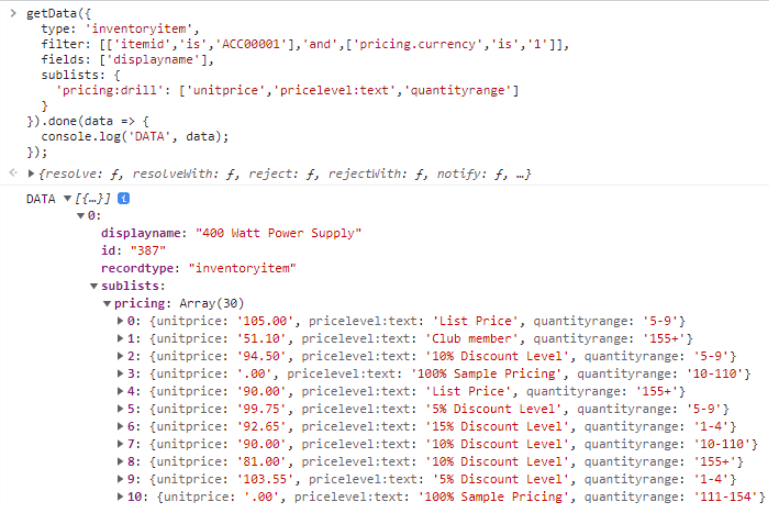
You can also use the :drill option to return joined data as a sublist. In this example, pricing data is filtered so that only records with a currency value of 1 are returned. The pricing information is then returned in the pricing sublist, with each entry containing the corresponding pricing details.
                getData({
  type: 'inventoryitem',
  filter: [
    ['itemid', 'is', 'ACC00001'],
    'and',
    ['pricing.currency', 'is', '1']
  ],
  fields: ['displayname'],
  sublists: {
    'pricing:drill': [
      'unitprice',
      'pricelevel:text',
      'quantityrange'
    ]
  }
}).done(data => {
  console.log('DATA', data);
});
See the output in the console
Filtering on Sublist Line Fields
When filtering on sublist line fields, you can use the field name without joined syntax, as if the field were a regular field. Keep in mind that applying filters to sublist line fields affects both the records returned and the sublist data included in the results. Only sublist lines that match the filter criteria are returned.
In this example, the filter retrieves sales orders for a specific customer (entity ID 4003) that contain at least one line with a value in the custcol_scpq_item_col_config_data field.
                getData({
  type: 'salesorder',
  filter: [
    ['entity', 'is', '4003'],
    'and',
    ['custcol_scpq_item_col_config_data', 'isnotempty', '']
  ],
  fields: [
    'tranid',
    'trandate'
  ]
}).done(data => {
  console.log('DATA', data);
});
See the output in the console:
