SuiteScript 2.1 Scripting with Subrecords
Use SuiteScript 2.1 record methods to access subrecords through their parent records. Depending on the script's deployment, you can retrieve values or create and update subrecords.
In the UI, you usually open a subrecord by clicking an icon on the parent record. This opens the subrecord form in a new window. For example, the following illustration shows, at left, a purchase order with one line in its Items sublist. If you click the icon, it opens a window showing the inventory detail subrecord.
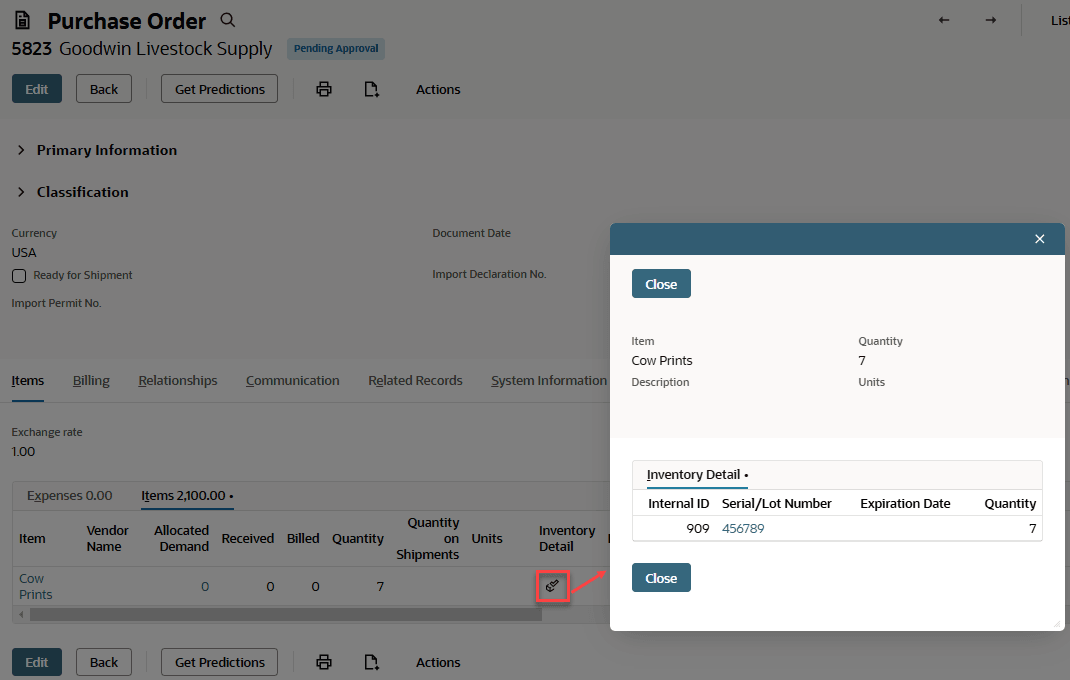
To access this same subrecord from a script, start by loading the purchase order. Then you would use the Record.getSublistSubrecord(options) method to open the subrecord. For example:
          ...
// Load the purchase order.
const rec = record.load({
    type: record.Type.PURCHASE_ORDER,
    id: 7,
    isDynamic: false
});

// Retrieve the subrecord. For sublistId, use the ID of the relevant sublist on
// the purchase order record type. For fieldId, use the ID of the summary field
// on the sublist that holds the subrecord.
const subrec = rec.getSublistSubrecord({
    sublistId: 'item',
    line: 0,
    fieldId: 'inventorydetail'
 });

...
For a full script example in standard mode, see Inventory Detail Subrecord Example in Standard Mode.
For details on using SuiteScript 2.1 to work with subrecords, see the following topics: