Updating the User Event Script
This procedure tells you how to update createTask.js so that it uses the phoneCall.js custom module file. For more information about how dependencies should be defined in the following procedure, see Custom Module Dependency Paths.
To update the script:
-
Open the createTask.js file for editing.
-
Add /phoneCall.js to the first argument of the define function to update your dependencies.

-
Add another dependency to the callback function's first argument. This object represents the phone call module. You can use it to access the phone call module's API.

-
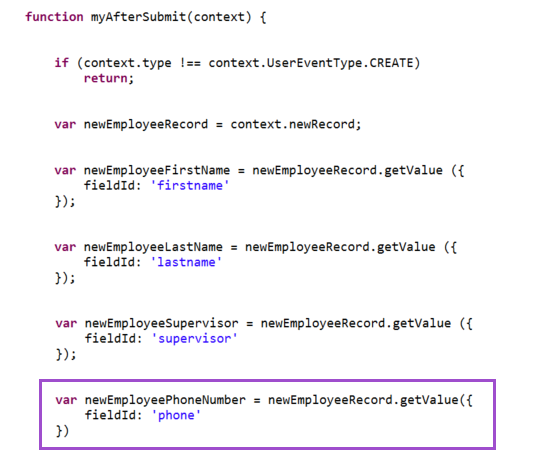
In the script's afterSubmit function, add logic to get the employee's phone number.
-
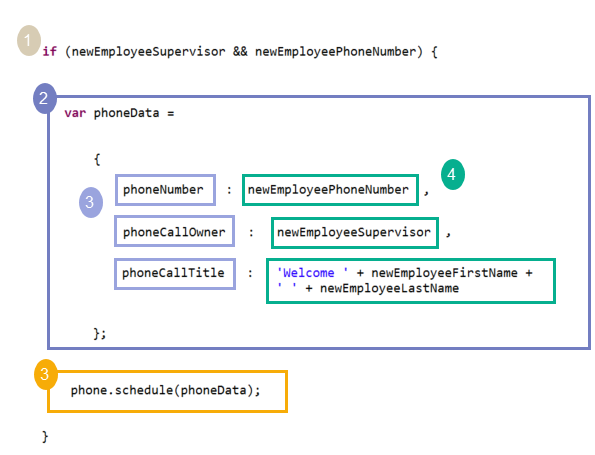
Create a block of code that does the following:
-
Add a conditional test to check if the employee record has values for both the phone number and supervisor fields (Callout 1).
-
Create an object called phoneData that sets all the fields needed for the phone call module's schedule method (Callout 2).
-
Call the schedule method, passing the phoneCall object as its argument (Callout 3).
-
-
Upload the revised script file to your NetSuite File Cabinet, overwriting the prior version.