Enabling Validations on the CAMT053 Sample Script
Download the sample CAMT parser script from the File Cabinet and customize it as needed. The CAMT script file doesn't include validation by default. If you'd like to enable this feature, you'll need to provide your own XSD validation file.
To enable validation on the CAMT053 script:
-
Download the bsp_lite_parser_camt053 script from the File Cabinet. For more information, see Downloading Sample Bank Statement Parsers Scripts.
-
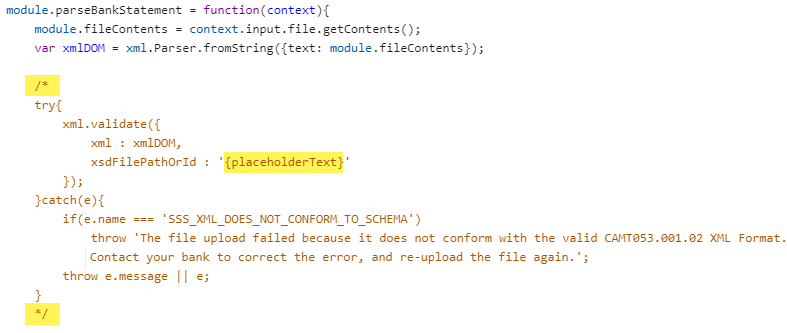
On your computer, open the CAMT053 parser script file and find module.parseBankStatement.
-
In the module.parseBankStatement code block, do the following:
-
Remove the / * and * / characters to enable validations on the script.
-
Replace {placeholderText} with the path to your uploaded XSD file validation. For more information, see xml.validate(options)
Note:You can use the standard XSD validation file for the CAMT parser. Download it from the File Cabinet by going to SuiteBundles > Bundle 293699 > com.netsuite.bsp > src > validation. If you plan to upload a custom parser, rename the validation file before you upload it to avoid conflicts.
-
-
Save your file.
-
Deploy the modified script files as a plug-in implementation. For more information, see Adding the Plug-in Implementation.