Creating a calculated measure
In your pivot table, you can use this definition to create a calculated measure:
% Profit (calculated measure) = Est. Gross Profit (Sum) / Amount (Sum)
The calculated measure column gives a percentage value based on the aggregated values from Est. Gross Profit (Sum) and the Amount (Sum).
(648.40 + 4,500 + 294) / (3,602 + 4,500 + 294) = 64.82
The % Profit (calculated measure) in the pivot table gives 64.82%, while the % Profit (formula) (Avg) column gives 72.67%.
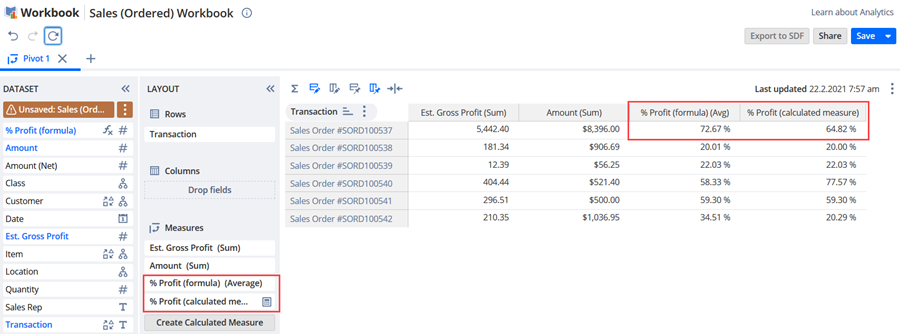
In this example, the formula field measure only shows an average of the percentages from the dataset ((18% + 100% + 100%) / 3 = 72.67%). With the calculated measure, the amount is found by first aggregating Est. Gross Profit and Amount fields first and then performing the division (that is 648.40 + 4500 + 294 = 5442.4, 3602 + 4500 + 294 = 8396, so 5442.4 / 8396= 64.82%). Therefore, the calculated measure returns the expected value.