Working with Licenses for a Business
View and manage the licenses associated with a business in the business parent data on the Licenses page.
The license information here is consistent with the information that you find on the consolidated Licenses list page. For more information, see Managing Licenses for an Agency.
One way to access the business parent is to select the Businesses tile on the Agency Springboard. On the Businesses list page, click the row for the business parent you are working with. Navigate to the Licenses detail page in the business parent data using the Licenses link in the left-hand navigation panel.
This example illustrates the Licenses page for a business, showing available actions.
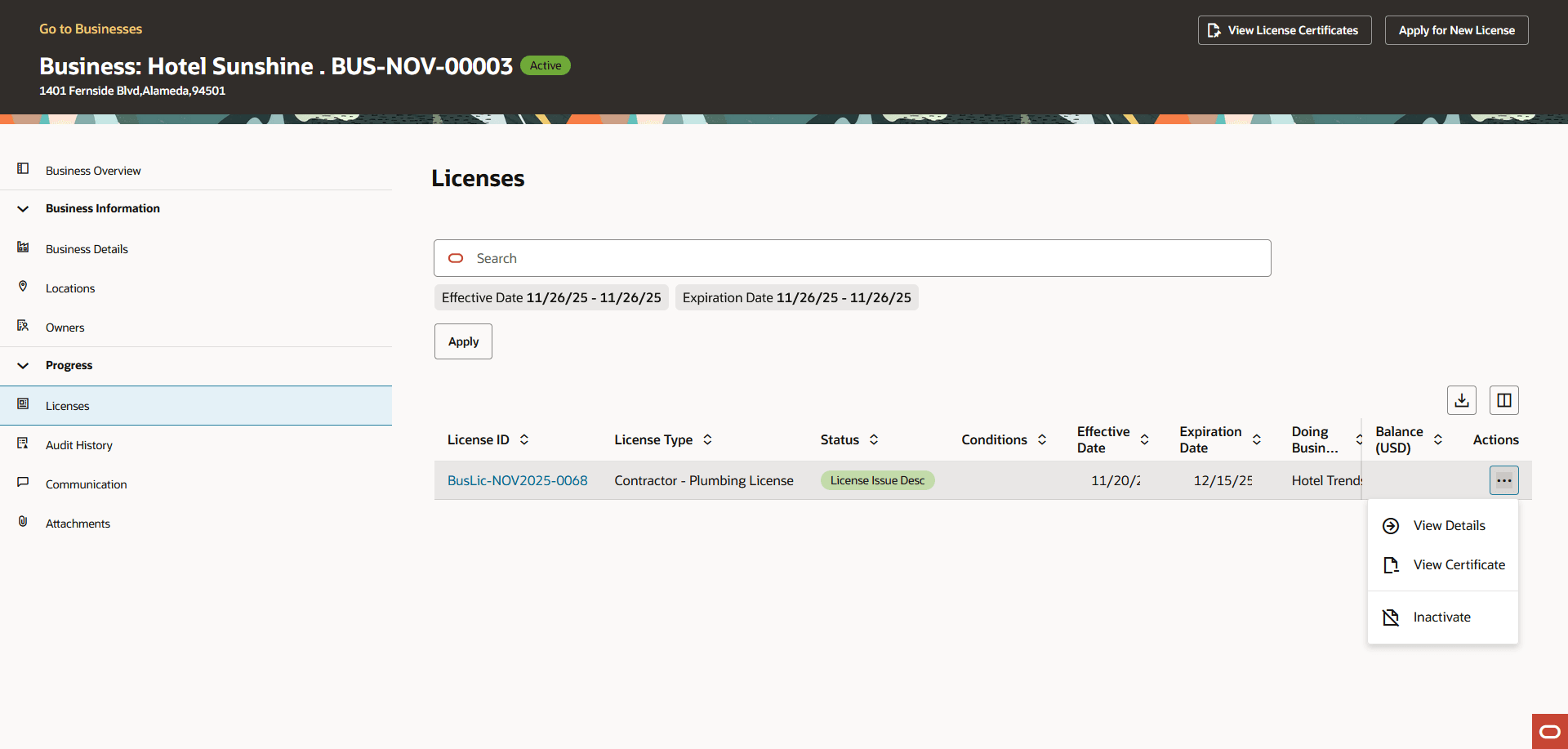
Click the Apply button to start a new license application associated with this business. You can also click the Apply for New License button at the top of the page for the business parent.
|
Page Element |
Description |
|---|---|
|
License ID |
Displays the license ID, application type, Active if the license is active, and information about the expiration date. If the license is about to expire, the expiration information additionally includes a warning icon and the number of days remaining until the expiration date. |
|
License Type |
Displays the type of license. For example, a license for a restaurant, chauffeur, contractor, and so on. |
|
Status |
Displays the status of the license, such as Active if the license is active. |
|
Conditions |
Displays the conditions associated with the license. |
|
Effective Date and Expiration Date |
Displays the period for which the license was issued, including the effective date and the expiration date for the license. These dates are updated for renewals. |
|
Doing Business As (also known as DBA name) |
Displays the name that the licensed business uses to operate publicly that is different from its legal name. |
|
Address |
Displays the address for the licensed location. This can be different from the address of the business itself. If the application indicates that the location is outside of the agency’s jurisdiction, the address of business is displayed instead of the specific location. |
|
Description |
Displays the description from the origination application, or from the renewal or amendment if the license is renewed or amended. Applicants optionally enter a description during the application process. Agency staff can add or update descriptions on the Activity Summary page of the origination, renewal, or amendment transaction. |
|
Subclassification |
Displays the subclassification for the license, if applicable, such as for contractor registration. |
|
Total Fees (USD) and Balance (USD) |
Displays the total fees and remaining balance for the business license in US dollars, including the license origination, renewal, and amendment transactions. When all fees are paid, you’ll see Fees Paid next to the amount. |
You can click the three-dot Actions menu for a license and select the appropriate action.
|
Action |
Description |
|---|---|
|
View Details |
Select to access the detail pages for the license. You can also click the license row in the list to access the details for a business license. For more information, see Viewing the Business License. |
|
View Certificate |
Select to view the business license certicate. Your agency sets up the certificate report. |
|
Amend |
Select to start the process for amending an active business license. This action isn't available if the license already has a renewal or amendment in progress. The agency must also configure the business license type to allow amendments. |
|
Inactivate |
Select to start the process for inactivating the license. You must have permissions set up to inactivate licenses. |
|
Renew |
Select to start the process for renewing an active business license. This action is available for licenses that are about to expire (as defined in the expiration rules) unless the license already has a renewal or an amendment in progress. |