Offer Design Integrity Check AI Agent
One major area of concern for Communications Service Providers (CSP) is around incorrect order capture leading to order fallouts, provisioning failures and wrongly billed services . Often times, there are entitlements in a bundle offer that violate selling rules, incorrect validity or the intent of the requirement is not fully met. All these add up to increased support costs to handle such situations in making the corrections and applying to all involved systems in addition to other indirect costs such as poor customer satisfaction, NPS drop and churn. What if this can be avoided during offer design enabling CSPs to design and release offers with higher confidence leading to reduced operational costs, accelerated time to market and improved customer experience with operational reliability?
Offer Design Integrity Check AI Agent addresses these challenges by carrying out the following validations:
- Validate any incompatible component products or services in a bundle offer
- Validate the effectivity of all component products with the effectivity of the bundle offer
- Validate the Intent of the requirement as mentioned in Description with the components of the bundle offer
- Validate the bundle offer starting price
You get the summary and detailed explanation of the findings including suggestions and recommendations that can be acted upon. In addition, it also presents similar offers based on the structure and attributes of the bundle offer.
The "Check Integrity" action of invoking the AI Agent is available when you are in offer details page. You can also click on "Check Integrity" control at the time of creating an offer, updating an offer.
The following figure shows how to invoke the Design Integrity Check AI Agent:
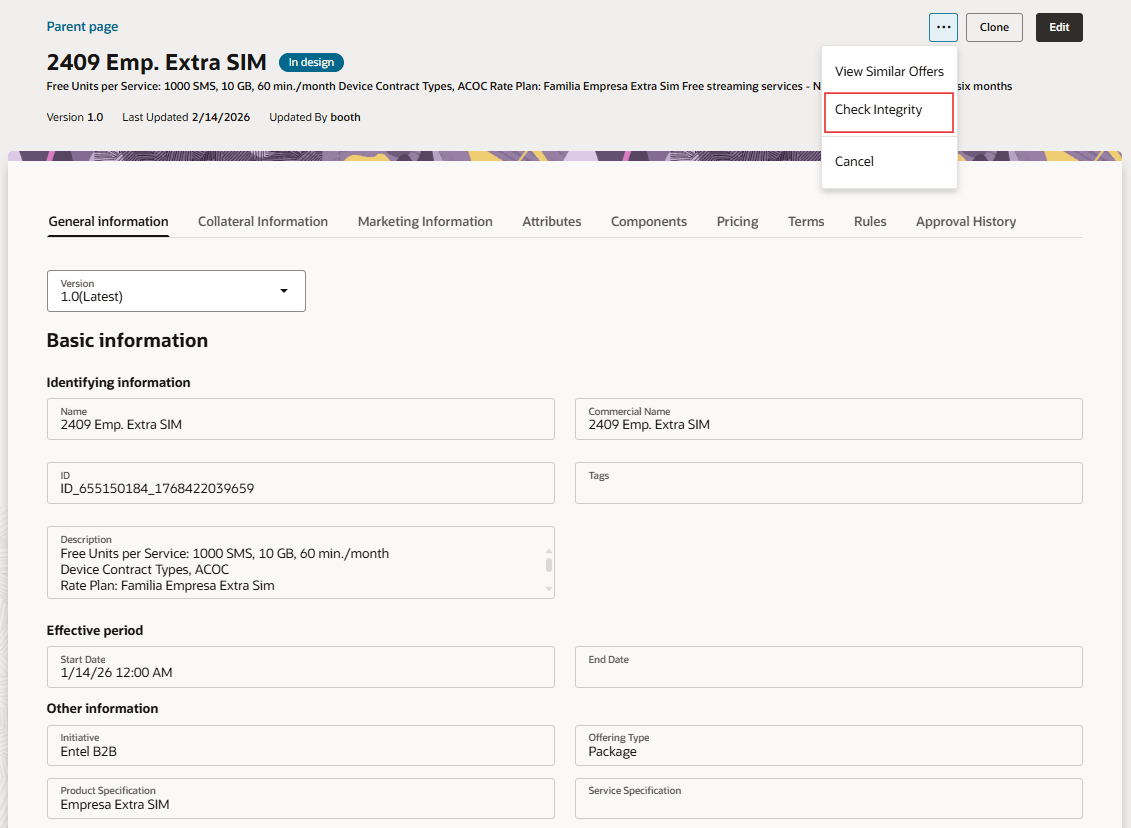
Invocation of Design Integrity Check AI Agent
Upon invocation of the AI Agent, it validates the offer to mark it Valid or Invalid. In addition it provides explanation of what makes the bundle invalid along with details of potential issues, warnings and recommendations and suggestions to address the same. The following figure shows the findings of the Design Integrity Check AI Agent:
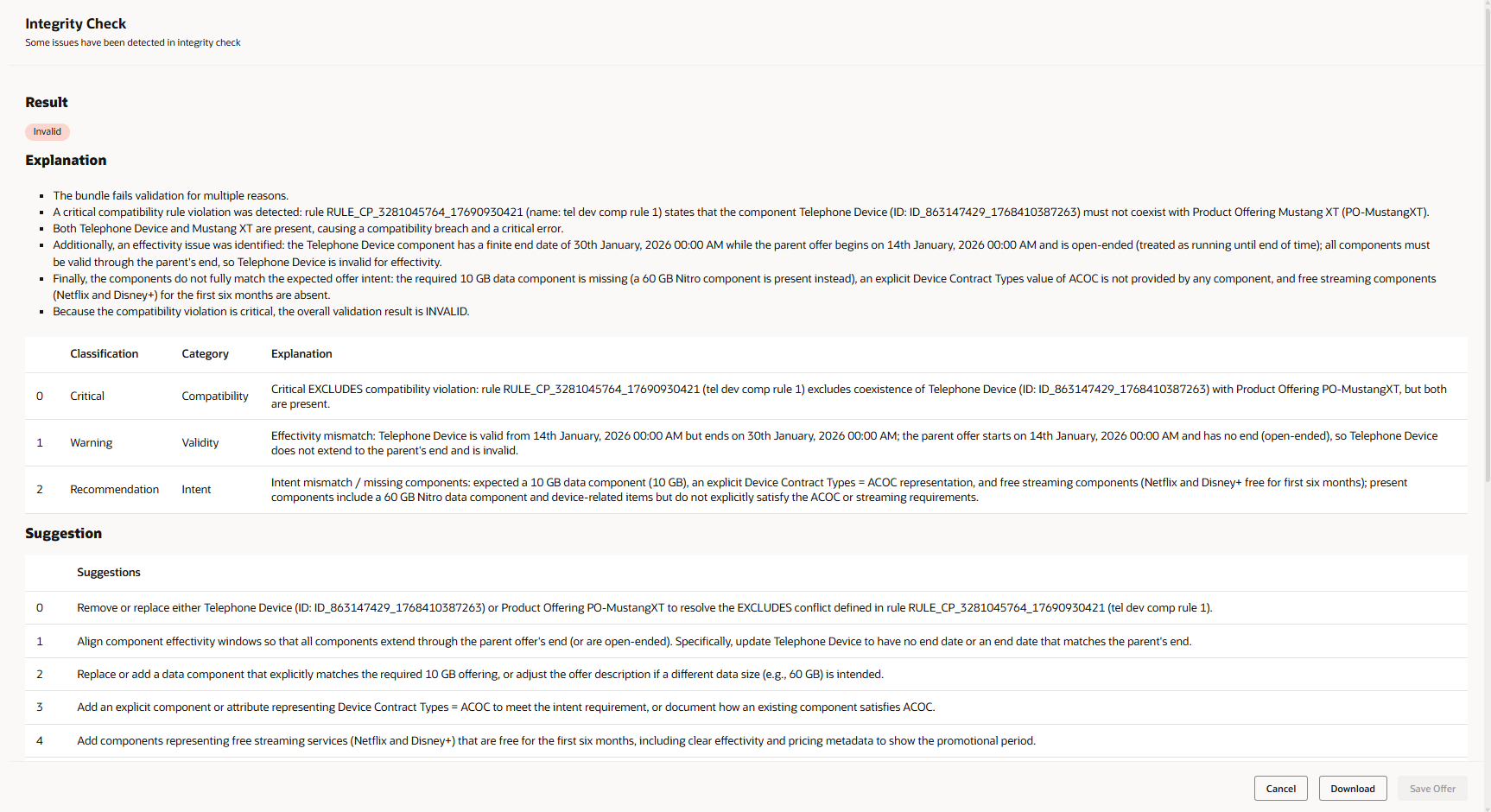
Results of Design Integrity Check AI Agent
Along with the recommendations and suggestions to make it a valid bundle offer, it also shows the semantically similar bundle offers to enable the Product Managers to take appropriate actions.
All findings are grouped into three easy-to-understand categories:
-
Critical - Must be fixed before you can save or confirm the rule.
Note: This validation can be turned off through the steps mentioned later
-
Warning - Potential to fail during order capture or billing or provisioning
-
Recommendations - Suggestions that can be made to the offer
In addition, you can also validate the rule creation for any overlapping or contradictory eligibility condition or compatibility condition for the same subject and parameter combination that would cause a clear conflict.
The following figure shows how to invoke the Design Integrity Check AI Agent:
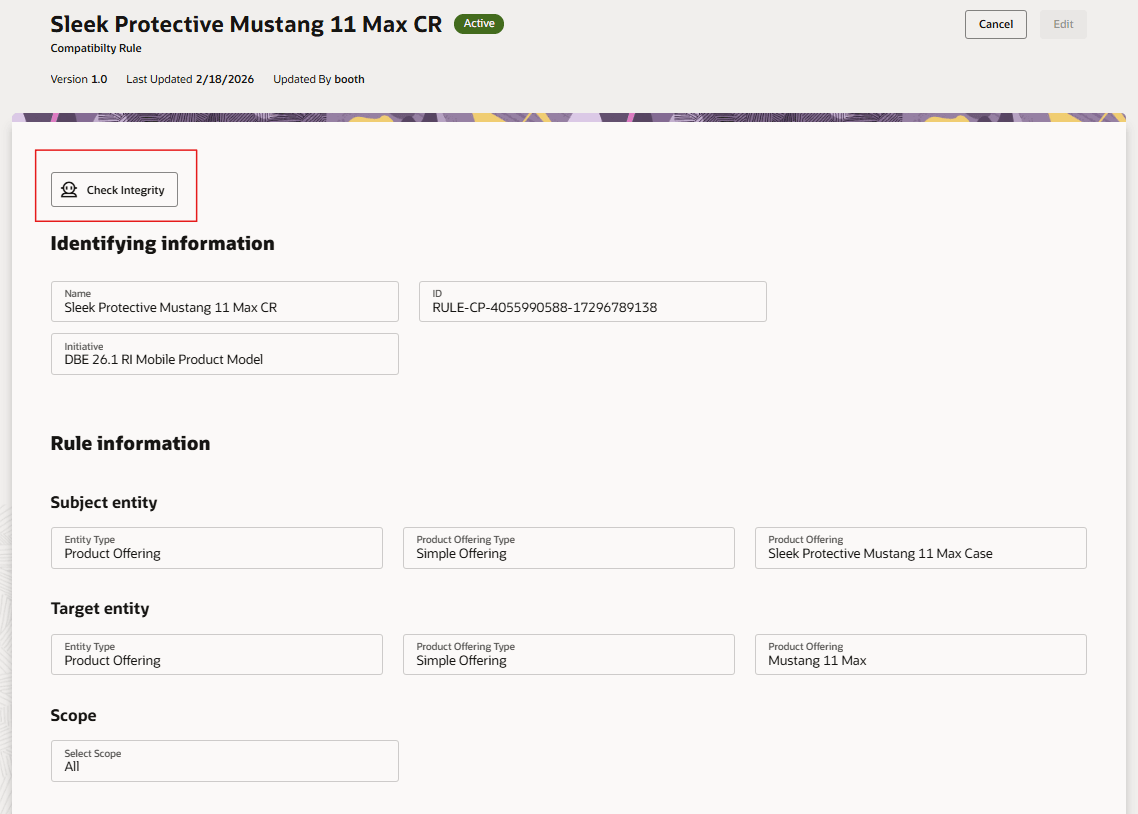
Invocation of Rules Design Integrity Check
Upon invocation of the AI Agent, it validates the rule to mark it Valid or Invalid. In addition it provides explanation of what makes the rule invalid along with details of issues and suggestions to address the same. The following figure shows the findings of the Design Integrity Check AI Agent:
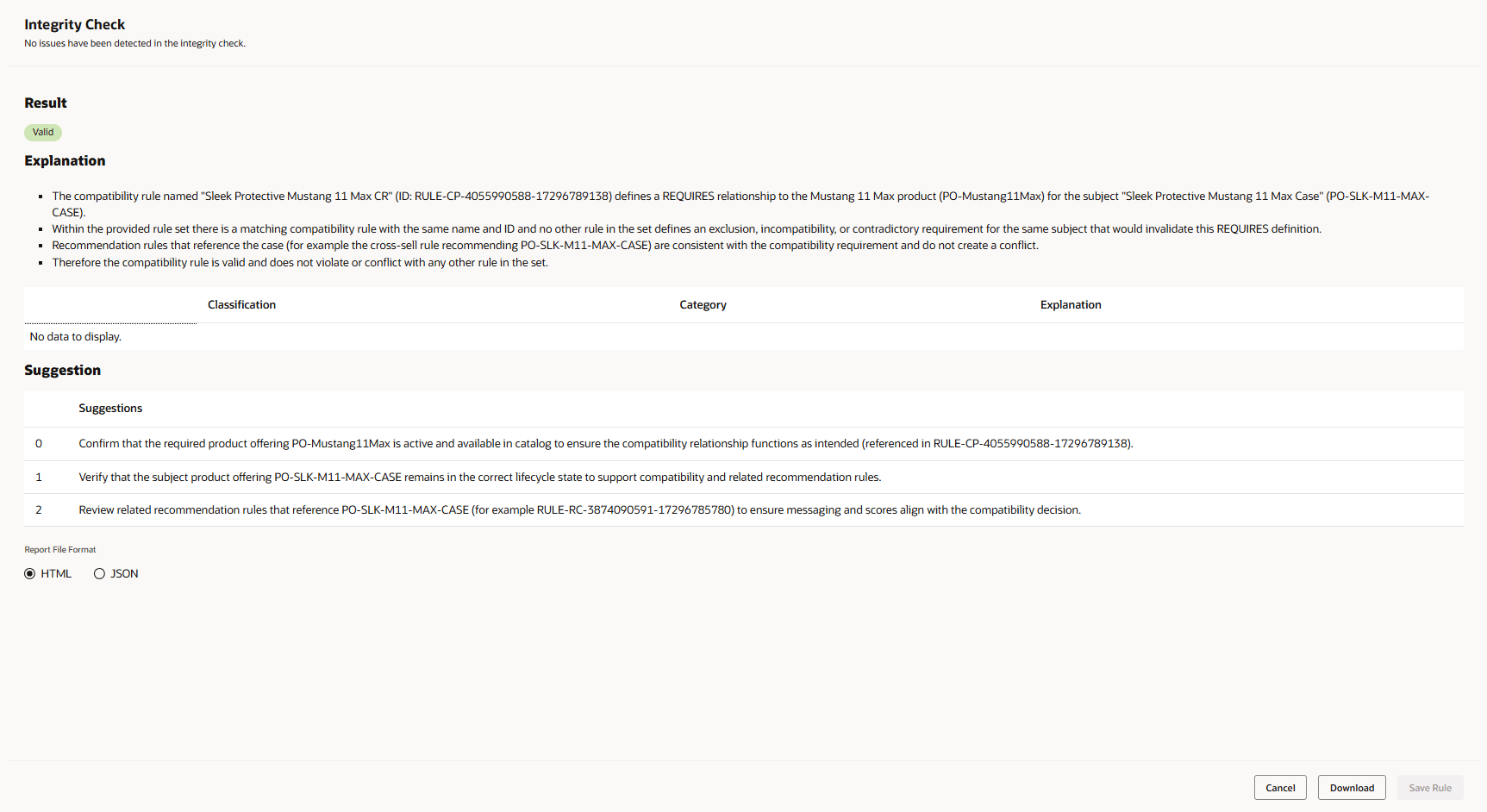
Results of Design Integrity Check AI Agent
- Empower Business to design "Right the first time"
- Reduce Operational Risks & Order Fallouts
Steps to enable and configure
To enable automated invocation of the Agent while saving the design of an offer or while confirming the design of an offer, you need to create a new Business Configuration parameter as "Agent Profile Options" to add the following values:
- Name = RunIntegrityCheckOnConfirm, Value = INTEGRITY_CHECK_ON_CONFIRM and status = Active
- Name = RunIntegrityCheckOnCreate, Value = INTEGRITY_CHECK_ON_CREATE and status = Active
The figure below shows the setup in Business Configuration:
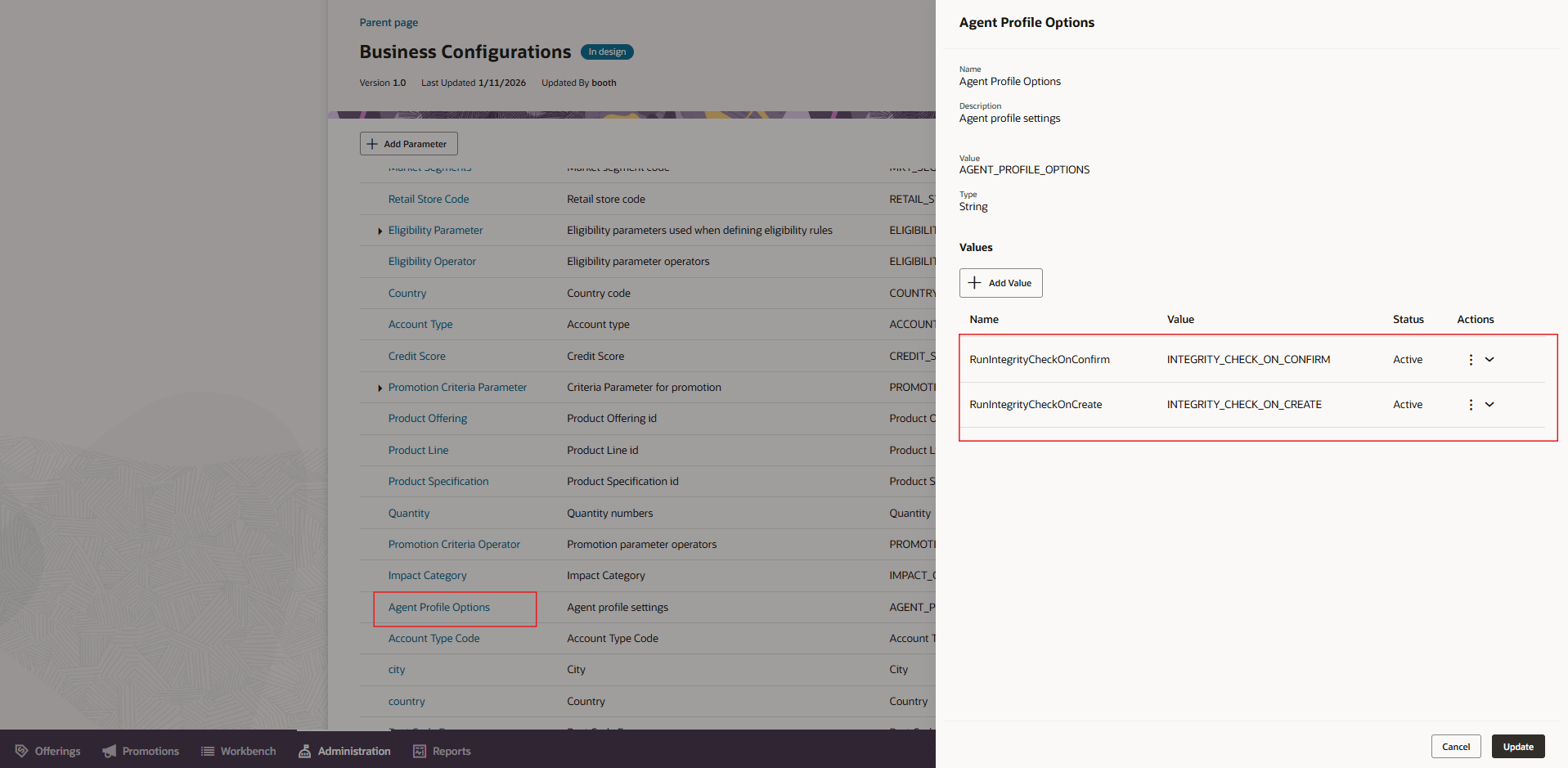
Business Configuration setup
Key resources
- For information of getting started with AI Agents, see Oracle AI for Fusion Applications - Get Started
- For information on using AI Agent Studio, see How do I use AI Agent Studio?
- For information on the access requirements for AI Agent Studio, see Access Requirements for AI Agent Studio.
- For guidance on how to create AI agents, see Create AI Agents.
Access requirements
To access the Oracle AI Agent Studio for Fusion Applications and manage Launch AI agents, users must be assigned a custom job role that contains specific duty roles. Please follow the steps below to configure the two roles.
Configure Launch AI Agent Admin User Role
- Navigate to the Security Console and create a new custom job role titled "AI Agent Launch Admin Role"
Note: Make sure to enable permission groups.
- On the Role Hierarchy page, open the Roles and Privileges tab and add these roles:
- Manage CX AI Agents (ORA_ZCA_MANAGE_CX_AI_AGENTS)
- Manage CX AI Agents (ORA_ZCA_MANAGE_CX_AI_AGENTS_HCM)
- Open the Roles and Permission Groups tab and add the below duty role.
- Fai Genai Agent CX Administrator Duty (ORA_DR_FAI_GENERATIVE_AI_AGENT_CX_ADMINISTRATOR_DUTY)
- Save the custom role and assign this custom role to the "Communications Catalog Administrator" job role.
Configure Launch AI Agent Product Manager User Role
To interact with AI agents on Launch product pages, users must be assigned a configured job role that contains specific duty role. Please follow the steps below to configure it.
- Navigate to the Security Console and create a new custom job role titled "AI Agent Launch User Role"
Note: Make sure to enable permission groups.
- On the Role Hierarchy page, open the Roles and Privileges tab and add these roles:
- Manage CX AI Agents (ORA_ZCA_MANAGE_CX_AI_AGENTS)
- Manage CX AI Agents (ORA_ZCA_MANAGE_CX_AI_AGENTS_HCM)
- Open the Roles and Permission Groups tab and add the below duty role
- Fai Genai Agent Runtime Duty (ORA_DR_FAI_GENERATIVE_AI_AGENT_RUNTIME_DUTY)
- Save the custom role and assign this custom role to the following job roles.
- Communications Catalog Product Manager
- Communications Catalog Marketing Manager
See Access Requirements for AI Agent Studio (for administrators) and How can I give users access to AI agents (for end-users) for more information.
For further AI Agent configuration and set up, please review the AI Agent Studio Guide https://docs.oracle.com/en/cloud/saas/fusion-ai/aiaas/index.html
See Access Requirements for AI Agent Studio (for administrators) and How can I give users access to AI agents (for end-users) for more information.