Offer Design Integrity AI Agent Enhancements
You can now configure additional validations for the Offer Design Integrity Agent by copying the Offer Integrity Advisor template available in Oracle AI Agent Studio. This enhancement enables organizations to extend out-of-the-box offer integrity validations with customer-specific governance rules and validation logic tailored to their business requirements.
The Offer Design Integrity Agent evaluates offer payloads, bundled components, eligibility rules, compatibility rules, recommendation rules, lifecycle dates, and other contextual information before offer publication. Organizations can configure additional AI-driven validations to identify invalid configurations, enforce catalog governance policies, and improve offer quality.
Apart from the out-of-the-box validations delivered using the two nodes - "Offer Integrity Advisor Worklfow" node that executes the default validations and "Summarizer" node that curates the output from the validation node to present the results to the user interface, you can now copy the Agent template to create your own Agent to add additional nodes as shown below:
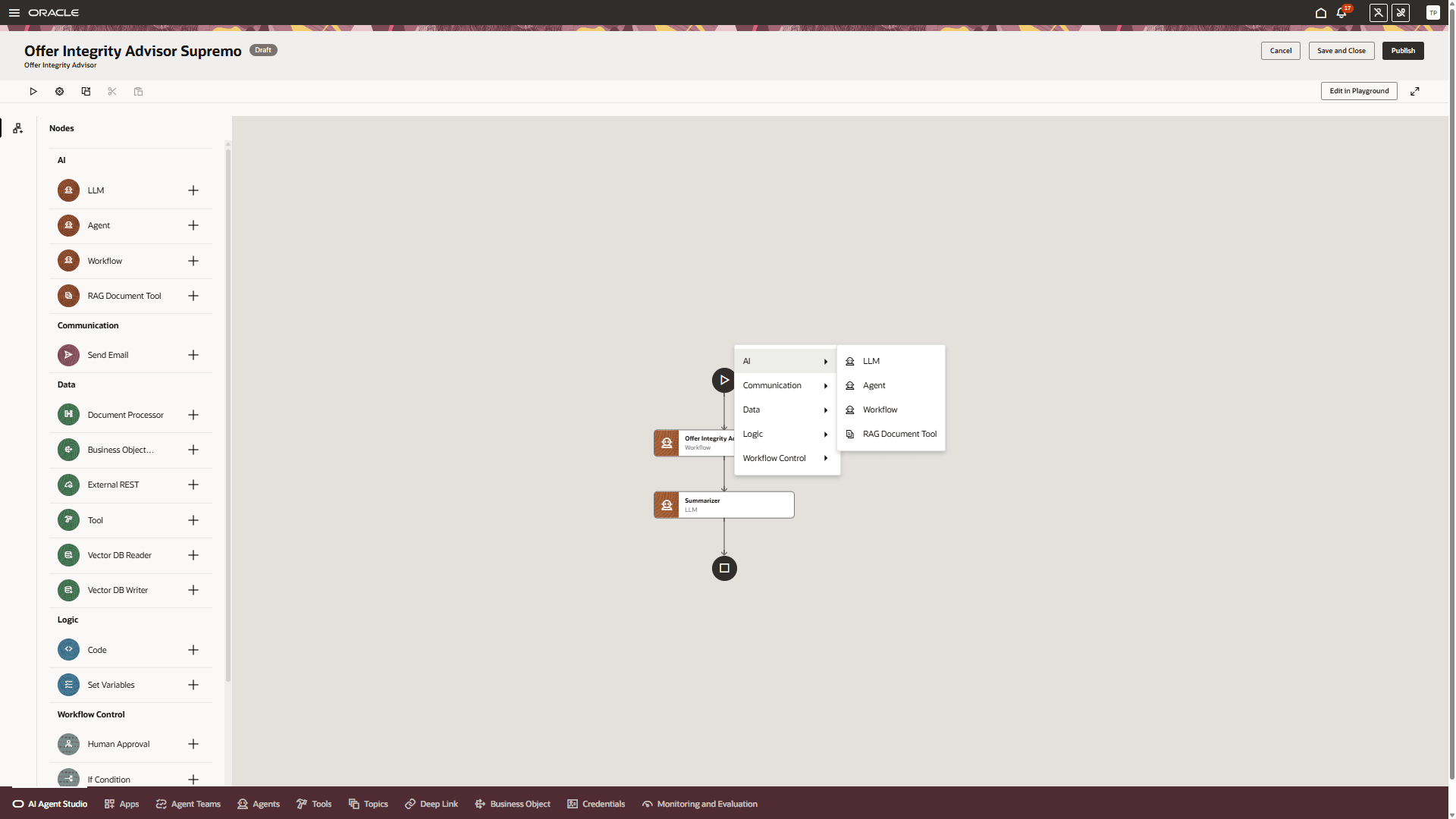
Extending the Agent for additional validations
To summarize, using Fusion AI Agent Studio, you can now:
- Create custom validation nodes within the Offer Integrity Advisor workflow.
- Extend seeded offer integrity validations with organization-specific business rules.
- Configure AI-driven validation prompts using contextual offer payload data.
- Classify validations as Critical, Warning, or Recommendation.
- Generate structured validation outputs using Specification Mode.
- Configure summarization logic to consolidate seeded and custom validation results.
This enhancement provides the following benefits:
- Improves offer governance and catalog quality
- Enables customer-specific validation logic
- Reduces invalid offer publication
- Minimizes downstream order fallout
- Accelerates offer onboarding
- Simplifies compliance enforcement
- Supports extensible AI-driven validation workflows
Steps to enable and configure
- Click Navigator > Tools > AI Agent Studio.
- The page named AI Agent Studio will open.
- On the tab named AI Agent Studio, search for Offer Integrity Advisor, and click Copy Template.
- Enter a suffix for the name of your agent team. This suffix is appended to the names of the agent team’s worker agents so that they can be identified. Duplicate suffixes aren’t allowed.
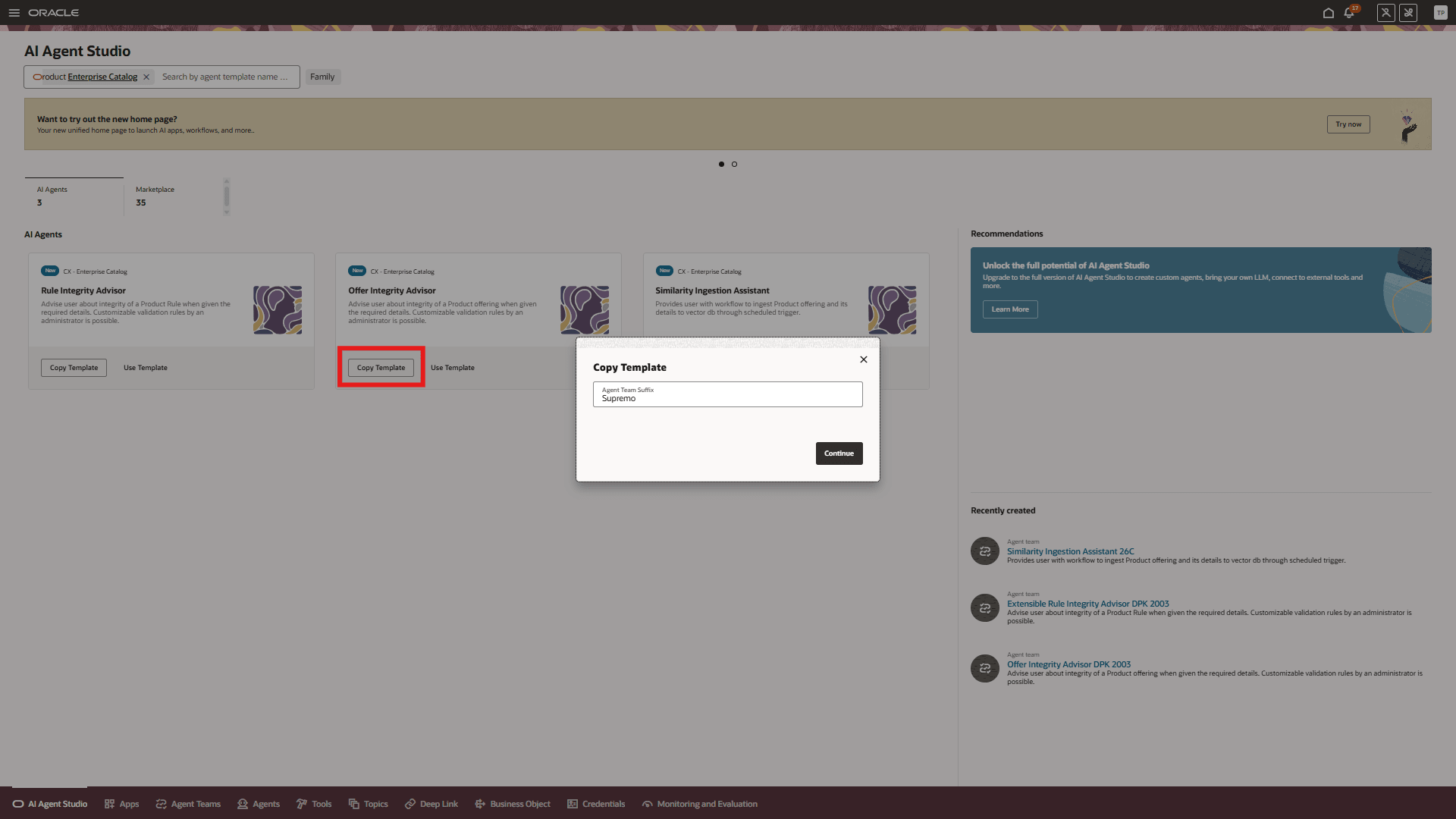
Template Named Offer Integrity Advisor in AI Agent Studio
- Click Continue. You will see a graphical representation of the new agent team with the provided suffix
- Publish the draft Agent team
- Enable the UI to invoke this custom agent. Make a note of the newly copied Agent Team's code and version and add it to the "Offer Integrity Agent Configuration" parameter in the Business Configurations tile as shown below:
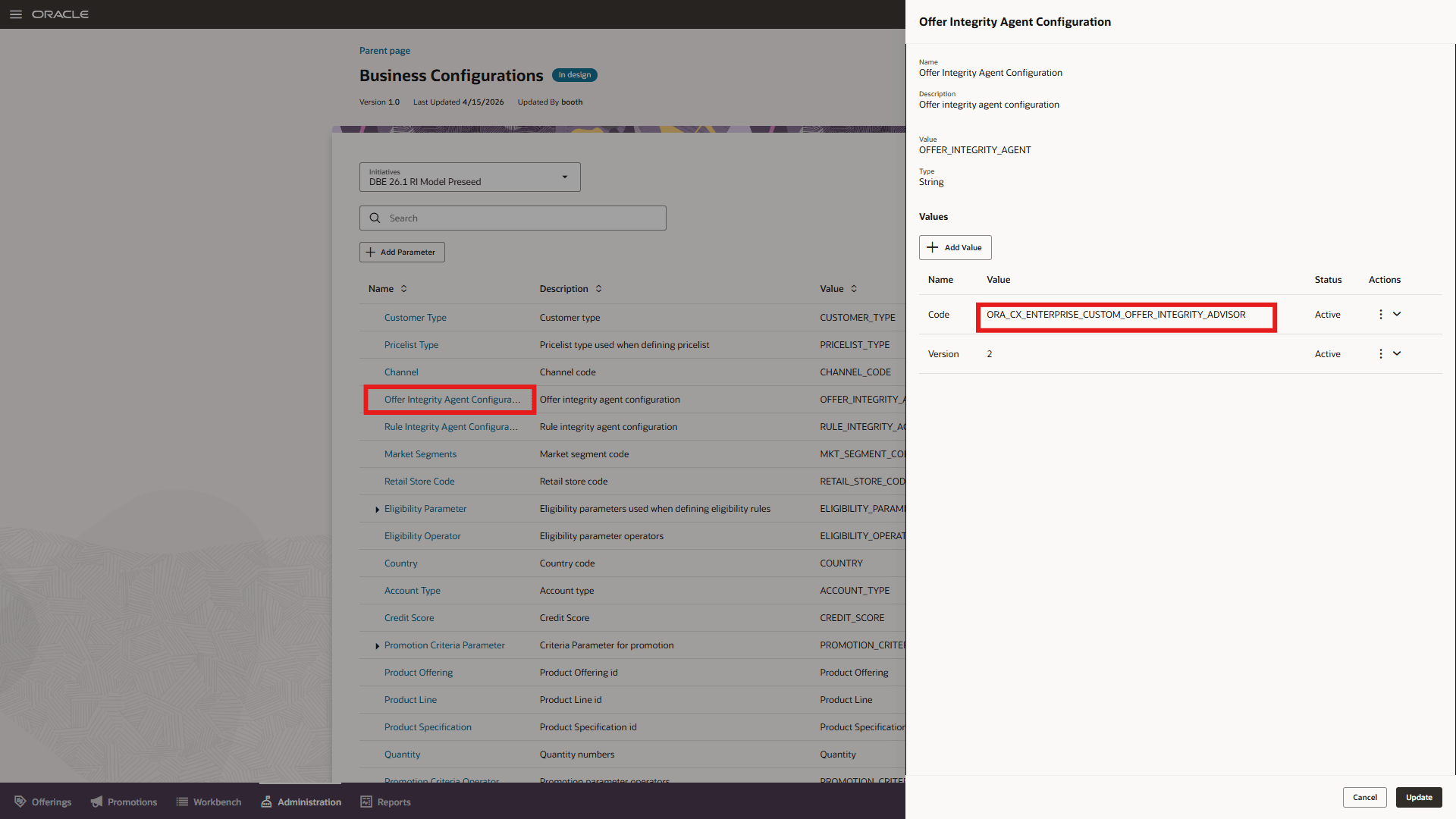
Business Configuration change
- Enable the automated invocation of the Agent while saving the rule or while confirming the design of the rule. You need to ensure the two parameters are set for Business Configuration parameter as "Agent Profile Options" .
- Verify the Offer Integrity Advisor Agent can be invoked from the Offers Page.
Key resources
- For information of getting started with AI Agents, see Oracle AI for Fusion Applications - Get Started
- For information on using AI Agent Studio, see How do I use AI Agent Studio?
- For information on the access requirements for AI Agent Studio, see Access Requirements for AI Agent Studio.
- For guidance on how to create AI agents, see Create AI Agents.
- For information of getting started with AI Agents, see Oracle AI for Fusion Applications - Get Started
- For information on using AI Agent Studio, see How do I use AI Agent Studio?
- For information on the access requirements for AI Agent Studio, see Access Requirements for AI Agent Studio.
- For guidance on how to create AI agents, see Create AI Agents.
Access requirements
To access the Oracle AI Agent Studio for Fusion Applications and manage Launch AI agents, users must be assigned a custom job role that contains specific duty roles. Please follow the steps below to configure the two roles.
Configure Launch AI Agent Admin User Role
- Navigate to the Security Console and create a new custom job role titled "AI Agent Launch Admin Role"
Make sure to enable permission groups.
- On the Role Hierarchy page, open the Roles and Privileges tab and add these roles:
- Manage CX AI Agents (ORA_ZCA_MANAGE_CX_AI_AGENTS)
- Manage CX AI Agents (ORA_ZCA_MANAGE_CX_AI_AGENTS_HCM)
- Open the Roles and Permission Groups tab and add the below duty role.
- Fai Genai Agent CX Administrator Duty (ORA_DR_FAI_GENERATIVE_AI_AGENT_CX_ADMINISTRATOR_DUTY)
- Save the custom role and assign this custom role to the "Communications Catalog Administrator" job role.
Configure Launch AI Agent Product Manager User Role
To interact with AI agents on Launch product pages, users must be assigned a configured job role that contains specific duty role. Please follow the steps below to configure it.
- Navigate to the Security Console and create a new custom job role titled "AI Agent Launch User Role"
Make sure to enable permission groups.
- On the Role Hierarchy page, open the Roles and Privileges tab and add these roles:
- Manage CX AI Agents (ORA_ZCA_MANAGE_CX_AI_AGENTS)
- Manage CX AI Agents (ORA_ZCA_MANAGE_CX_AI_AGENTS_HCM)
- Open the Roles and Permission Groups tab and add the below duty role
- Fai Genai Agent Runtime Duty (ORA_DR_FAI_GENERATIVE_AI_AGENT_RUNTIME_DUTY)
- Save the custom role and assign this custom role to the following job roles.
- Communications Catalog Product Manager
- Communications Catalog Marketing Manager
See Access Requirements for AI Agent Studio (for administrators) and How can I give users access to AI agents (for end-users) for more information.
For further AI Agent configuration and set up, please review the AI Agent Studio Guide https://docs.oracle.com/en/cloud/saas/fusion-ai/aiaas/index.html
See Access Requirements for AI Agent Studio (for administrators) and How can I give users access to AI agents (for end-users) for more information.