Rules Integrity Check AI Agent
CSPs manage what is being sold, to whom and how with a multitude of selling rules.
These selling rules broadly fall into 1.) Eligibility rules - channel, location, segments and many other criteria, 2.) Compatible offerings in their bundles 3.) offer recommendations for cross-sell, up-sell opportunities at the time of ordering, 4.) plan upgrade/downgrade rules and last but not the least 5.) solution level rules such as constraint rules for B2B quotes.
CSPs face significant operational and financial risks when complex catalog and selling rules across eligibility, compatibility, recommendations, and migrations become contradictory or inconsistent. These conflicts can lead to incorrect orders, fulfillment failures, inaccurate billing, poor customer experience, and increased cost of order fallout and jeopardy management.
Additionally, managing evolving rules across channels, bundles, customer segments, and lifecycle states becomes highly error-prone without intelligent semantic validation, proactive risk detection, and AI-driven recommendations to prevent conflicts before offers and rules are launched.
Rules Integrity Check AI Agent addresses these challenges by carrying out the following validations:
- Detects rule conflicts and inconsistencies within and across rule types:
- Compatibility
- Constraint
- Eligibility
- Recommendation
- Ensures valid product bundling by identifying
- Incompatible combinations
- contradictions between compatibility and constraint rules
- Validates alignment of recommendation rules with:
- Compatibility
- Constraint
- Eligibility
- Identifies contractions:
- Within the same rule type
- Across different rule types
- Uses semantic and probabilistic validation (not just deterministic checks)
- Recommends corrective actions and safer alternatives
- Supports sequence-aware validations:
- Flags conflicts based on order of rule creation. For example:
- Existing incompatibility --> blocks/flags recommendation
- Existing recommendation --> flags new exclusion rule
- Flags conflicts based on order of rule creation. For example:
- Provides actionable outputs, including:
- conflict identification
- Explanation
- Suggested resolution paths
You get the summary and detailed explanation of the findings including suggestions and recommendations that can be acted upon.
The "Check Integrity" action of invoking the AI Agent is available when you are in Rules page. You can also click on "Check Integrity" control at the time of creating an offer, updating an offer.
The following figure shows how to invoke the Rules Integrity Check AI Agent:
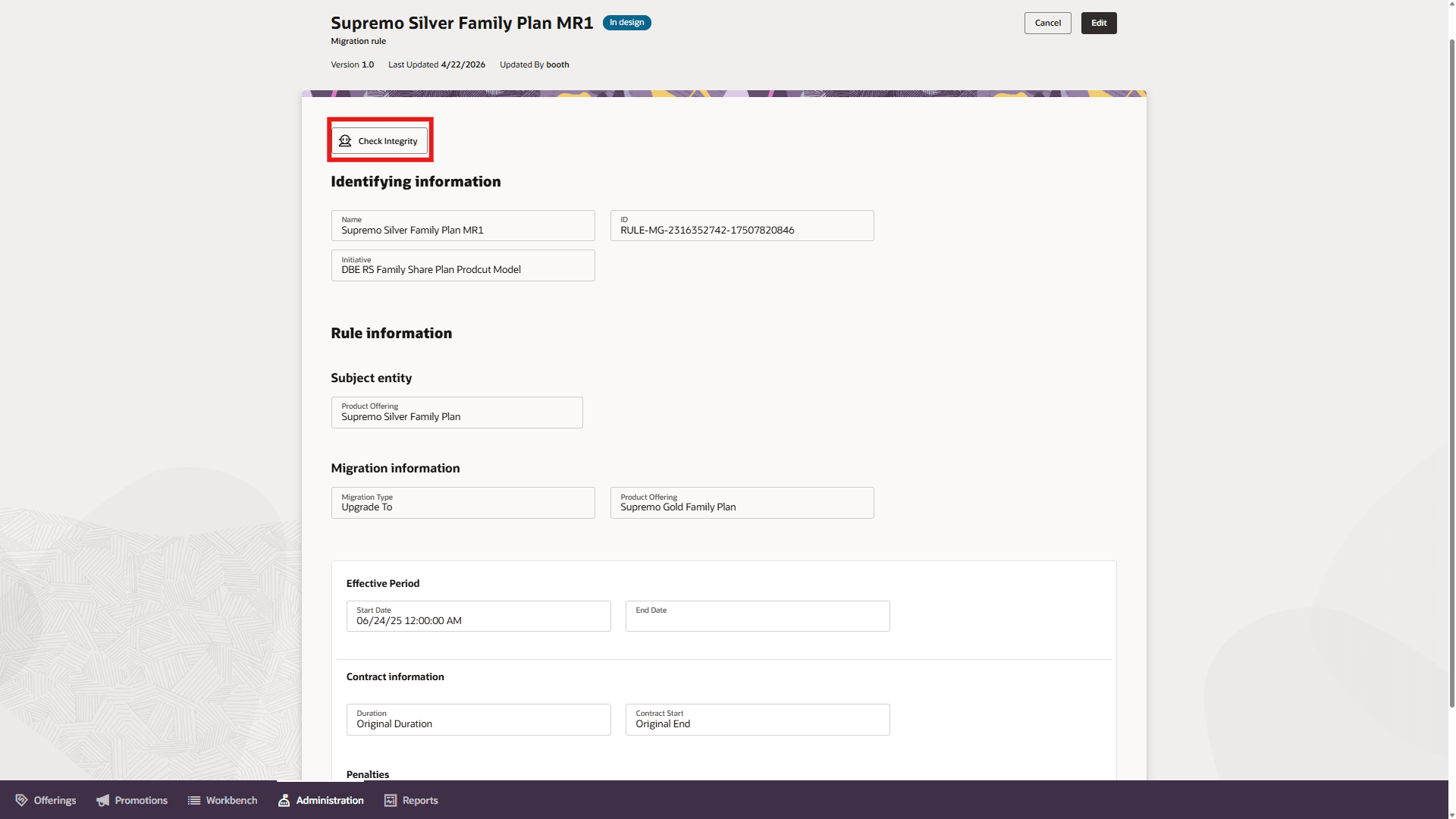
Invocation of Rules Integrity Check AI Agent
Upon invocation of the AI Agent, it validates the rule to mark it valid or invalid. In addition it provides explanation of what makes the Rule invalid along with details of potential issues, warnings and recommendations and suggestions to address the same. The following example figure shows the findings of the Rules Integrity Check AI Agent:
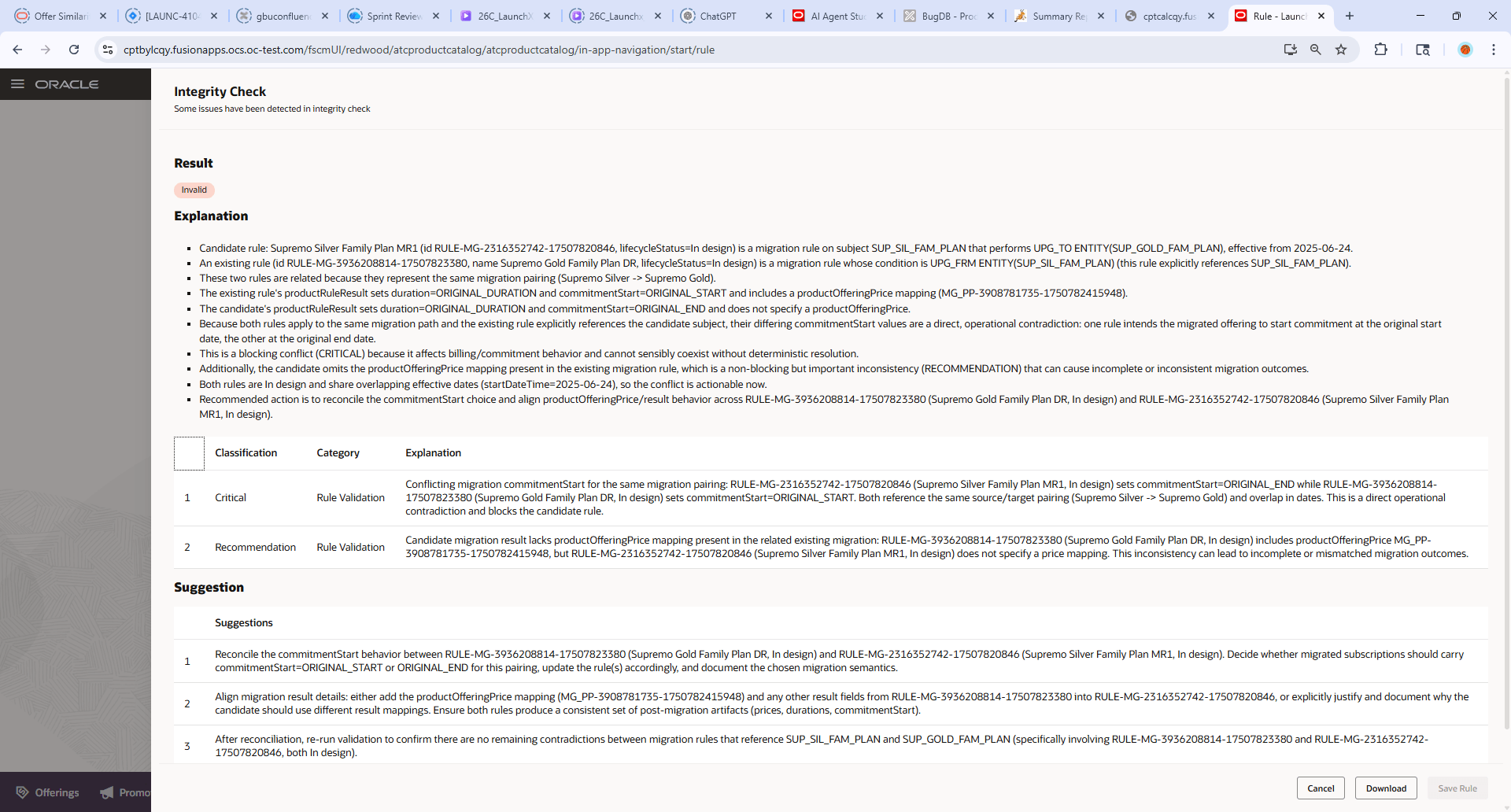
Results of Rules Integrity Check AI Agent
- Improved catalog Quality & Consistency
- Prevents conflicting, duplicate, or incompatible rules and attributes
- Ensures alignment across product, pricing, and eligibility logic
- Faster Time-to-Market with Reduced Rework
- Detects issues early (pre-commit) instead of post-deployment
- Provides actionable recommendations and fixes
- Reduced Operational Risk & Revenue Leakage
- Identifies risky or contradictory rules that could lead to invalid bundles or offers
- Ensures compliance with compatibility and constraint logic
Steps to enable and configure
You can use AI Agent Studio to use or copy a preconfigured agent template to create agents for your business processes. To automatically add a suffix to all artifacts in your agent team, you can Copy Template instead of Use Template. When you copy a template, you're directly taken to the agent team canvas where you can edit the agent team settings, agents, tools, and topics. The Use Template option takes you through a step-by-step process for configuring each artifact in the agent team.
For information on using AI Agent Studio, see How do I use AI Agent Studio?
Follow these steps to enable this functionality:
- In the AI Agent Studio, search for the template named Rule Integrity Advisor, and copy it.
In the Copy Template dialog box, enter an agent team suffix, and select Continue.
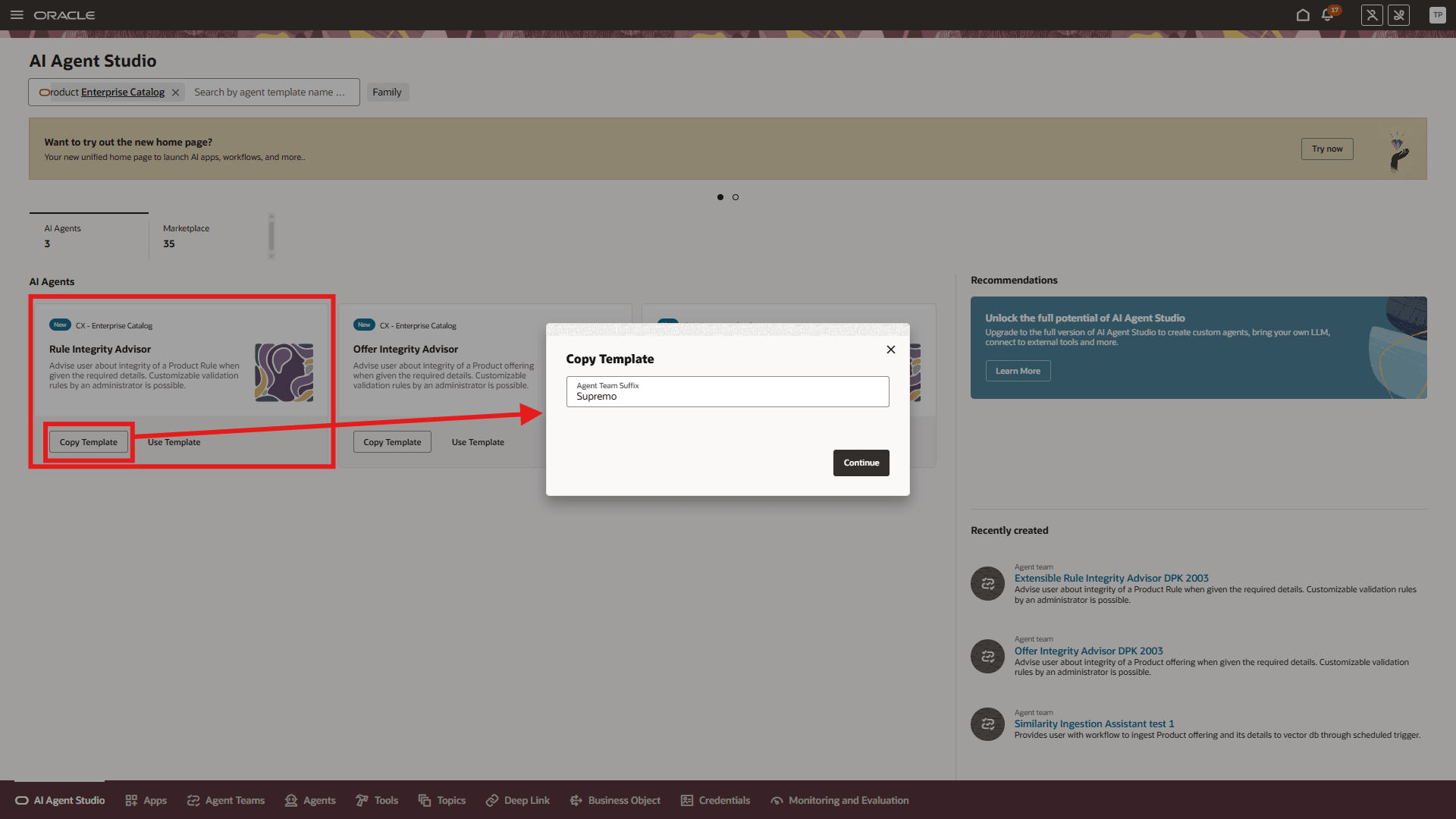
Template Named Rule Integrity Advisor in AI Agent Studio
- Publish the draft Agent team
- Enable the UI to invoke this custom agent. Make a note of the newly copied Agent Team's code and version and add it to the "Rule Integrity Agent Configuration" parameter in the Business Configurations tile as shown below:
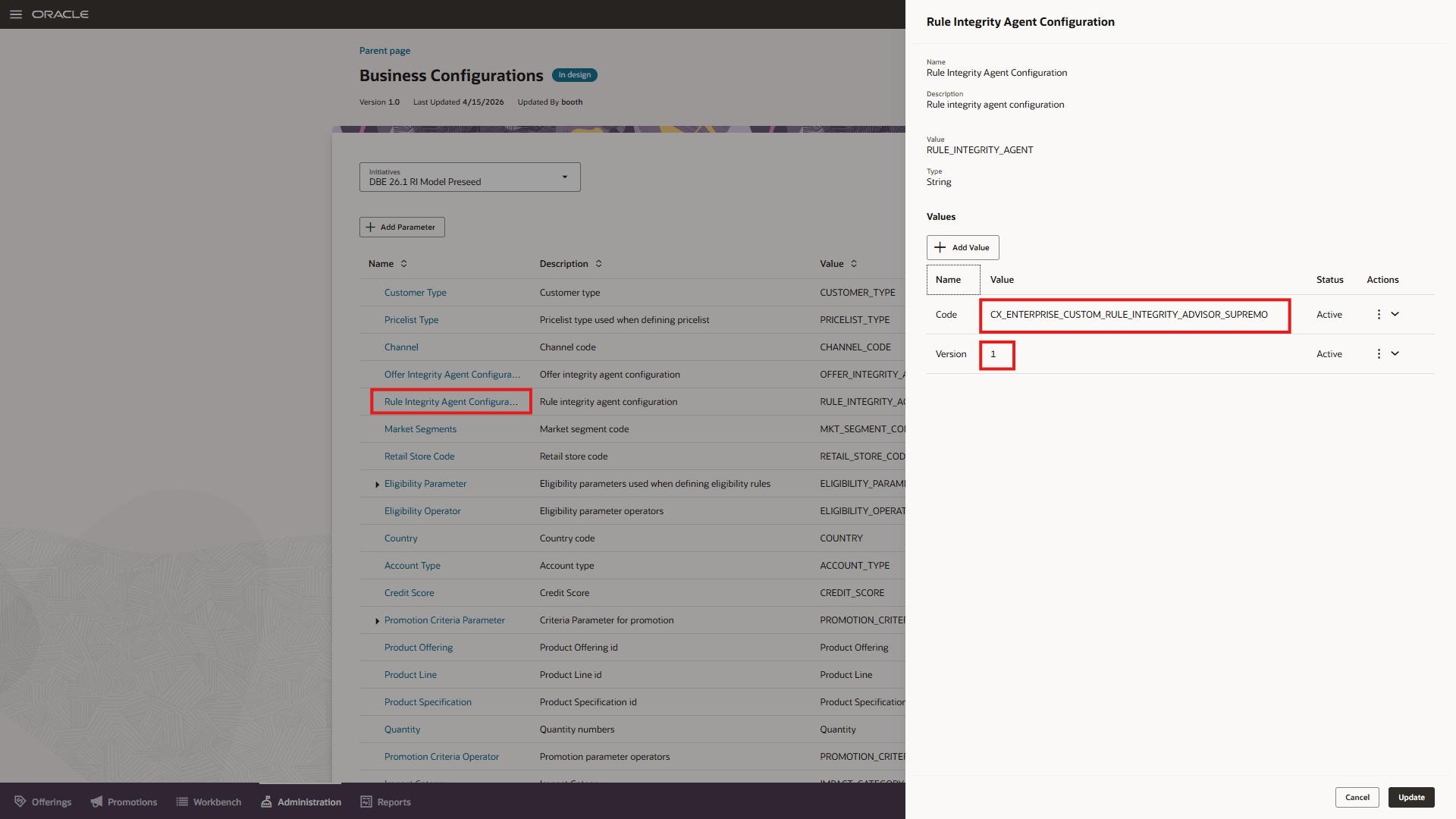
Business Configuration Changes for invocation of the custom Agent
- Enable the automated invocation of the Agent while saving the rule or while confirming the design of the rule. You need to ensure the two parameters are set for Business Configuration parameter as "Agent Profile Options" . Please note that this change is not just restricted to Rules Integrity Advisor and is in general for any Agents today such as Offer Integrity Advisor Agent and for any new Agents in the future.
- Verify the Rule Integrity Agent can be invoked from the Rules Page.
Key resources
- For information of getting started with AI Agents, see Oracle AI for Fusion Applications - Get Started
- For information on using AI Agent Studio, see How do I use AI Agent Studio?
- For information on the access requirements for AI Agent Studio, see Access Requirements for AI Agent Studio.
- For guidance on how to create AI agents, see Create AI Agents.
Access requirements
To access the Oracle AI Agent Studio for Fusion Applications and manage Launch AI agents, users must be assigned a custom job role that contains specific duty roles. Please follow the steps below to configure the two roles.
Configure Launch AI Agent Admin User Role
- Navigate to the Security Console and create a new custom job role titled "AI Agent Launch Admin Role"
Note - Make sure to enable permission groups.
- On the Role Hierarchy page, open the Roles and Privileges tab and add these roles:
- Manage CX AI Agents (ORA_ZCA_MANAGE_CX_AI_AGENTS)
- Manage CX AI Agents (ORA_ZCA_MANAGE_CX_AI_AGENTS_HCM)
- Open the Roles and Permission Groups tab and add the below duty role.
- Fai Genai Agent CX Administrator Duty (ORA_DR_FAI_GENERATIVE_AI_AGENT_CX_ADMINISTRATOR_DUTY)
- Save the custom role and assign this custom role to the "Communications Catalog Administrator" job role.
Configure Launch AI Agent Product Manager User Role
To interact with AI agents on Launch product pages, users must be assigned a configured job role that contains specific duty role. Please follow the steps below to configure it.
- Navigate to the Security Console and create a new custom job role titled "AI Agent Launch User Role"
Note - Make sure to enable permission groups.
- On the Role Hierarchy page, open the Roles and Privileges tab and add these roles:
- Manage CX AI Agents (ORA_ZCA_MANAGE_CX_AI_AGENTS)
- Manage CX AI Agents (ORA_ZCA_MANAGE_CX_AI_AGENTS_HCM)
- Open the Roles and Permission Groups tab and add the below duty role
- Fai Genai Agent Runtime Duty (ORA_DR_FAI_GENERATIVE_AI_AGENT_RUNTIME_DUTY)
- Save the custom role and assign this custom role to the following job roles.
- Communications Catalog Product Manager
- Communications Catalog Marketing Manager
See Access Requirements for AI Agent Studio (for administrators) and How can I give users access to AI agents (for end-users) for more information.
For further AI Agent configuration and set up, please review the AI Agent Studio Guide https://docs.oracle.com/en/cloud/saas/fusion-ai/aiaas/index.html
See Access Requirements for AI Agent Studio (for administrators) and How can I give users access to AI agents (for end-users) for more information.