Joint Venture Account Sets Classification
Classify joint venture account sets according to their intended purpose, such as distributable, distribution-only, or billable asset accounts in a joint venture, or for use in overhead, partner contributions, and ownership definition assignment rules. This streamlines the selection of relevant account sets when configuring various joint venture processes—including joint venture definitions, ownership definition assignment rules, overhead methods, and partner contributions—by displaying only those account sets that match the context in which they are being used.
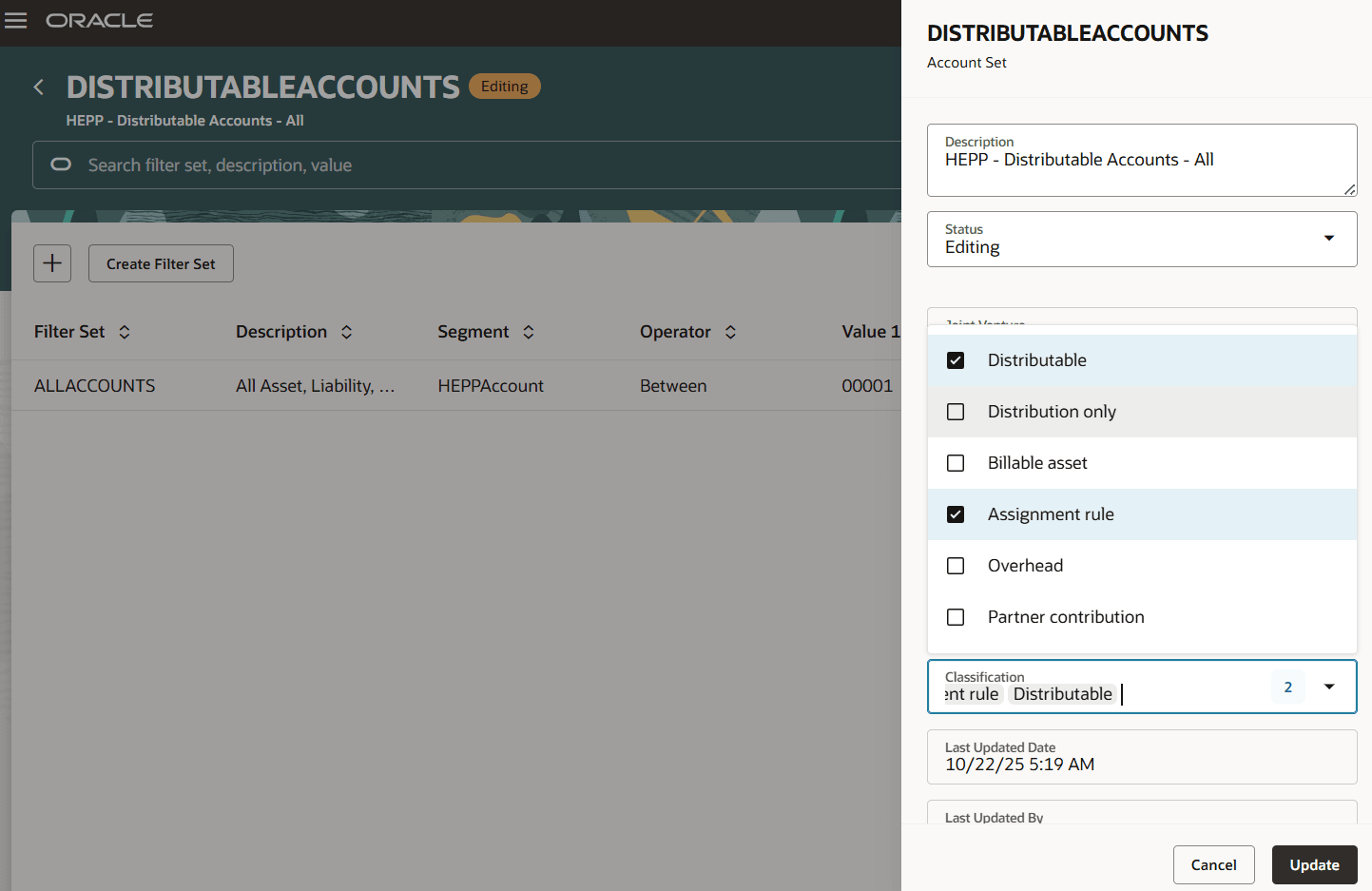
Account sets classification
Joint venture administrators and accountants can assign one or more classifications when creating or updating an account set. These classifications determine where the account set will be available for selection in different joint venture applications.
Business benefits include:
- Reduces complexity and administrative overhead by helping joint venture accountants focus only on relevant account sets for each joint venture application or process.
- Provides users with a streamlined setup and improved accuracy when configuring joint venture processes.
- Helps minimize the risk of selecting incorrect or irrelevant account sets.
- Supports better compliance and data management.
Steps to enable and configure
No opt-in or special activation is required for this feature. You can continue using current account set management functionality, with the added ability to classify and filter account sets as described below:
- In Setup and Maintenance, access the Joint Venture Management functional area in Financials and select the Manage Joint Venture Account Sets task.
- Add or edit an account set. In the side panel, complete the “Classification” section by selecting one or more of the following classifications as appropriate:
- Distributable
- Distribution only
- Billable asset
- Assignment rule
- Overhead
- Partner contribution
- Save the account set and return to the Account Sets page where you can view and sort on classification attributes.
- Note that when configuring joint venture definitions, ownership definition assignment rules, overhead methods, or partner contributions, only account sets that are categorized for the relevant configuration or account sets without any classification will appear in the list of account sets available for selection.
Tips and considerations
- Classifications can be set or changed on both new and existing account sets.
- Classifications determine which account sets are available for selection in a particular joint venture setup, reducing the chance of irrelevant selections.
- There is no filter capability on the classification attribute in the download filter page, but sorting is available in the UI.
Key resources
For more information, refer to:
- Implementing Joint Venture Management guide and
- Using Joint Venture Management guide.
Access requirements
The privilege required for access is Manage Joint Venture Account Sets, which is included as part of the Joint Venture Application Administrator role.