 Prevention of Self-Review and Completion of Receivables Transactions
Prevent users from reviewing and completing their own submitted transactions. Even if a user is explicitly designated as an approver, they will be restricted from approving their own transactions. By preventing self-approval, the application maintains proper segregation of duties, minimizes the risk of fraud, and promotes accountability.
This 26A feature offers additional functionality for feature Receivables Transaction Review and Control delivered in release 24D.
The table below lists examples where invoices cannot be approved by the initiator of the transaction even if they have approving authority. The reference to invoice in the table specifically represents a Receivables invoice.
| Initiator | Approver | Outcome |
|---|---|---|
| Amy Marlin creates an invoice. | Amy Marlin is assigned as the approver in Receivables Transaction Approval Rules spreadsheet (SRC sheet) | Amy Marlin will not be able to approve her own transaction. |
| Sandra Vikholm creates an invoice. | Same as above | Amy Marlin will be able to approve Sandra Vikholm's transaction. |
| Amy Marlin creates an invoice | Amy Marlin is assigned the role that allows approving Receivables Transactions. | Amy Marlin will not be able to approve her own transaction |
| Sandra Vikholm creates an invoice | Same as above | Amy Marlin will be able to approve Sandra Vikholm's transaction. |
| Amy Marlin creates an invoice | Amy Marlin is assigned the role that allows force-approving Receivables Transactions. | Amy Marlin will not be able to approve her own transaction |
| Sandra Vikholm creates an invoice | Same as above |
Amy Marlin will be able to approve Sandra Vikholm's transaction. |
For the transactions Amy Marlin can approve, she will see the actions Approve and Rework on the Pending Approval transactions
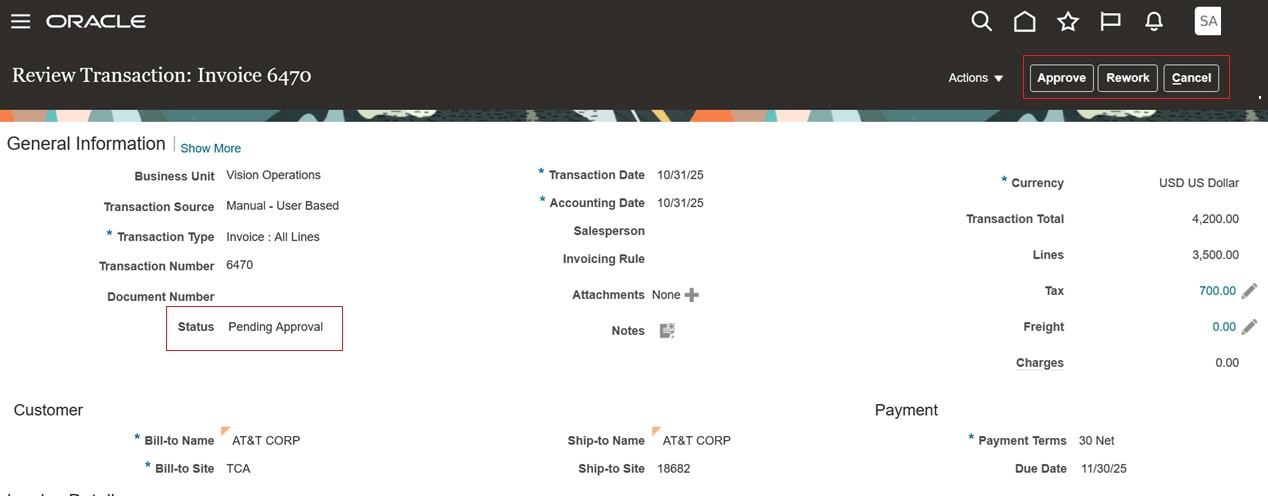
Approve Receivables Invoice
For the transactions Amy Marlin has initiated, she will not see the Approve and Rework actions even if the transaction is in Pending Approval status.
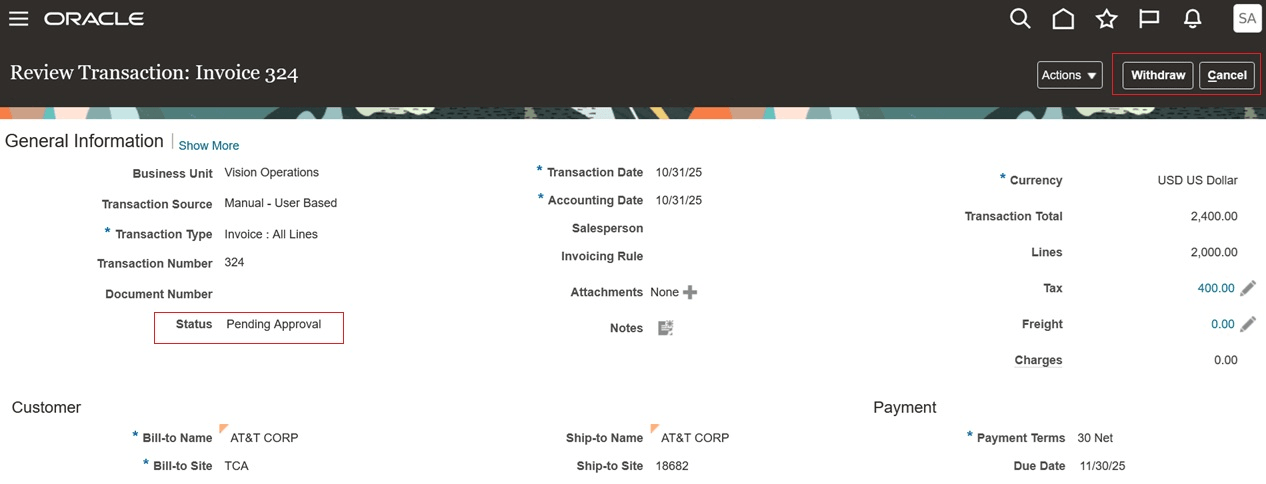
Prevent Self-Approval of Receivables Transaction
These are the business benefits:
- Maintains proper segregation of duties.
- Minimizes the risk of fraud.
- Enforces accountability.
Steps to enable and configure
Use the following steps to enable the feature:
- Navigate to the Setup and Maintenance work area.
- Search for the Manage Receivables Profile Option setup page
- Search for the profile option code ORA_AR_ALLOW_SELF_APPROVAL
- Set the value to No at the Site level to prevent self-approval of transactions.
Tips and considerations
- Because by default users can approve transactions they created or submitted, it is important to set the profile option ORA_AR_ALLOW_SELF_APPROVAL to No to maintain the integrity of Control of Transaction Completion
- Attempting self-approval with the restriction enabled will result in a system message, and the transaction will require force approval by another approver.
Key resources
- Control of Transaction Completion Overview
- Control of Transaction Completion Setup
- Based on Idea 907528 from the Receivables & Collections Idea Lab on Oracle Cloud Customer Connect.
- For more information on Receivables transaction review and control, refer to Receivables Credit to Cash documentation from Oracle Help Center.
Access requirements
No new access requirements.