 Award-Specific Viewer Access
Assign view-only access to specific awards, rather than access to all awards within a business unit. For example, a user can have edit access to one award while having view-only access to another award. This feature enhances transparency by allowing the award team to view award details as needed, without granting unnecessary editing permissions.
The award-specific view access is driven by a new data security privilege and condition, assigned to the user using a custom job role and custom project role if needed or the Award Participant seeded project role.
As in the example below, Lisa Collins is assigned a custom project role Award Member.
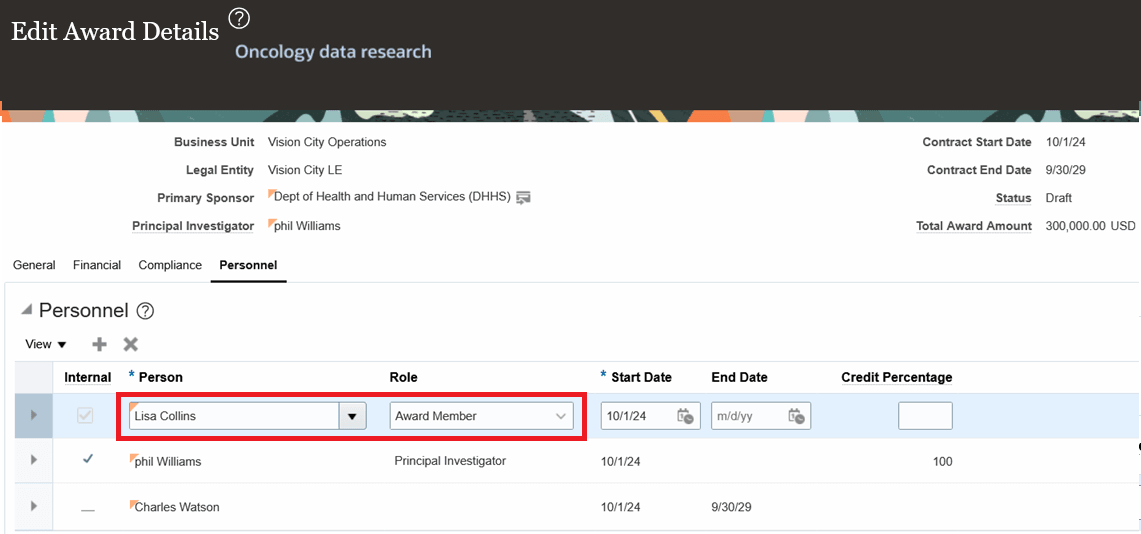
Assign user to custom project role in Award Details page
The Award Overview page for Lisa Collins displays in read-only mode.

Read-only view of the Award Overview page
The business benefits of this feature are:
- Enhanced Data Security: Restricts award data exposure.
- Improved Collaboration: Enables the entire award team to have visibility into relevant awards without editing rights.
- Operational Clarity: Prevents accidental updates or changes to awards outside a user’s scope.
Steps to enable and configure
To use this feature:
- As a project application administrator, create a custom project role (ex. Award Member) in the Manage Project Roles page. You can use a placeholder enterprise role for now, which you will update later.
- As an application administrator, create a data model using Oracle BI Publisher and query for PJF_PROJ_ROLE_TYPES_B.PROJECT_ROLE_ID and note the internal identifier of the project role.
- As a user having access to Security Console, create a custom data condition. Modify the specific condition highlighted in the screenshot to provide the project role ID of the custom project role created in Step 1.

Custom data condition
NOTE: If using the existing Award Participant project role, you do not need to create the custom condition. The existing data condition (ORA_GMS_RO_DIRECT_AWARD_IS) can be used.
Here is the sql predicate:
&TABLE_ALIAS.ID in (SELECT ID FROM ( SELECT AwardPersonnelEO.AWARD_ID AS ID
FROM GMS_AWARD_PERSONNEL AwardPersonnelEO,
  (SELECT ProjectRoleTypePEO.PROJECT_ROLE_ID,
    PerUserPEO.person_id
  FROM PJF_PROJ_ROLE_TYPES_b ProjectRoleTypePEO,
    PER_USERS PerUserPEO,
    per_user_roles PerUserRoles,
    FND_SESSION_ROLE_SETS SROLE,
    per_roles_dn_vl RolePEO
  WHERE PerUserPEO.person_id     =  hrc_session_util.get_user_personid
  AND PerUserRoles.user_id     =  PerUserPEO.user_id
  AND PerUserRoles.role_id    =  RolePEO.role_id
  AND SROLE.SESSION_ROLE_SET_KEY = FND_GLOBAL.SESSION_ROLE_SET_KEY
  AND SROLE.ROLE_NAME   =  RolePEO.ROLE_COMMON_NAME
  AND ProjectRoleTypePEO.ROLE_ID = RolePEO.role_id
  AND (TRUNC(SYSDATE) BETWEEN TRUNC(ProjectRoleTypePEO.START_DATE_ACTIVE) AND TRUNC(NVL(ProjectRoleTypePEO.End_DATE_ACTIVE,SYSDATE)))
  AND  ProjectRoleTypePEO.PROJECT_ROLE_ID = <Provide the project role ID of the custom project role created in Step 1>
  ) READ_PI_ROLE_USER
WHERE AwardPersonnelEO.ROLE_ID  = READ_PI_ROLE_USER.PROJECT_ROLE_ID
AND AwardPersonnelEO.personnel_id = READ_PI_ROLE_USER.person_id
AND (TRUNC(SYSDATE) BETWEEN TRUNC(AwardPersonnelEO.START_DATE) AND TRUNC(NVL(AwardPersonnelEO.END_DATE,SYSDATE)))) WHERE ID = &TABLE_ALIAS.ID)
- Create a custom job role (ex. Award Viewer) and ensure the following functional security privileges are associated with the custom job role.
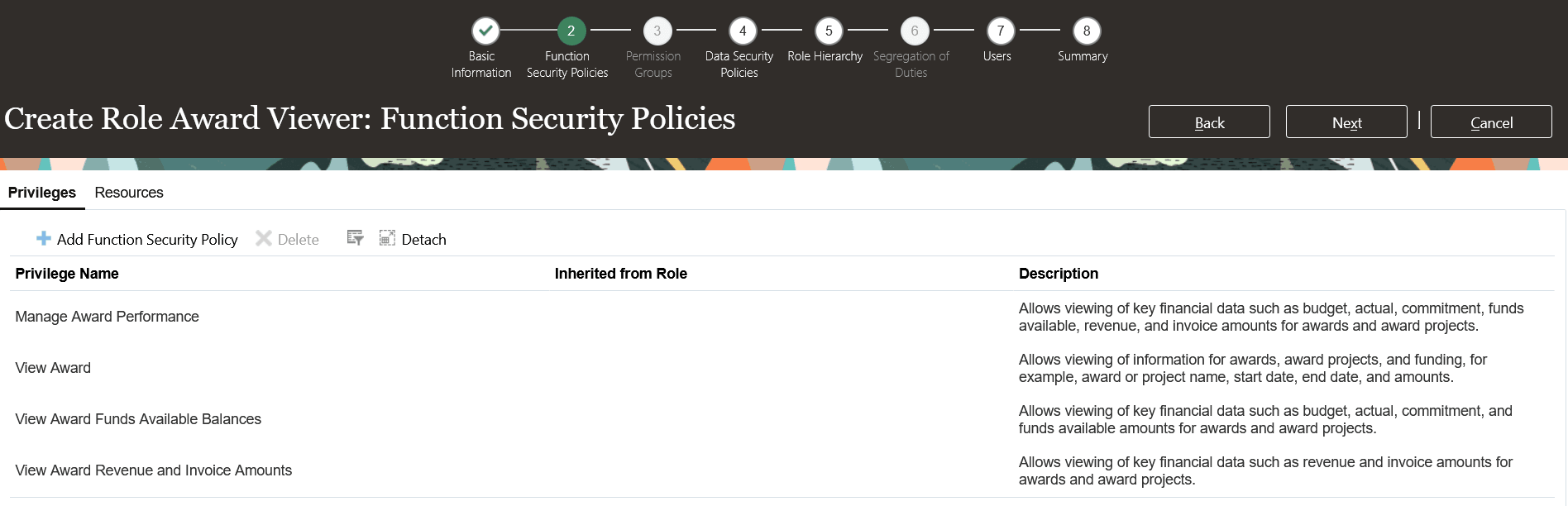
Add the functional security privileges
- Add the following data security privileges and conditions.
-
The View Award Data (GMS_VIEW_AWARD_DATA) privilege with the data security condition created in Step 2.
-
Read Only Award Data (GMS_READ_ONLY_AWARD_DATA) privilege with the data security condition created in Step 2.
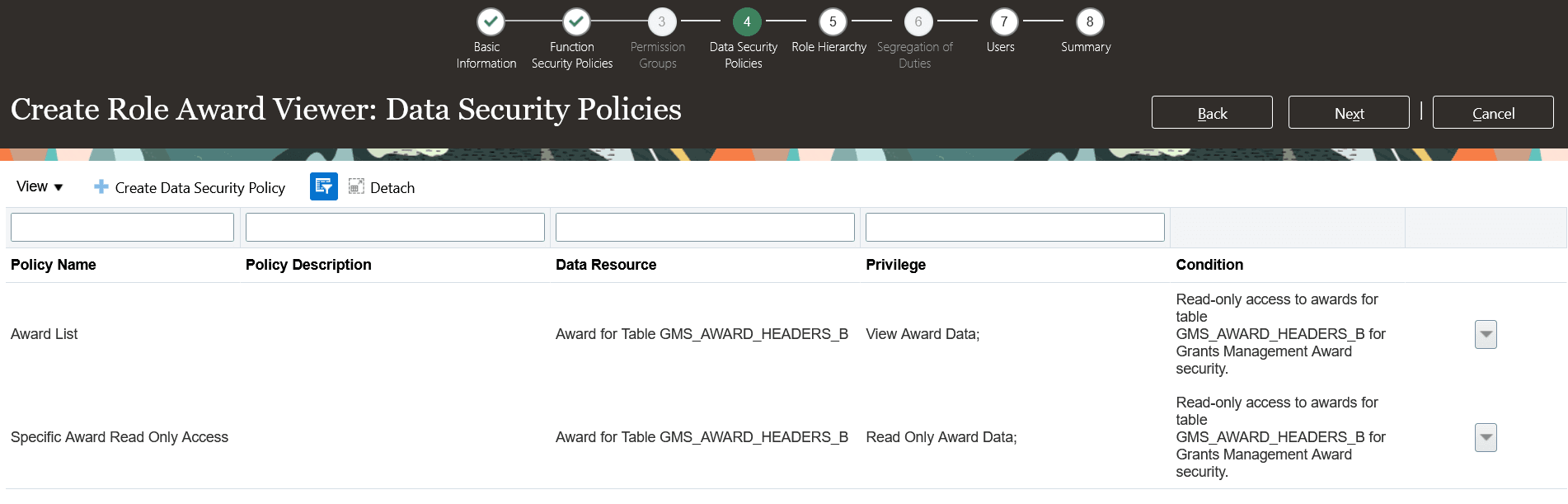
Associate the View Award Data and Read Only Award Data
- Assign the above custom job role to user.
- As a project application administrator, assign the above custom job role (ex. Award Viewer) to the custom project role (ex. Award Member) in the Manage Project Roles page.

Manage Project Roles
- As a user having edit access to the award, assign the project role to the users on specific awards in the Award Personnel region of the Manage Awards page.
Tips and considerations
-
This enhancement adds differentiated access at the award level, specifically for view-only access and does not modify any of the existing access such as the business unit–level or award organization-level or award-level edit access.
-
The existing View Award Data (GMS_VIEW_AWARD_DATA) privilege drives the access to all awards and the new Read Only Award Data (GMS_READ_ONLY_AWARD_DATA) privilege determines read-only access to specific awards.
- Award-level view-only access applies only within the award-related pages within Grants Management. Users may still be able to perform adjustments on the Manage Project Costs page if they have edit privileges in Project Costing. Review user access across both Grants Management and Project Costing to ensure consistent behavior.
Key resources
- Based on Idea 703728 from the Project Management Idea Lab on Oracle Cloud Customer Connect.
Access requirements
Follow the instructions mentioned in Steps to Enable and Configure.