Purge Expired Outbound and Inbound Message Files from the Oracle Content Repository
Oracle Collaboration Messaging stores integration artifacts in specific repository accounts. Over time, these files can accumulate, driving storage growth and slowing down queries, which can impact overall processing performance.
You can use the Run Data Lifecycle Process for Collaboration Messaging job to remove outdated message files from the Oracle Content Repository to maintain repository hygiene and prevent operational slowdowns.
You now have:
- Sustained performance and reliability: Prevent repository accounts from growing unbounded, reducing query slowdowns that can degrade Collaboration Messaging operations like export or import, monitoring, and troubleshooting.
- Improved system hygiene and risk reduction: Keep repository content manageable, reducing the chance of timeouts, long-running queries, and backlog-related incidents.
Steps to enable and configure
Here's how you can clean up accumulated files:
- From the Scheduled Processes area, schedule the Run Data Lifecycle Process for Collaboration Messaging job. The Process Details dialog is displayed.
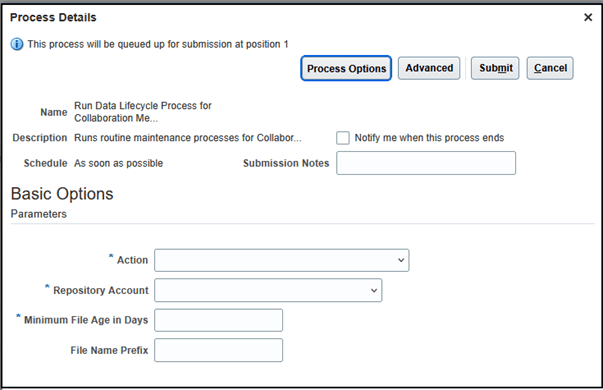
Run Data Lifecycle Process for Collaboration Messaging
- Here are the fields available:
- Action - A mandatory field used to select the maintenance action to run the Purge Aged Messaging Files from Content Repository job.
- Repository Account - A mandatory filter that scopes which content items are targeted by the purge job. Only documents stored under the selected account are eligible for selection and deletion.
- Minimum File Age in Days - A mandatory filter that sets the minimum age a document must be before it’s eligible for deletion. For example, if the minimum file age is 30 days, only documents 30 days old or older are eligible for deletion.
- File Name Prefix – An optional filter that limits which items are eligible for deletion. Only documents with the entered text as a prefix are eligible. For example, if the document title begins with ValidateBrazilNFe, only documents titled ValidateBrazilNFe-3.10-… and so on are eligible.
- Select Submit. The scheduled process ID is displayed. The log summarizes the outcome with these counts:
- Repository items marked for deletion
- Repository items successfully deleted
- Repository items that failed, if any
Tips and considerations
- If File Name Prefix isn't provided, the job will delete all the files in the Repository Account selected.
- The Minimum File Age in Days parameter enforces a minimum value of 30 days to prevent accidental deletion of recently created files.
- The following Content Repository accounts are available for selection:
- scm$/CMKOutboundMessageQueue$/export$: Account where outbound Collaboration Messaging files are stored.
- scm$/BrazilSEFAZPartnerMessages$/export$: Account where Brazil SEFAZ outbound Collaboration Messaging files are stored.
- scm$/BrazilSEFAZSupplierMessages$/import$: Account where files for importing Brazil SEFAZ supplier and message-related data are located.
- scm$/BrazilSEFAZPartnerMessages$/import$: Account where files for importing Brazil SEFAZ partner and message-related data are located.
- scm$/B2BConfiguration$/import$: Account where files for importing Collaboration Messaging configuration data are located.
- Consider scheduling the job to run during off-peak hours to minimize performance impact on other supply chain operations.
Access requirements
Users who are assigned a configured job role that contains this privilege can access this feature:
Manage Collaboration Message Definitions by Web Service (CMK_MANAGE_COLLAB_MESG_DEFINITION_WEB_SERVICE_PRIV).
This privilege was available prior to this update.