Report Sales Order Import Errors
You can now view Oracle Order Management failure or error notifications for inbound PO messages submitted via Collaboration Messaging (Purchase Order, Purchase Order Change, and Purchase Order Cancellation). These notifications are generated after the Import Sales Orders scheduled process runs, so the Messaging History page reflects the final processing outcome when a failure occurs.
This feature provides accurate end-to-end status visibility. Previously, a transaction would be marked as a success when the inbound message was staged, even if the business processing failed at a later stage. Now, the log is updated with the actual final outcome and error details, ensuring the page reflects the true downstream processing result.
Steps to enable and configure
- Perform the following high-level tasks to set up your documents:
- Define your providers.
- Create connections.
- Assign properties to your inbound order documents.
- Add Customer Messaging properties.
- Process an inbound order. The inbound order message will display a Delivery in progress status when the Load Interface File for Import scheduled process is running.
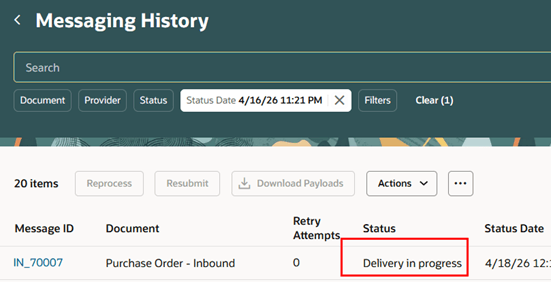
Messaging History Showing a Delivery in Progress Status
3. Run the Import Sales Orders scheduled process when the message status changes to Success. If the scheduled process ends in error, the inbound order message status will be updated to Error.
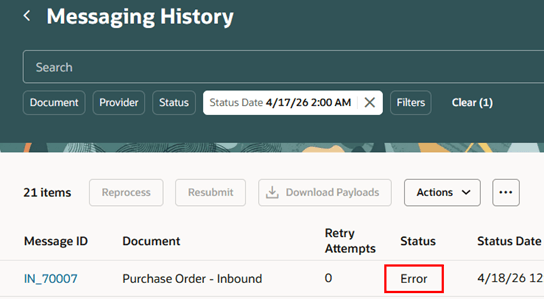
Messaging History Showing an Error Status
4. Errors reported by the Import Sales Orders scheduled process are displayed under Processing History > Error Description.
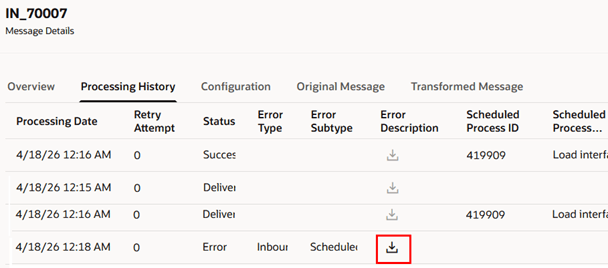
Errors Reported by the Import Sales Orders Scheduled Process
Tips and considerations
- If the Import Sales Orders scheduled process encounters validation or processing errors, the failure or error notifications are sent after it is run.
- Successful processing does not generate notifications. Visibility into successful processing continues to rely on existing Collaboration Messaging event or acknowledgement functionality when configured..
- If multiple messages reference the same source order number due to revisions or duplicate order creation, the system applies the error update to the most recently created message.
- As part of this feature, error messages for sales orders created in Draft status are also displayed in the Messaging History page.
- If an error generated by the Import Sales Orders scheduled process includes a sales order line reference, Collaboration Messaging displays it as a line-level error in the sales order line error description. If no line reference is included, Collaboration Messaging displays it as a header-level error.
- If the FOM_IMPORT_VIA_REST_BACKEND profile option is enabled, Order Management logs all errors during the Import Order process. If it isn’t enabled, the import stops at the first error. You may not see all errors in a single run. This is existing Order Management functionality.
- Order-to-cash inbound documents require Customer Messaging properties for proper partner and BU identification and processing.
- For order-to-cash inbound documents, you can configure the document to submit the Load Interface File for Import scheduled process when purchase orders are received:
- Enable the Document properties property group.
- Set Initiate Load Interface File for Import on receipt of orders to Yes.
- Order-to-cash inbound messages will display a status of Delivery in progress:
- When Initiate Load Interface File for Import on receipt of orders is set to Yes. No failure or error notifications are sent while the message remains in this status.
- Run the Import Sales Orders scheduled process once the message status changes to Success.
- If Initiate Load Interface File for Import on receipt of orders isn’t enabled, you must run both the Load Interface File for Import and Import Sales Orders scheduled processes manually.
Access requirements
Users who are assigned a configured job role that contains this privilege can access this feature:
- Manage B2B Message Transactions using a REST Service (CMK_B2B_MESG_TRXN_REST_SERVICE_PRIV).
This privilege was available prior to this update.