Project Cost Exceptions Assistant
Identify and analyze unprocessed project cost exceptions using natural language requests. The assistant streamlines exception investigation and resolution by summarizing and categorizing exceptions and proposing resolution options for each type of exception.
The assistant helps project accountants work more efficiently when investigating project cost exceptions by making it easier to locate relevant exception transactions and review the context needed for follow-up action. For example, users can request cost exceptions based on many filterable attributes, such as business unit, transaction source, project, cost organization, cost type, and others.
The assistant summarizes exceptions matching your filter criteria into meaningful categories, such as Project Definition, Rate Definition, Accounting Period, and so on. For example, the Project Definition category includes all exceptions related to project configuration, such as transaction dates falling outside the project start and finish dates, transaction dates outside the task transaction start and finish dates, project statuses that don’t allow new transactions, project-level transaction, and control exceptions.
Project accountants can drill down to the unique exception types associated with an exception category. From an exception type, users can then drill down to a summary of exceptions grouped by the key attributes relevant to the exception type. When displaying exception details, the assistant also provides a list of possible resolution options for the exception type.
Example Flow
Katie, a project accountant responsible for three business units, is preparing for month-end close and wants to clear rejected unprocessed project cost transactions for one of her business units before downstream activities, such as billing and revenue recognition.
She navigates to the Agent Explore area and initiates the Project Cost Exceptions Assistant. She requests to see all unprocessed project cost exceptions for the business unit that is closing its project accounting period first.
The assistant retrieves all unprocessed project cost exceptions that meet her search criteria, groups the exceptions into meaningful categories, and displays this summary with record counts for each category.
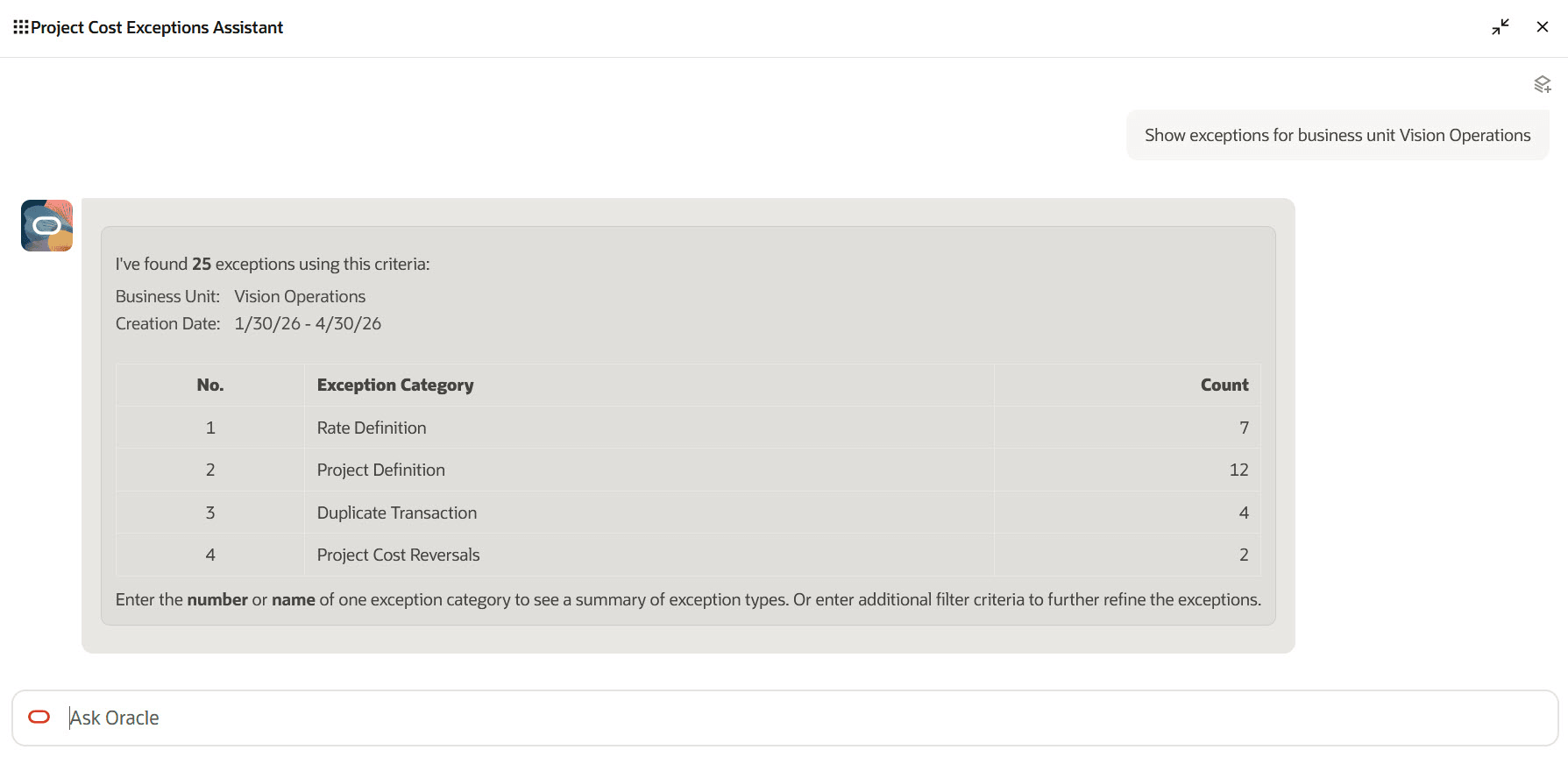
Exceptions Summarized by Exception Category
Katie wants to explore the exception types associated with the seven exceptions in the Rate Definition category. She enters either the name of the category or the corresponding row number in the table to instruct the assistant to drill down to the exception types for that category.
The assistant displays the seven exceptions by exception type, using the error message text to describe the reason for each exception. It also automatically adds the Rate Definition exception category to the filter criteria.
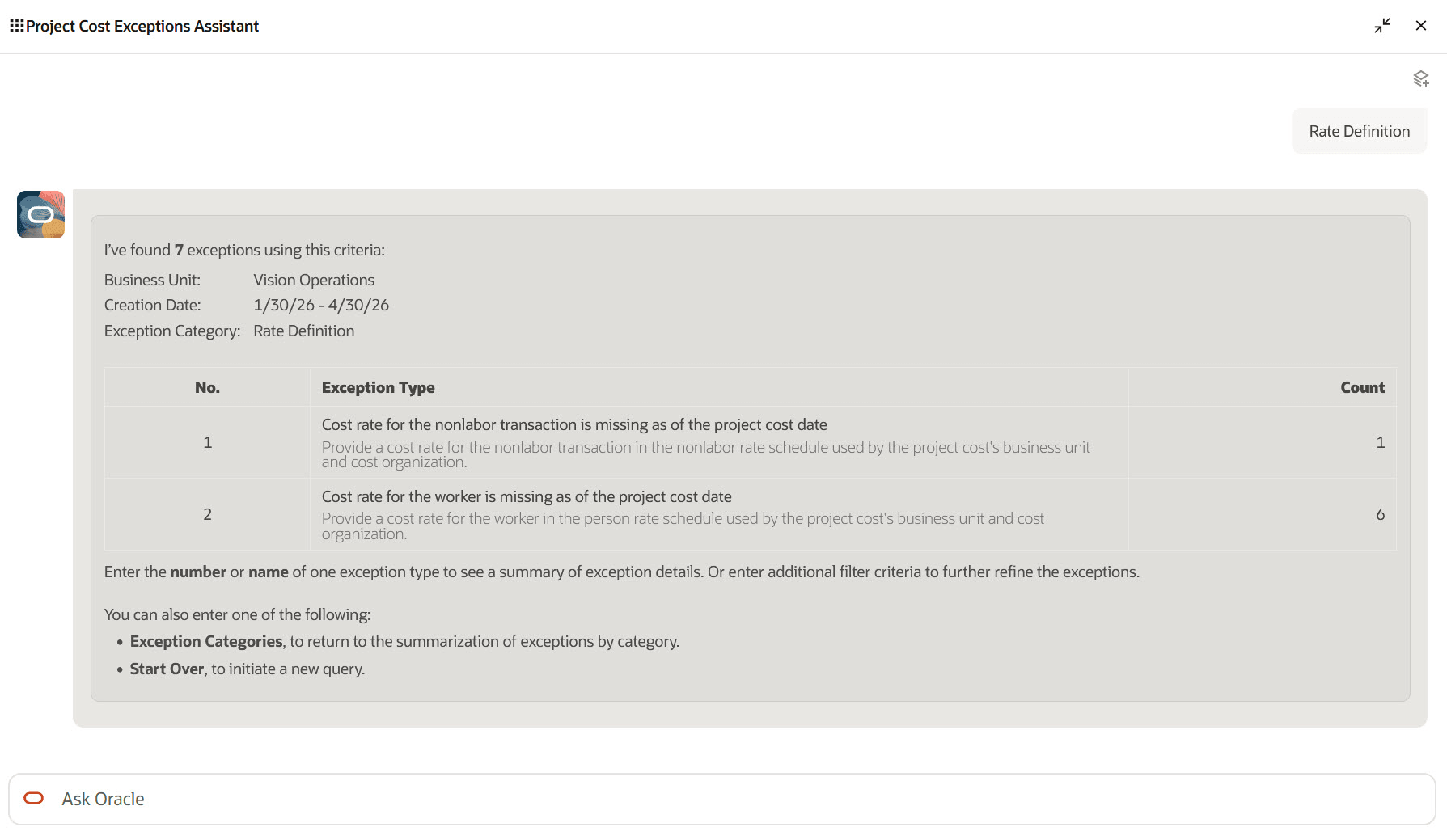
Exceptions for an Exception Category Summarized by Exception Type
Katie wants to review details for the missing worker cost rate exception type, so she asks to display details for this type.
The assistant selects all missing worker cost rate exceptions and groups them by the key attributes relevant for that exception type: Worker, Rate Schedule, and Transaction Date (or date range). A deep link to the unprocessed cost transaction record in the Manage Unprocessed Costs page is provided whenever there's only one record found for a particular grouping.
Below the displayed exception details, the assistant lists the possible resolution options for the exception type.
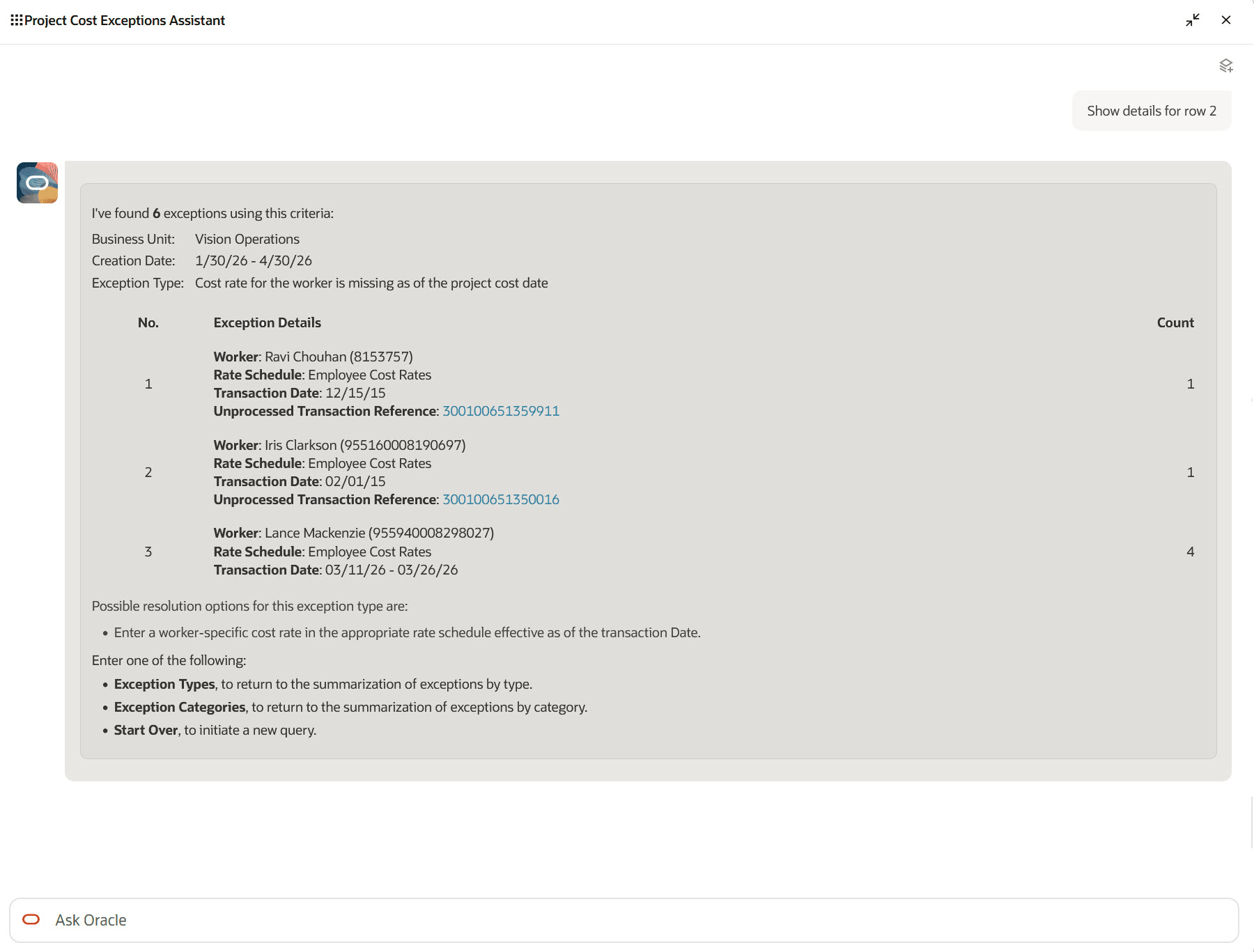
Summarized Exception Details for an Exception Type
NOTE: To align with the terminology change from Project Expenditure Item to Project Cost Transaction, Expenditure Type and Expenditure Organization will transition to be referred to as Cost Type and Cost Organization respectively.
These are the business benefits of the Project Cost Exceptions Assistant:
- Reduces manual effort required to investigate rejected and unprocessed project cost transactions.
- Helps project accountants identify patterns across exceptions instead of reviewing each transaction individually.
- Speeds issue triage during period close so downstream processes can begin on time.
- Improves project financial accuracy by helping users resolve cost ingestion issues more efficiently.
- Makes it easier to retrieve exceptions through natural language instead of relying only on rigid page filters and fixed groupings.
Here's a demo of these capabilities:
Steps to enable and configure
Project Cost Exceptions Assistant role is needed to use the assistant within the AI Agent Studio. Refer to the Access Requirements section for details.
Tips and considerations
- The assistant queries and analyzes exceptions recorded by the Import Costs process. Other project cost exceptions, such as burdening, adjustments, labor distribution, and borrowed and lent, aren't currently supported.
- Only Import Cost errors are considered; warning messages aren't included in the scope for the assistant.
- The assistant proposes possible resolution options for each exception type, but it can't currently perform corrective actions.
- Access to unprocessed project cost exception records is controlled by existing user data access configuration by business unit.
- By default, the assistant queries unprocessed project cost exceptions created in the last 90 days, unless you specify otherwise or request to remove this filter in your input.
- Start requests with a clear action word, such as Get, Show, or Find.
- Avoid ambiguous requests, such as "Show data for project ABC". Instead, include key words, such as "exceptions" or "configuration", in your requests so that your intention is clear. For example, use "Show exceptions for project ABC" when you want to query unprocessed project costs for the project, and use "Show configuration for project ABC" when you want to see the setup or configuration details of the project.
- When including filter criteria in a request, provide both the business object and the search value to avoid ambiguity. For example, use "Show me exceptions for project ABC" instead of "Show me exceptions for ABC".
- Non-date attributes are searched using a case sensitive, partial match. For example, "Show exceptions for project Abc" would match projects "Abc", "Abcd", and "PAbc", but it wouldn't match project "abc".
- Submit requests in English, as the assistant currently supports English only.
Key resources
Access requirements
Take the following steps to provide users access to the Project Cost Exceptions Assistant.
A) Users Without the Project Accountant Role
To enable users without the seeded Project Accountant role or a custom role derived from the Project Accountant role to use the Project Cost Exceptions Assistant, create and assign a custom role with the following configurations.
Function Security Policies > Privileges
- Get Project Setups (PJF_GET_PROJECT_SETUPS_PRIV)
- Manage Award Service (GMS_MANAGE_AWARD_SERVICE_PRIV)
(Note: This privilege is required to view award and funding source configuration details.)
Data Security Policies
- Access for Business Units
- Data Resource: Business Unit
- Data Set: Select by Instance Set
- Condition Name: Access the business units for which the user is explicitly authorized
- Actions: Manage Project Unprocessed Expenditure Item
- Access for Managing Project Unprocessed Cost Transactions
- Data Resource: Project Unprocessed Cost Transaction for Table PJC_TXN_XFACE_ALL
- Data Set: Select by Instance Set
- Condition Name: Access the Unprocessed Transaction for Table PJC_TXN_XFACE_ALL for business unit
- Actions: Manage Project Unprocessed Expenditure Item
- Access for Awards
(Note: This data security policy is required to view award and funding source configuration details.)- Data Resource: Award for Table GMS_AWARD_HEADERS_B
- Data Set: Select by Instance Set
- Condition Name: Access awards for table GMS_AWARD_HEADERS_B for business units based on Grants Management Award security as defined in the Manage Data Access for Users Page.
- Actions: View Award Data
Role Hierarchy > Roles and Permission Groups
- Project Cost Exceptions Assistant (ORA_PJC_PROJECT_COST_EXCEPTION_ASSISTANT_DUTY)
- Project Cost Transaction Processing (ORA_PJC_PROJECT_COST_TRANSACTION_PROCESSING_DUTY)
- Project Cost Setup Inquiry (ORA_PJC_PROJECT_COST_SETUP_INQUIRY_DUTY)
B) Users With the Seeded Project Accountant Role
To enable users with the seeded Project Accountant role to use the Project Cost Exceptions Assistant, create and assign a custom role with the following configurations.
Function Security Policies > Privileges
- Get Project Setups (PJF_GET_PROJECT_SETUPS_PRIV)
- Manage Award Service (GMS_MANAGE_AWARD_SERVICE_PRIV)
(Note: This privilege is required to view award and funding source configuration details.)
Data Security Policies
- Access for Awards
(Note: This data security policy is required to view award and funding source configuration details.)- Data Resource: Award for Table GMS_AWARD_HEADERS_B
- Data Set: Select by Instance Set
- Condition Name: Access awards for table GMS_AWARD_HEADERS_B for business units based on Grants Management Award security as defined in the Manage Data Access for Users Page.
- Actions: View Award Data
Role Hierarchy > Roles and Permission Groups
- Project Cost Exceptions Assistant (ORA_PJC_PROJECT_COST_EXCEPTION_ASSISTANT_DUTY)
- Project Cost Transaction Processing (ORA_PJC_PROJECT_COST_TRANSACTION_PROCESSING_DUTY)
- Project Cost Setup Inquiry (ORA_PJC_PROJECT_COST_SETUP_INQUIRY_DUTY)