Project Capitalization Analyst
Investigate project capitalization issues through a guided, conversational experience.
Project accountants can review pending capitalization costs for a project, narrow large result sets by business dimensions such as transaction source, task, or expenditure type, and diagnose why selected project cost transactions didn’t generate asset lines. When affected costs are already known, users can provide transaction numbers directly and ask why those costs didn’t capitalize.
Users can start the investigation in either of these ways:
- Ask to review pending capitalization costs for a project.
- Provide up to 50 transaction numbers and ask why those costs didn’t capitalize.
For project-based review, the analyst works with one selected project at a time. If the project search returns multiple matches, users are asked to select the correct project. After the project is selected, pending capitalization costs are summarized and can be refined using grouping and filtering options.
For transaction-based diagnosis, the provided transaction numbers are analyzed and the current blocking reason is summarized for each transaction. Transactions that were already capitalized are also identified, helping users avoid unnecessary rework.
Instead of manually reviewing reports, exports, and process outputs, users receive a business-friendly explanation of the issue, supporting transaction details, and recommended next steps. After the identified blocking reason is resolved, another prerequisite may need review before capitalization can continue.
Example
A project accountant is reviewing a data center expansion project. Costs have been incurred for electrical infrastructure, cooling systems, network fit-out, construction, commissioning, and security systems. The accountant expects these costs to capitalize, but the Construction in Progress amount appears lower than expected.
The accountant needs to answer three questions:
- Which costs are still pending?
- Why did they not capitalize?
- What should happen next?
The accountant opens the analyst and asks to see pending capitalization costs for a project. The analyst asks which project to review. The accountant enters a partial project identifier, such as PJC_DCI. The analyst finds matching digital infrastructure projects, and the accountant selects selects PJC_DCI_SEP, Silicon Edge Phase 2 Expansion.
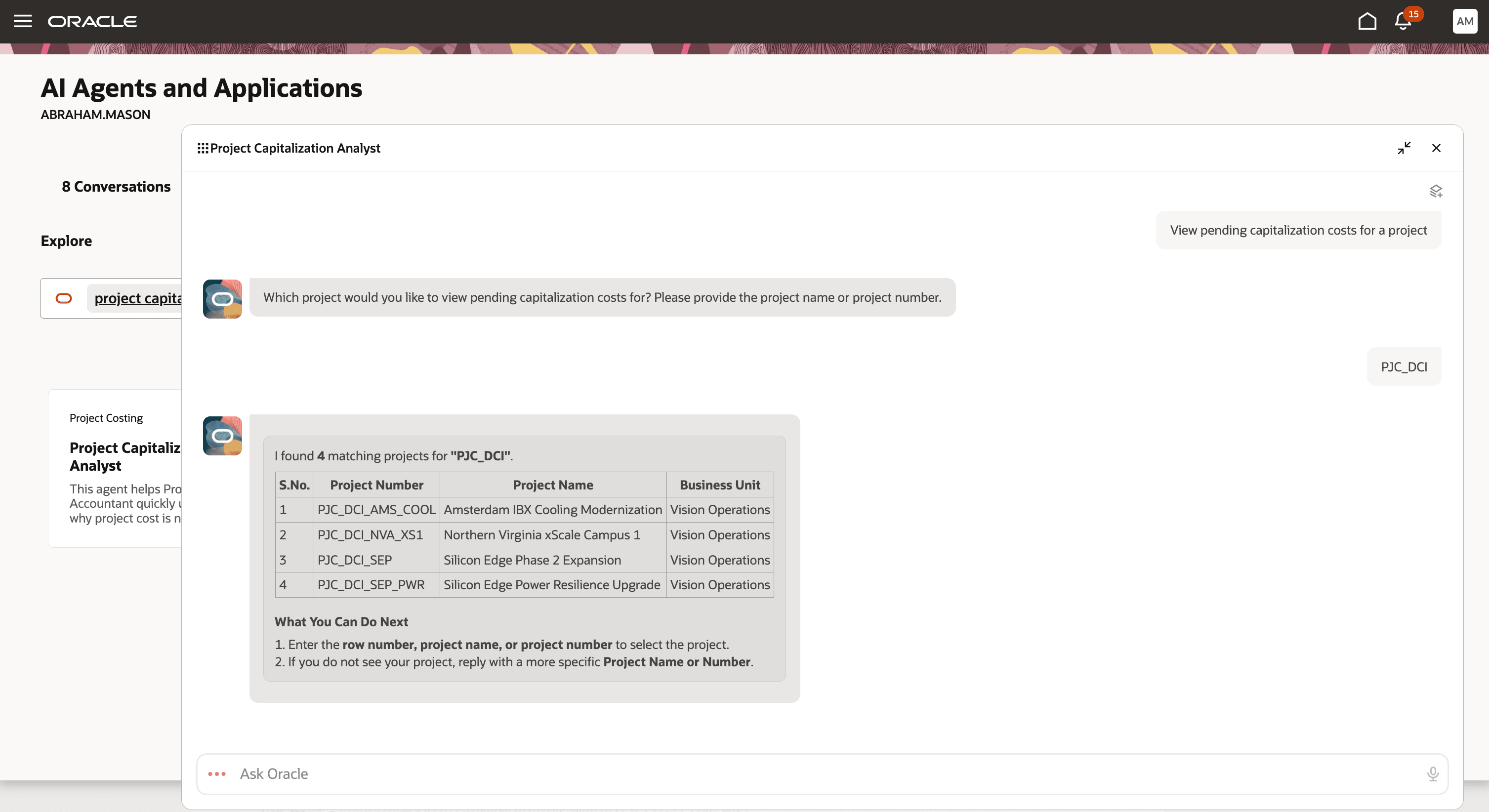
Selecting the correct project from matching results
The analyst asks the project accountant which project they want to review. The accountant enters a partial project identifier, such as PJC_DCI. The analyst finds matching digital infrastructure projects, and the accountant selects Silicon Edge Phase 2 Expansion (project PJC_DCI_SEP).
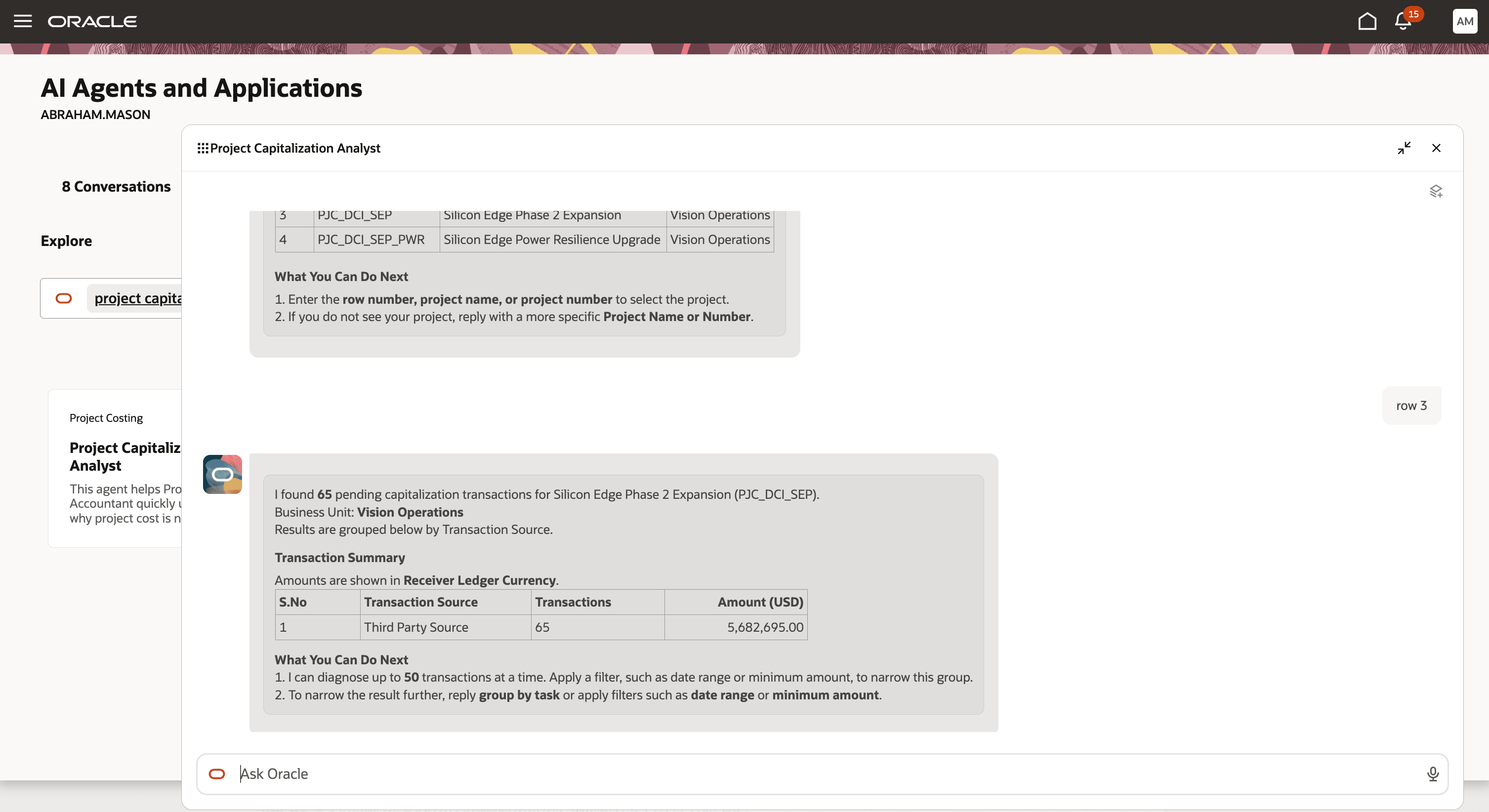
Reviewing pending capitalization costs grouped by transaction source
Because the result set has more than 50 transactions, the accountant refines the results by grouping the pending costs by task.
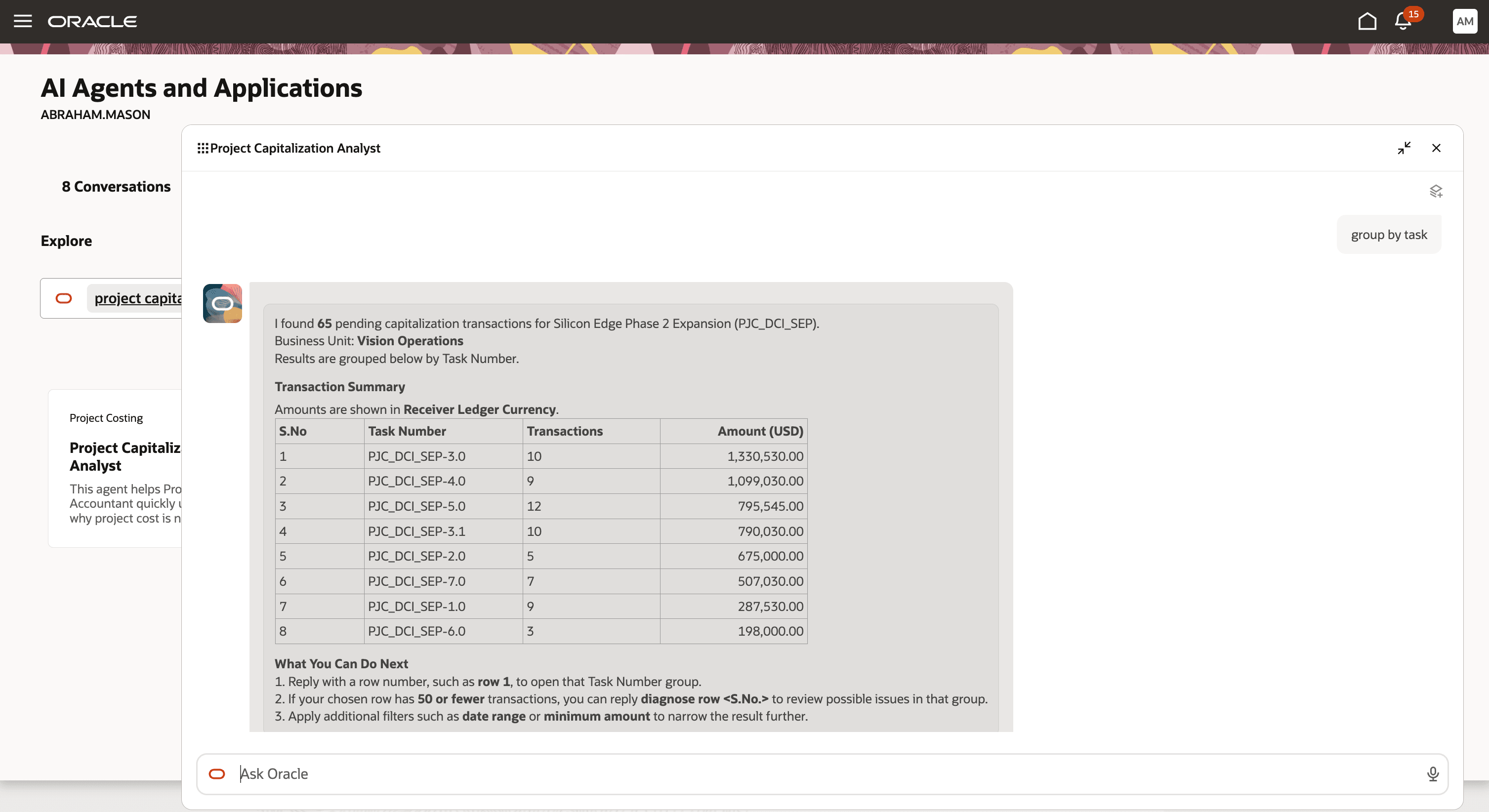
Grouping pending capitalization costs by task
The accountant drills into task PJC_DCI_SEP-5.0, Network and Interconnection Fit-Out, and asks the analyst to diagnose the displayed transactions. The analyst identifies the current blocking reason: No eligible project asset exists. It recommends reviewing the project asset setup and assignment, setting the asset to as-built when ready, providing the in-service date, and running Generate Asset Lines again.
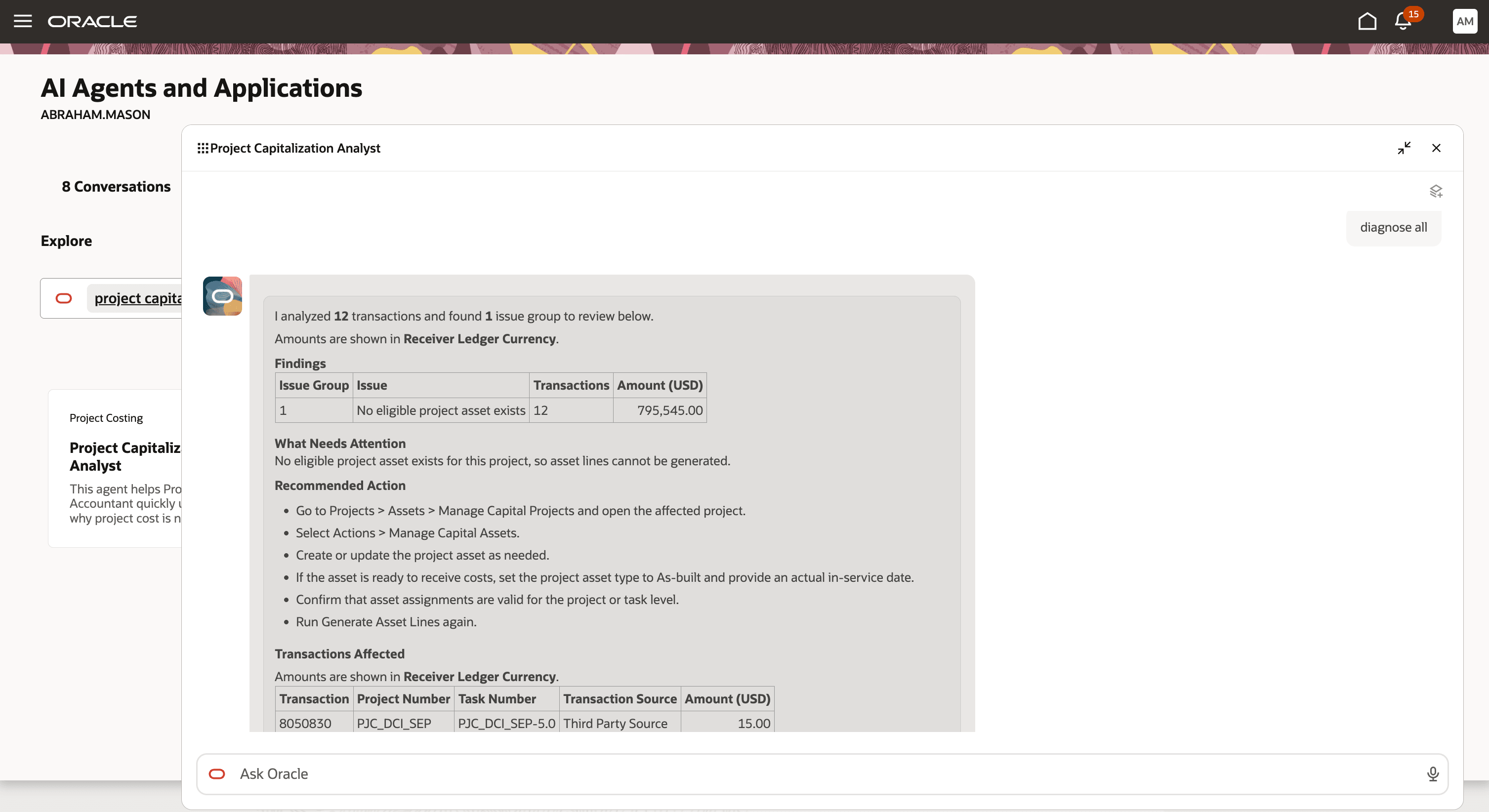
Diagnosing a task group with no eligible project asset
Business Benefit:
- Speed up capitalization investigations by identifying pending capitalization costs through a guided conversation.
- Reduce manual effort across multiple pages, reports, exports, and process outputs.
- Help users focus on the most relevant transactions by grouping and narrowing large result sets.
- Explain capitalization blockers in clear, business-friendly language.
- Support direct diagnosis when users already know the affected transaction numbers.
- Reduce dependency on technical support for initial root-cause analysis.
- Help users identify the next step required to continue capitalization processing.
- Avoid unnecessary rework by identifying transactions that were already capitalized.
Here's the demo of these capabilities:
Steps to enable and configure
Project Capitalization Analyst role is needed to use the assistant within the AI Agent Studio. Refer to the Access Requirements section for details.
Tips and considerations
Keep these points in mind when using the analyst:
- Use project-based review when you want to investigate pending capitalization costs for a specific project.
- Use transaction-number-based diagnosis when you already have transaction numbers from reports, reconciliations, or prior analysis.
- For large result sets, group or filter the results before drilling into transaction-level details.
- Supported grouping options include transaction source, task, and expenditure type.
- The analyst provides diagnostic guidance and next-step recommendations, but users complete corrective actions and reprocessing in the relevant Oracle Project Financial Management pages and processes.
- The analyst doesn’t perform corrective actions or submit capitalization processes on behalf of the user.
Key resources
Access requirements
Take the following steps to provide users access to the Project Capitalization Analyst.
A) Users without the Project Accountant Role
To enable users without the seeded Project Accountant role or a custom role derived from the Project Accountant role to use the Project Capitalization Analyst, create and assign a custom role with the following configurations.
Function Security Policies > Privileges
To provide access to the related project cost and capital asset work areas, assign these privileges:
- Project Cost Transaction Processing (ORA_PJC_PROJECT_COST_TRANSACTION_PROCESSING_DUTY)
- Project Asset Maintenance (ORA_PJC_PROJECT_ASSET_MAINTENANCE_DUTY)
For sponsored projects, assign these privileges:
- Get Project Setups (PJF_GET_PROJECT_SETUPS_PRIV)
- Manage Award Service (GMS_MANAGE_AWARD_SERVICE_PRIV)
Data Security Policies
- Access for Business Units
- Data Resource: Business Unit
- Data Set: Select by Instance Set
- Condition Name: Access the business units for which the user is explicitly authorized.
- Actions: View Project Expenditure Item, View Project Capital Asset
- Access for Managing Project Cost Transactions
- Data Resource: Project Expenditure Items for Table PJC_EXP_ITEMS_ALL
- Data Set: Select by Instance Set
- Condition Name: Access the project expenditure items for table PJC_EXP_ITEMS_ALL for business unit.
- Actions: Manage Project Expenditure Item
- Access for Cost Distributions
- Data Resource: Project Cost Distribution Lines for Table PJC_COST_DIST_LINES_ALL
- Data Set: Select by Instance Set
- Condition Name: Access the project cost distribution lines for table PJC_COST_DIST_LINES_ALL for business unit.
- Actions: Manage Project Expenditure Item
- Access for Awards - For sponsored projects, configure award data access
- Data Resource: Award for Table GMS_AWARD_HEADERS_B
- Data Set: Select by Instance Set
- Condition Name: Access awards for table GMS_AWARD_HEADERS_B for business units based on Grants Management Award security as defined in the Manage Data Access for Users page.
- Actions: View Award Data
Role Hierarchy > Roles and Permission Groups
- Project Capitalization Analyst (ORA_PJC_PROJECT_CAPITALIZATION_ANALYST_DUTY)
- Project Cost Setup Inquiry (ORA_PJC_PROJECT_COST_SETUP_INQUIRY_DUTY)
- Accounted Project Cost Distribution Inquiry (ORA_PJC_ACCOUNTED_PROJECT_COST_DISTRIBUTION_INQUIRY_DUTY)
- Project Cost Transaction Processing (ORA_PJC_PROJECT_COST_TRANSACTION_PROCESSING_DUTY)
- Project Asset Maintenance (ORA_PJC_PROJECT_ASSET_MAINTENANCE_DUTY)
B) Users with the Project Accountant Role
To enable users with the seeded Project Accountant role or a custom role derived from the Project Accountant role to use the Project Capitalization Analyst, create and assign a custom role with the following configurations.
Function Security Policies > Privileges
For sponsored projects, assign these privileges:
- Get Project Setups (PJF_GET_PROJECT_SETUPS_PRIV)
- Manage Award Service (GMS_MANAGE_AWARD_SERVICE_PRIV)
Data Security Policies
- Access for Awards - For sponsored projects, configure award data access.
- Data Resource: Award for Table GMS_AWARD_HEADERS_B
- Data Set: Select by Instance Set
- Condition Name: Access awards for table GMS_AWARD_HEADERS_B for business units based on Grants Management Award security as defined in the Manage Data Access for Users page.
- Actions: View Award Data
Role Hierarchy > Roles and Permission Groups
- Project Capitalization Analyst (ORA_PJC_PROJECT_CAPITALIZATION_ANALYST_DUTY)
- Project Cost Setup Inquiry (ORA_PJC_PROJECT_COST_SETUP_INQUIRY_DUTY)
- Accounted Project Cost Distribution Inquiry (ORA_PJC_ACCOUNTED_PROJECT_COST_DISTRIBUTION_INQUIRY_DUTY)
- Project Cost Transaction Processing (ORA_PJC_PROJECT_COST_TRANSACTION_PROCESSING_DUTY)
- Project Asset Maintenance (ORA_PJC_PROJECT_ASSET_MAINTENANCE_DUTY)
Business Unit Access
For both scenarios, ensure that users have access to the relevant business units. In Setup and Maintenance, use the Manage Data Access for Users task, select Business Unit as the security context, and assign the applicable business units.