Lease Accounting lookup value configuration
Configure Lease Accounting lookup values, such as Payment Purpose, Payment Type, and Right Type, at the user configuration level. Add new values and end date or disable predefined values that are not relevant to the business requirements.
The following Lease Accounting lookups are now user configurable:
- ORA_FLA_ASSET_UOM_CODE
- ORA_FLA_GRANT_TYPE_CODE
- ORA_FLA_MILESTONE_TYPE_CODE
- ORA_FLA_OBLIGATION_TYPE_CODE
- ORA_FLA_OBLI_PAID_BY_CODE
- ORA_FLA_PAYMENT_PURPOSE
- ORA_FLA_PAYMENT_TYPE
- ORA_FLA_PROPERTY_TYPE
- ORA_FLA_PROPERTY_TYPE_LEVEL
- ORA_FLA_RESP_TYPE_CODE
- ORA_FLA_RIGHT_TYPE_CODE
Business benefits include:
- Improve user productivity by shortening lookup-based selection lists, so users can find and choose the correct lookup values faster.
- Reduce operational errors and improve data consistency by removing irrelevant seeded values, giving organizations a more tailored set of lookup choices aligned to their business needs.
Steps to enable and configure
Complete these settings in Manage Lease Accounting Configuration:
- Navigate to the Manage Lease Accounting Lookups page.
- Search for a Lease Accounting lookup with the configuration level set to User, such as ORA_FLA_PAYMENT_PURPOSE.
- Add lookup values, or end date or disable predefined values that aren’t relevant.
- Save your changes.
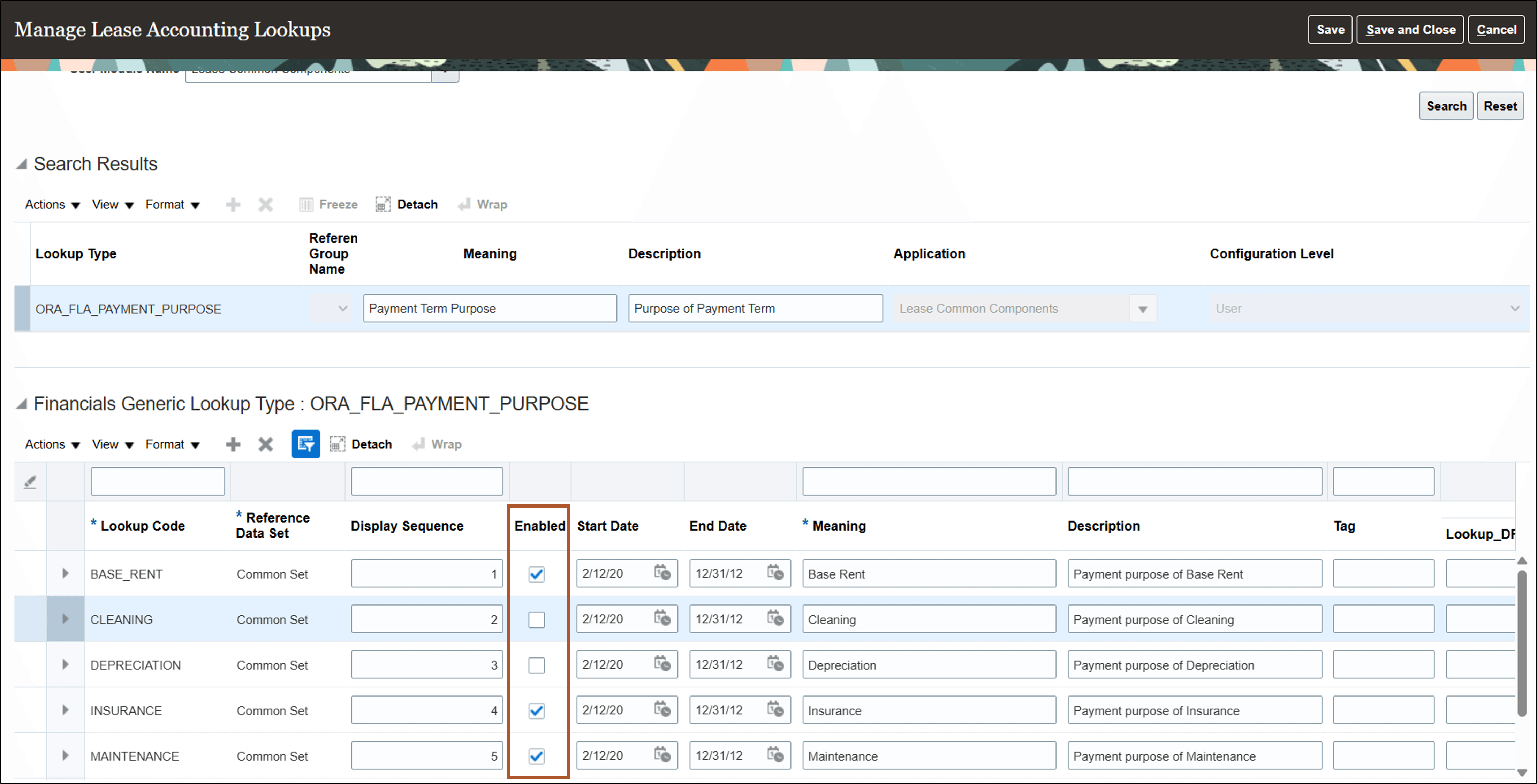
Manage Lease Accounting Lookups page
Tips and considerations
Keep the OPTION_PAYMENT lookup code active for the ORA_FLA_PAYMENT_TYPE lookup type because system processes use this value. Don’t disable or end date this lookup code.
Key resources
Based on Idea 607112 from the Lease Accounting Idea Lab on Oracle Cloud Customer Connect.
Access requirements
No new access requirements.