Tax authority calculated taxes for Brazil National Service fiscal documents
Automatically update transaction tax amounts with the values calculated and approved by the Brazilian Tax Authority for National Service Fiscal Documents. Starting in 2027, companies are required to use the official tax value calculated and returned by the tax authority on each approved national service fiscal document. This ensures that Receivables and compliance reporting always reflect the legally recognized tax data.
Once you enable the feature, taxes will no longer be calculated for transactions subjected to the national service fiscal document. The exception applies to taxes with a negative rate, typically used to represent withholding taxes on Receivables transactions.
When the approved fiscal document is imported, the application validates and maps the returned tax information, stores it for the fiscal document, updates document totals, and replaces the existing Receivables tax lines with the authority-calculated values. The invoice completes only after the tax update succeeds.
This capability supports authority-calculated taxes such as ISS, CBS, IBS, and IS for applicable national service fiscal document flows.
Import Fiscal Document Approval Information FBDI
For Brazil National Service Fiscal Documents, fiscal integration partners must use the existing Import Fiscal Document Approval Information FBDI to provide tax details returned by the Brazilian Tax Authority, including tax regime, tax code, city code, taxable amount, and tax amount. The transaction line identifier is also required, and it is provided in the FDG XML.
Use the tax acronym as the tax regime and tax code in the FBDI template to map the tax returned by the tax authority to the configured tax in the Cloud ERP through the tax type.
To facilitate integration, even if you have city, state, or federal level taxes, populate the tax line with the corresponding city code. The system will derive the corresponding tax jurisdiction in the Cloud ERP.
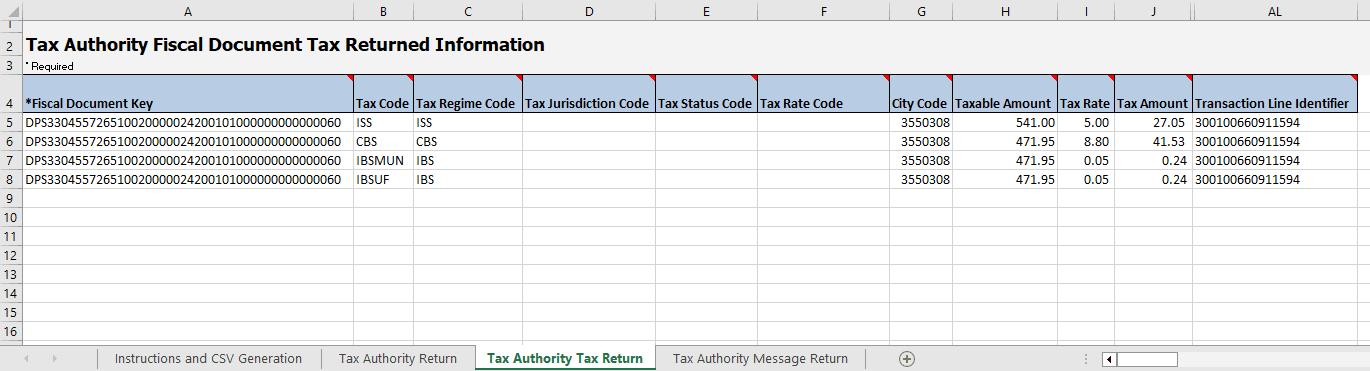
Import Fiscal Document Approval Information FBDI example
The business benefit is that using legally recognized tax amounts in Receivables and compliance reporting helps reduce manual correction work when ERP-calculated and authority-calculated taxes differ.
Steps to enable and configure
Use the Opt In UI to enable this feature. For instructions, refer to the Optional Uptake of New Features section of this document.
Offering: Financials
Tips and considerations
- This capability applies to National Service Fiscal Documents only; it doesn't apply to goods, regular service, or communication service fiscal document flows.
- Starting in 2027, the new Brazil VAT taxes are exclusive and will affect the transaction total amount. Approved National Service Fiscal Documents use the tax amounts returned by the Brazilian Tax Authority as the authoritative values, so the associated Receivables transactions reflect these values.
Access requirements
No new access requirements.