Asset Acquisition Cost Analyst
The Asset Acquisition Cost Analyst helps to analyze the fixed asset acquisition from source systems and direct capitalization. This analyst helps asset accountants summarize additions and adjustments by source system, break down results across key business dimensions, and drill down to asset-level and invoice-level details to support reconciliation, audit, and asset acquisition analysis.
The following options are presented when you open the analyst:
- Analyze asset acquisition
- Show asset acquisition trends
Analyze asset acquisition
You can analyze asset acquisition cost for a selected asset book and accounting period. The analyst provides key insights into the highest and lowest transaction costs, along with the corresponding transaction sources.
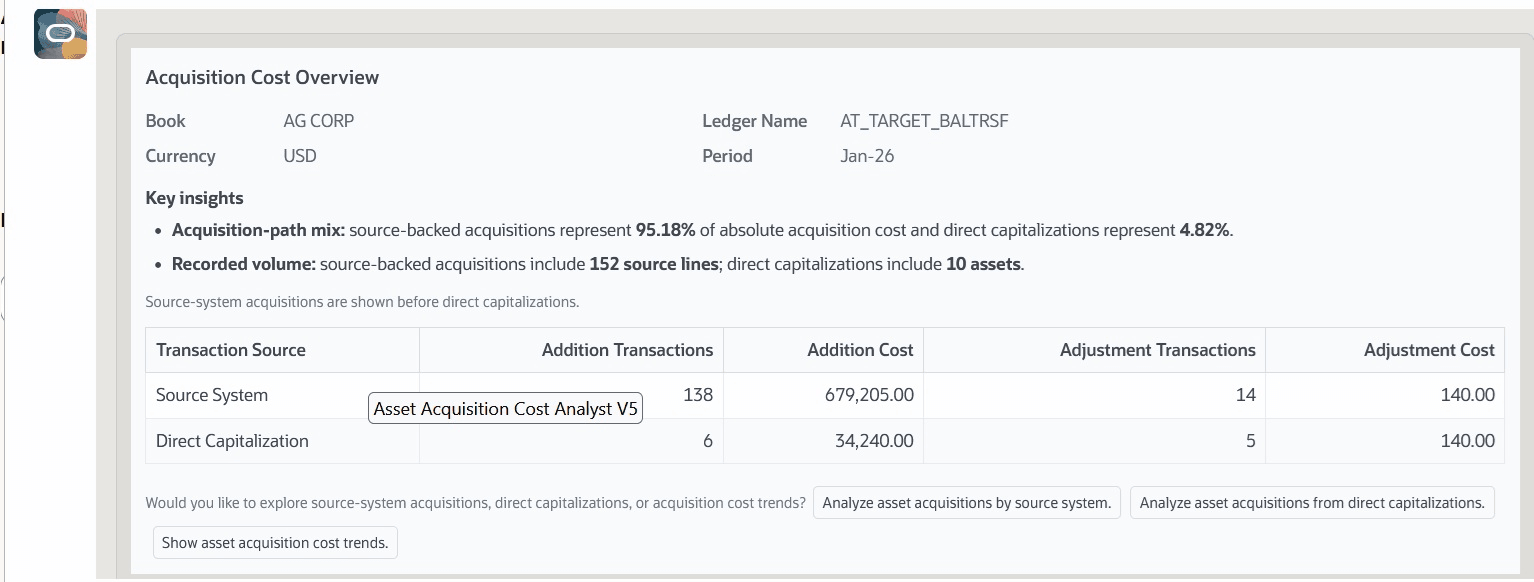
It also enables quick analysis based on:
- Source system
- Acquisition from direct capitalizations
- Acquisition trends
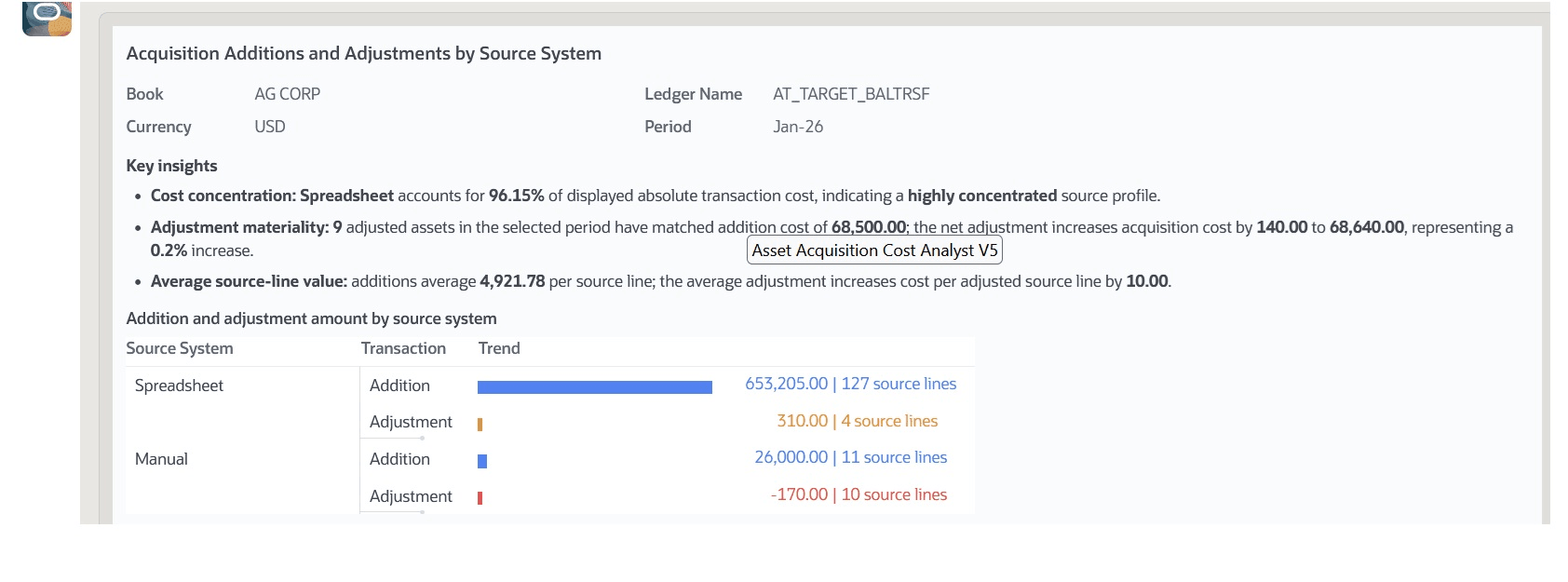
In addition, the analyst provides analysis of transaction types and source systems to provide supplier-level insights. It highlights key metrics such as:
- Supplier Concentration – Identifies dependency on specific suppliers.
- Review Priority - Marks transactions that may require further attention.
- Source-Line Density – Provides visibility into the distributions of transactions across source lines.
Show asset acquisition trends
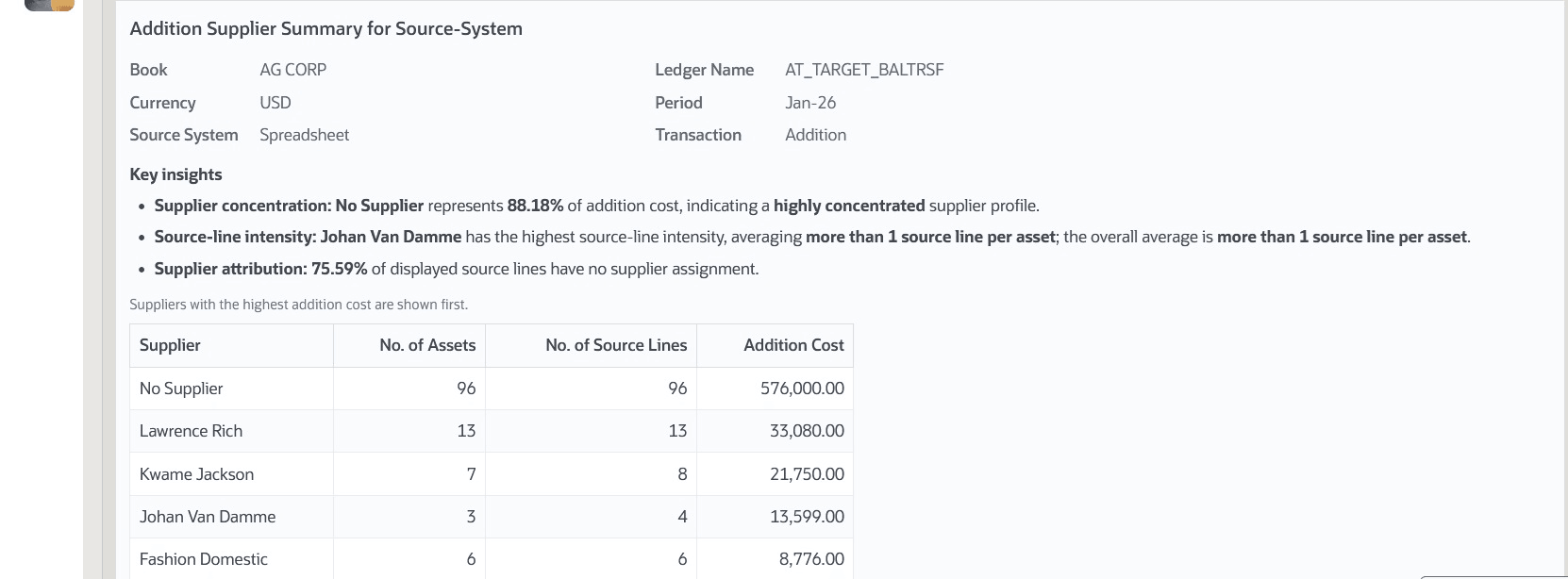
You can analyze acquisition trends for a selected asset book and accounting period. The analyst provides trend analysis based on:
- Source System Asset Acquisition Trends
- Direct Capitalization Acquisition Trends
Business benefits include:
- Quickly analyzes asset acquisition cost from multiple source systems and direct capitalization, reducing manual effort and speeding up month-end and period-close activities.
- Summarizes asset additions and adjustments, to help identify significant changes, monitor capital investments, and make decisions.
- Supports drilldown into suppliers, asset source lines, and acquisition trends, allowing users to quickly investigate unusual transactions or variances without navigating multiple reports.
Steps to enable and configure
- Refer to the Access requirements section to set up the required security roles and privileges.
- After the required security roles and privileges are set up, users can access the Asset Acquisition Cost Analyst from the Explore area on the AI Agents page.
Tips and considerations
- For the best experience, manually resize the analyst window to full screen.
- Enter Help in the analyst to access the help screen and view user guidance.
- The analyst can analyze acquisition transactions for only one book at a time.
- The analyst does not support displaying alternate ledger currencies.
- Natural language conversation is English-only in this phase.
- Interact with the Analyst through the recommended guided prompts.
- The analyst does not support:
- Creating, updating, transferring, retiring, or deleting assets.
- Posting accounting entries or depreciation.
- Changing asset assignments, locations, employees, or units.
- Approving transactions or other approval actions.
- Category-based analysis or asset-type-based analysis.
- Depreciation, Retirement , Impairment and Revaluation of assets
Key resources
Access requirements
The Asset Acquisition Cost Analyst requires data security access to asset books to analyze acquisition costs for an asset book. Access to asset book data can be granted through the custom job role. If the user already has an Assets job role, then the existing book access granted to that role is sufficient.
To provide user access to the Asset Acquisition Cost Analyst, complete these steps:
- Go to the Security Console.
- Create a new custom job role with the following details:
- Role Name: Specify a name, for example, Asset Acquisition Analyst Custom Role
- Role Code: Specify a code, for example, FA_ACQ_ANALYST_CUSTOM_ROLE
- Role Category: Financials – Job Roles
- Enable the Enable Permission Groups option.
- Go to Function Security Policies and add the following privileges:
- Access FSCM Integration Rest Service
- Go to Role Hierarchy > Roles and Permission Groups and add the following roles:
- ORA_FA_FIXED_ASSET_ACQUISITION_COST_ANALYST
- Add the required users to the custom job role, then save and submit the role.